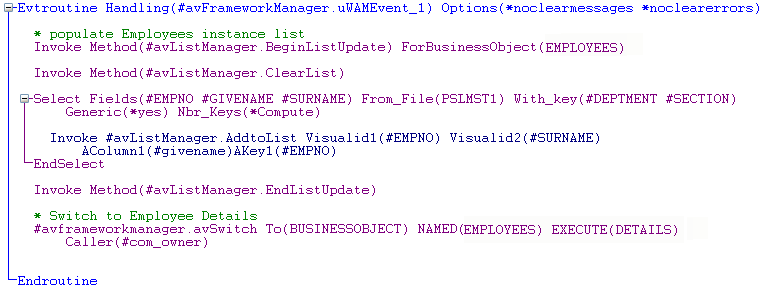
Override Field(#UB_PUSHB1) Default('Details')Invoke Method(#avListManager.BeginListUpdate) ForBusinessObject(EMPLOYEES)
Invoke Method(#avListManager.ClearList)
Select Fields(#EMPNO #GIVENAME #SURNAME) From_File(PSLMST1) With_key(#DEPTMENT #SECTION) Generic(*yes) Nbr_Keys(*Compute)
Invoke #avListManager.AddtoList Visualid1(#EMPNO) Visualid2(#SURNAME) AColumn1(#givename)AKey1(#EMPNO)
EndSelect
Invoke Method(#avListManager.EndListUpdate)
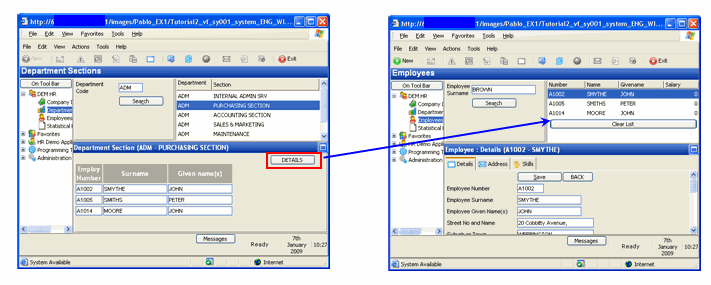
In WAM command handlers you can name the instance list you want to use, in this case the instance list for business object EMPLOYEES. (In Windows you use the avAddSwitchInstances event to work with another business object's instance list.)
- The To parameter contains BUSINESSOBJECT to indicate the switch is to a business object (you can also switch to the Framework or an application).
- The NAMED parameter must contain your actual business object name.
- The EXECUTE parameter contains the name of the command to execute. Then add a statement to switch to the Details command handler of the Employees business object:
#avframeworkmanager.avSwitch To(BUSINESSOBJECT) NAMED(EMPLOYEES) EXECUTE(DETAILS) Caller(#com_owner)
Your code will now look like this: