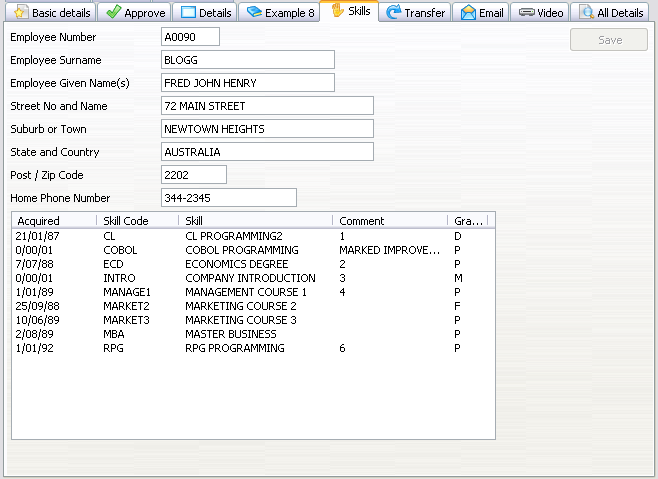
In this example you can see how to access a subfile/browselist:
Function Options(*DIRECT)
Begin_Com Role(*EXTENDS #VF_AC010) Height(569) Layoutmanager(#MAIN_LAYOUT) Width(776)
This example is an extension of the previous one. It shows the same details but it also shows the skills in a Visual LANSA list view.
In this example you can see how to access a subfile/browselist:
Function Options(*DIRECT)
Begin_Com Role(*EXTENDS #VF_AC010) Height(569) Layoutmanager(#MAIN_LAYOUT) Width(776)
* ================================================================================
* Simple Field and Group Definitions
* ================================================================================
Group_By Name(#XG_HEAD) Fields(#EMPNO #SURNAME #GIVENAME #ADDRESS1 #ADDRESS2 #ADDRESS3 #POSTCODE #PHONEHME #DEPTMENT #SECTION)
* Body and Button arrangement panels
Define_Com Class(#PRIM_PANL) Name(#BUTTON_PANEL) Displayposition(2) Height(569) Hint(*MTXTDF_DET1) Layoutmanager(#BUTTON_FLOW) Left(688) Parent(#COM_OWNER) Tabposition(3) Tabstop(False) Top(0) Width(88)
Define_Com Class(#PRIM_PANL) Name(#BODY_HEAD) Displayposition(1) Height(569) Hint(*MTXTDF_DET1) Layoutmanager(#BODY_HEAD_FLOW) Left(0) Parent(#COM_OWNER) Tabposition(2) Tabstop(False) Top(0) Verticalscroll(True) Width(688)
* Attachment and flow layout managers
Define_Com Class(#PRIM_ATLM) Name(#MAIN_LAYOUT)
Define_Com Class(#PRIM_FWLM) Name(#BUTTON_FLOW) Direction(TopToBottom) Flowoperation(Center) Marginbottom(4) Marginleft(4) Marginright(4) Margintop(4) Spacing(4) Spacingitems(4)
Define_Com Class(#PRIM_FWLM) Name(#BODY_HEAD_FLOW) Direction(TopToBottom) Marginbottom(4) Marginleft(4) Marginright(4) Margintop(4) Spacing(4) Spacingitems(4)
Define_Com Class(#PRIM_FWLI) Name(#FWLI_EMPNO) Manage(#EMPNO) Parent(#BODY_HEAD_FLOW)
Define_Com Class(#PRIM_FWLI) Name(#FWLI_SURNAME) Manage(#SURNAME) Parent(#BODY_HEAD_FLOW)
Define_Com Class(#PRIM_FWLI) Name(#FWLI_GIVENAME) Manage(#GIVENAME) Parent(#BODY_HEAD_FLOW)
Define_Com Class(#PRIM_FWLI) Name(#FWLI_ADDRESS1) Manage(#ADDRESS1) Parent(#BODY_HEAD_FLOW)
Define_Com Class(#PRIM_FWLI) Name(#FWLI_ADDRESS2) Manage(#ADDRESS2) Parent(#BODY_HEAD_FLOW)
Define_Com Class(#PRIM_FWLI) Name(#FWLI_ADDRESS3) Manage(#ADDRESS3) Parent(#BODY_HEAD_FLOW)
Define_Com Class(#PRIM_FWLI) Name(#FWLI_POSTCODE) Manage(#POSTCODE) Parent(#BODY_HEAD_FLOW)
Define_Com Class(#PRIM_FWLI) Name(#FWLI_PHONEHME) Manage(#PHONEHME) Parent(#BODY_HEAD_FLOW)
Define_Com Class(#PRIM_FWLI) Name(#FWLI_SAVE_BUTTON) Manage(#SAVE_BUTTON) Parent(#BUTTON_FLOW)
* The save button
Define_Com Class(#PRIM_PHBN) Name(#SAVE_BUTTON) Caption(*MTXTDF_SAVE) Displayposition(1) Left(4) Parent(#BUTTON_PANEL) Tabposition(1) Top(4)
* Collection for detail fields
Define_Com Class(#Prim_ACol<#prim_evef>) Name(#PanelFields)
* Fields in the head area
Define_Com Class(#EMPNO.Visual) Displayposition(1) Height(19) Hint(*MTXTDF_DET1) Left(4) Parent(#BODY_HEAD) Tabposition(1) Top(4) Usepicklist(False) Width(209)
Define_Com Class(#SURNAME.Visual) Displayposition(2) Height(19) Hint(*MTXTDF_DET1) Left(4) Parent(#BODY_HEAD) Tabposition(2) Top(27) Usepicklist(False) Width(324)
Define_Com Class(#GIVENAME.Visual) Displayposition(3) Height(19) Hint(*MTXTDF_DET1) Left(4) Parent(#BODY_HEAD) Tabposition(3) Top(50) Usepicklist(False) Width(324)
Define_Com Class(#ADDRESS1.Visual) Displayposition(4) Height(19) Hint(*MTXTDF_DET1) Left(4) Parent(#BODY_HEAD) Tabposition(4) Top(73) Usepicklist(False) Width(363)
Define_Com Class(#ADDRESS2.Visual) Displayposition(5) Height(19) Hint(*MTXTDF_DET1) Left(4) Parent(#BODY_HEAD) Tabposition(5) Top(96) Usepicklist(False) Width(363)
Define_Com Class(#ADDRESS3.Visual) Displayposition(6) Height(19) Hint(*MTXTDF_DET1) Left(4) Parent(#BODY_HEAD) Tabposition(6) Top(119) Usepicklist(False) Width(363)
Define_Com Class(#POSTCODE.Visual) Displayposition(7) Height(19) Hint(*MTXTDF_DET1) Left(4) Parent(#BODY_HEAD) Tabposition(7) Top(142) Usepicklist(False) Width(216)
Define_Com Class(#PHONEHME.Visual) Displayposition(8) Height(19) Hint(*MTXTDF_DET1) Left(4) Parent(#BODY_HEAD) Tabposition(8) Top(165) Usepicklist(False) Width(286)
Define_Com Class(#PRIM_ATLM) Name(#ATLM_1)
Define_Com Class(#PRIM_ATLI) Name(#ATLI_1) Attachment(Center) Parent(#ATLM_1)
Define_Com Class(#PRIM_ATLI) Name(#ATLI_2) Attachment(Center) Manage(#BODY_HEAD) Parent(#MAIN_LAYOUT)
Define_Com Class(#PRIM_ATLI) Name(#ATLI_3) Attachment(Right) Manage(#BUTTON_PANEL) Parent(#MAIN_LAYOUT)
Define_Com Class(#PRIM_ATLI) Name(#ATLI_4) Attachment(Center) Parent(#MAIN_LAYOUT)
Define_Com Class(#PRIM_ATLI) Name(#ATLI_6) Attachment(Center) Parent(#MAIN_LAYOUT)
Define_Com Class(#PRIM_FWLI) Name(#FWLI_1) Parent(#BODY_HEAD_FLOW)
Define_Com Class(#PRIM_LTVW) Name(#skills) Componentversion(2) Displayposition(9) Fullrowselect(True) Height(229) Left(4) Parent(#BODY_HEAD) Showsortarrow(True) Tabposition(9) Top(188) Width(485)
Define_Com Class(#PRIM_LVCL) Name(#LVCL_1) Caption('Acquired') Captiontype(Caption) Displayposition(1) Parent(#skills) Source(#VF_ELTXTS) Width(18) Widthtype(Fixed)
Define_Com Class(#PRIM_LVCL) Name(#LVCL_2) Displayposition(2) Parent(#skills) Source(#SKILCODE) Width(17)
Define_Com Class(#PRIM_LVCL) Name(#LVCL_3) Captiontype(ColumnHeadings) Displayposition(3) Parent(#skills) Source(#SKILDESC) Width(32)
Define_Com Class(#PRIM_LVCL) Name(#LVCL_4) Captiontype(ColumnHeadings) Displayposition(4) Parent(#skills) Source(#COMMENT) Width(24)
Define_Com Class(#PRIM_LVCL) Name(#LVCL_5) Displayposition(5) Parent(#skills) Source(#GRADE) Width(8) Widthtype(Characters)
Define_Com Class(#vf_sy122) Name(#myscreen_wrapper) Displayposition(3) Height(569) Parent(#COM_OWNER) Width(688)
* =================================================================================================
* To better understand this example you should be famililar with the shipped Personnel System demo.
*
* We expect the following screens to appear as part of this navigation:
*
* Login -> type in user and password -> press Enter -> (a special screen? <F3>)
* i5 Main Menu -> type lansa run process(pslsys) partition(dem) -> press Enter
* Personnel System -> type option 3 -> press Enter
* Inquire -> type the current instance employee number -> press Enter
* Browse Employee Details and Skills in OUTPUT mode -> press F21
* Browse Employee Details and Skills in INPUT mode
* =================================================================================================
*
* Handle Initialization
* --------------------------------------------------------------------------------
Mthroutine Name(uInitialize) Options(*REDEFINE)
Define_Com Class(#Prim_evef) Name(#FormField) Reference(*dynamic)
Invoke Method(#Com_Ancestor.uInitialize)
For Each(#Control) In(#Body_Head.ComponentControls)
If_Ref Com(#Control) Is(*INSTANCE_OF #prim_evef)
Set_Ref Com(#FormField) To(*dynamic #Control)
Invoke Method(#PanelFields.Insert) Item(#FormField)
Endif
Endfor
* Set the uCommand wrapper property.
Set Com(#myscreen_wrapper) Ucommand(#com_owner)
Endroutine
* ----------------------------------------------------------------------------------------------------
* Handle Command Execution
*
* Always invoke makerampTSavailable to ensure RAMP-TS is up and running before starting a navigation
*
* You may also disable the entire form to prevent any input while RAMP is navigating
* ----------------------------------------------------------------------------------------------------
Mthroutine Name(uExecute) Options(*REDEFINE)
Invoke Method(#Com_Ancestor.uExecute)
Invoke Method(#myscreen_wrapper.MakeRampTSAvailable)
Set Com(#Save_Button) Enabled(False)
#com_owner.enabled := false
Endroutine
* ================================================================================
* Event Handlers
* ================================================================================
*
* RAMP has signalled it's ready. Invoke your navigation here. Also, clear the list and panel fields.
*
* Once the navigaton starts, processing resumes in the vHandleArrive event handler.
*
Evtroutine Handling(#myscreen_wrapper.RampTSAvailable)
Clr_List Named(#skills)
#XG_HEAD := *null
Invoke Method(#myscreen_wrapper.navigatetoscreen) Name('updempskills')
Endroutine
*
* The Payload is a 256 character string sent together with a SENDKEY. Use the Payload in the same way you would use parameters in an event.
* Assuming when 'updempskills' arrives we change some details and press Enter or click on the SAVE button, we expect one of these 2 screens to appear:
* If the SAVE was successfull, the INQUIRE screen appears.
* If the SAVE was NOT successfull, the update employee screen will reappear
* Setting the Payload we determine what caused the screen 'updempskills' to arrive.
*
* 1. In the Button script of updempskills for the Enter key, we attach a payload = "UPDATE_EMPLOYEE":
*
* case KeyEnter:
* SENDKEY( KeyEnter, "UPDATE_EMPLOYEE" )
* break
* 2. In the ARRIVE script of INQUIRE, we test payload. If the Payload is UPDATE_EMPLOYEE this is telling us we have just done an Update and we are most likely to want to go back to the same screen.
*
* if ( TOSTRING(oPayload) == "UPDATE_EMPLOYEE")
* {
* NAVIGATE_TO_DESTINATION("updempskills")
* }
*
Evtroutine Handling(#myscreen_wrapper.vHandleArrive) Arrivedscreen(#CurrentScreen) Previousscreen(#PreviousScreen) Arrivedpayload(#Payload)
Define_Com Class(#prim_boln) Name(#MoreRecords)
Case (#CurrentScreen)
When Value_Is(= 'updempskills')
Set Com(#SAVE_BUTTON) Enabled(false)
* Payloads are destroyed when the ARRIVE script finishes executing. Therefore, a payload of UPDATE_EMPLOYEE would most likely mean there was a validation error. Otherwise - if INQUIRE had arrived - the Payload would have been destroyed.
If (#Payload = UPDATE_EMPLOYEE)
Use Builtin(message_box_show) With_Args(ok ok info "Validation Error" "Please correct any errors")
Else
* Unlock the framework - no harm done if it wasn't locked
Set Com(#avFrameworkManager) Ulocked(false)
* Get the current instance and the values of the panel fields
Invoke Method(#avListManager.GetCurrentInstance) Akey1(#deptment) Akey2(#section)
* If there are no entries in the list or have sent a PageDown key, get the subfile page currently on the hidden 5250
If ((#skills.entries *LE 0) Or (#Payload = NEXT_PAGE))
#MoreRecords := #com_owner.uGetSubfilePage
* There are more records in teh subfile, send a pagedown. Processing will continue in this same event handler once the same screen with the next subfile page has arrived
If (#MoreRecords)
#myscreen_wrapper.sendkey Key(#myscreen_wrapper.KeyPageDown) Payload(NEXT_PAGE)
* When all the records have been added to the list view we can re enable the panel
Else
#com_owner.enabled := true
#myscreen_wrapper.getvalue From('empno') Value(#empno.value)
#myscreen_wrapper.getvalue From('surname') Value(#surname.value)
#myscreen_wrapper.getvalue From('givename') Value(#givename.value)
#myscreen_wrapper.getvalue From('address1') Value(#address1.value)
#myscreen_wrapper.getvalue From('address2') Value(#address2.value)
#myscreen_wrapper.getvalue From('address3') Value(#address3.value)
#myscreen_wrapper.getvalue From('homephone') Value(#phonehme.value)
#myscreen_wrapper.getvalue From('postcode') Value(#POSTCODE.value)
Endif
Else
* We can assume that there has been a successfull update so update the instance list.
Invoke Method(#avListManager.UpdateListEntryData) Akey1(#Deptment) Akey2(#Section) Akey3(#Empno.value) Visualid2(#surname + " " + #givename) Businessobjecttype(EMPLOYEE)
Endif
Endif
Endcase
Set Com(#myscreen_wrapper) Visible(False)
Endroutine
* Traverse the skills subfile/browselist