In this step, you will make changes to the Configuration Table. When a service request arrives at the host, JSM checks the file DC_W29.txt on Windows or database file DC@W29 on the IBM i to identify the function to execute. The key used by JSM is the Service Name and the Host: Port. The Service Name is the part of the URL keyword value that comes after the question mark entered as the value for the URI parameter: iiiFN04_SERVICE.
- Switch to Integrator Studio and select the Studio Workspace tab. Expand the Services folder and select the service created in INT003. If you are using an IBM i JSM Server, this may look similar to the following:
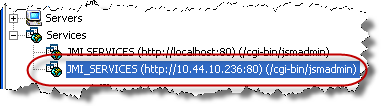
- Right click on this service and select Open Service. A list of the existing services will be displayed. This list will depend on what services have already been defined for this server.
- Right-click anywhere on a white space and select New to create a new service entry.
- A Direct Service Editor window will be similar to the following, using your Service, Process, Function and Partition names:
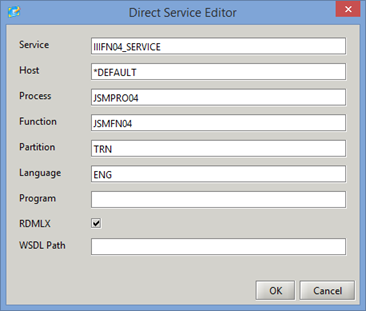
- Add a new entry with the values shown, substituting your value for iii. Note that the partition may be different for your course.
- Click OK to save your changes and close the Direct Services tab. The file DC@W29 for the correct JSM Server instance has been updated on the IBM i. If you are using http:/localhost, the file DC_W29.txt has been updated.