The DB2 SQL Debugger has been designed to help with testing and debugging of SQL stored procedures for DB2 versions 9.0 and above.
Launching the DB2 SQL Debugger
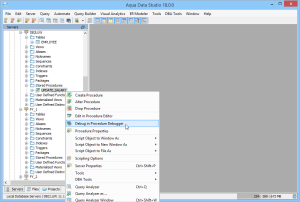
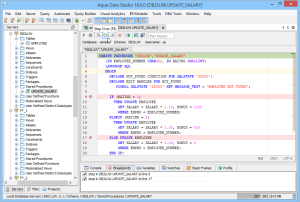
The DB2 Debugger is launched through a right-click in the Schema Browser on Stored Procedures and selecting Debug in Procedure Debugger from the popup menu. More than one debugger can be open at once, with each object to be debugged opened in a separate tab.
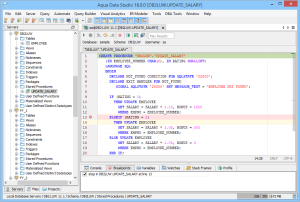
Debugger Workspace
The debugger displays a slightly modified version of the Query Analyzer Toolbar containing debugger-specific menus and buttons. Along the top of the debugger is the Execute, Stop, Step Into, Step Over, Step Return, Toggle Breakpoint, Turn On Profiling, Target Query Window, Debugger Query Window buttons. Next to the buttons is the Display Max Results input field. Beneath the buttons are the connection information, username, and SID information.
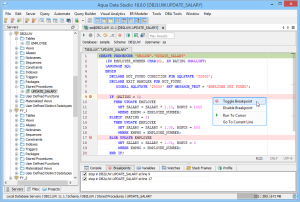
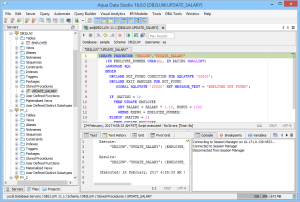
The procedure displays in the debugging window, within which breakpoints can be added by right-clicking and selecting "Toggle Breakpoint" from the popup menu. When this window has focused, and a line has been clicked, it is also possible to select "Run to Cursor," to run the debugger up to that line in the procedure. From the same popup menu, "Go to Current Line" brings the cursor to the current line, which is very useful when debugging multiple lengthy procedures.
Below the debugger window are tabs for Console, Breakpoints, Variables, Watches, Stack Frames, and Profile. The Console tab displays any errors or messages generated as debugging progress. The Breakpoints tab indicates the lines of the procedure where breakpoints are set and allows them to stop execution or not. The Variables tab lists any variables by name, their value, and type. The Watches tab allows selecting specific variables to be observed as they change, reducing from a possible list of hundreds to a select group. The Stack Frames tab lists the local variables of the functions and the arguments to them. The Profile tab lists commonly used terms or values a user works with on a regular basis in the debugging process.
Once execution of a procedure has begun through the use of the Start button at the top of the debugger window, the bottom left of the window is occupied by the Text, Text History, Grid, and Pivot Grid Results tabs. This area functions just as the Query Analyzer window does, revealing the results of procedures at each breakpoint or execution cursor.
The DB2 SQL Debugger features include:
- Setting breakpoints in the procedure body. A user can set a breakpoint at any line in the procedure source code in order to run it up to this line. The breakpoints can be viewed in the Breakpoints tab.
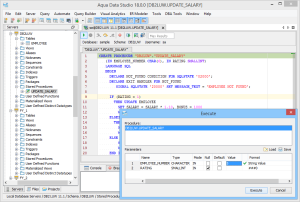
- Settings procedure parameter values at the beginning of execution. The parameters can be set to null, default, or a value chosen by a user.
- Running the procedure up to the next breakpoint. The execution can be stopped at any time using the stop button. Output messages for the execution can be viewed in the Console tab.
- "Step Into" button allows users to enter function calls in the body of the function or procedure. A new tab is opened for each function call stepped into. Once inside the function call, debugging can continue until the end of the function, or until the user clicks "Step Return".
- "Step Over" button allows users to move to the next line of the code.
- "Step Return" button allows users to execute the function or procedure until the current operation returns and then to exit. Focus shifts back to the initially opened procedure. The tab of the opened function remains open for easy access. The results of the execution will be displayed in a results view window.
- The user can place the cursor within the procedure and right-click to "Run to Cursor", executing from the beginning of the procedure to that point and stopping.
- The user can view variables and their values during the execution in the Variables tab.
- The user can enter variables from the Variables tab to the Watches tab, watch their values, and change the values of the variables that are not parameters.
- The user can open a separate Query Window as a Target Query Window and run queries before the debugging starts.
- The user can open a separate Query Window as a Debugger Query Window and run queries while debugging a procedure when it’s paused.