In this step, you will set up the web page for the HideMain WebRoutine in the Design view.
- Open the HideMain WebRoutine in the Design view.
- Use the context menu, Insert HTML / Table to add a 3 row by 3 column table to the page.
- Select the table and set the table's width property to 80%.
- Set the align property of each individual cell to center.
- Set the class property of each cell in the top row to bold.
- Add text, to clarify the technique used, to each of the three cells in the top row. The headings should be Hidden Class, hide_if, and xsl:if.
- Add a Combo box weblet to each of the three cells in the middle row.
- Add a Push button weblet to each of the three cells in the bottom row.
- Configure the three Hide/Show Push buttons using this table.
| Property | Value |
|---|
| caption | Hide/Show
|
| on_click_wrname | HideMain
|
Table Column 1 | submitExtraFields
| Field Name: STDRENTRY
|
| Literal Value: A
|
Table Column 2 | submitExtraFields
| Field Name: STDRENTRY
|
| Literal Value: B
|
Table Column 3 | submitExtraFields
| Field Name: STDRENTRY
|
| Literal Value: C
|
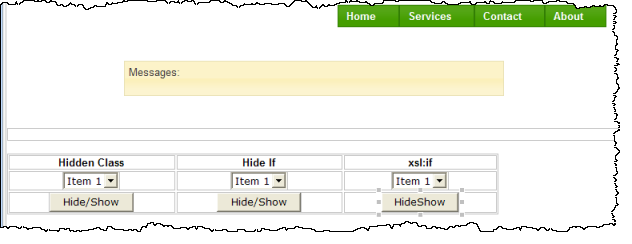
The Design view should appear something like the following:
- Save your changes.