In this step you will create a second WAM and enable session management in both WAMs so that they share a common Session GroupName. This makes both WAMs part of the same session. The new WAM will contain the WebRoutines showsave and showemp and the session invalid event handling routine.
- Create WAM iiiSessionMng2 by copying WAM iiiSessionMng. Perform the copy step as follows:
- Select the WAM iiiSessionMng on the Favorites / Last Opened tab and Copy it using the context menu.
- In the Active Designs dialog, select only SHOWEMP and SHOWSAVE.
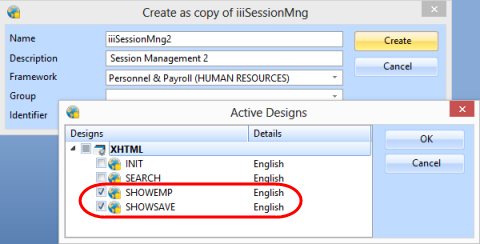
- Delete the WebRoutines INIT and SEARCH from the new WAM.
- Change four transfer commands to specify the WAM Identifier as well as the WebRoutine name, for example:
Transfer Toroutine(#iiiSES_2.search)
- Press F7 to display the WAM properties on the Details tab. Change the Session GroupName to IIIGROUP.
Set the Session Timeout value to 300.
- Compile WAM iiiSessionMng2.
- Open the showsave WebRoutine in the Design view and give the Return push button an on_click_wamname property of iiiSessionMng.
- Open the showemp WebRoutine in the Design view and give the Return to Search push button an on_click_wamname property of iiiSessionMng.
- Save your changes.
- If necessary open WAM iiiSessionMng in the editor.
- Open the search WebRoutine in the Design view. Make the following changes:
Push Button | Property | Value |
|---|
Show Saved List | on_click_wamname
| iiiSessionMng2
|
Show Employee Details | on_click_wamname
| iiiSessionMng
|
- Save your changes.
- Press F7 to display the WAM properties on the Details tab. Change the Session GroupName to IIIGROUP.
Ensure the Session Timeout value to 300.
- Compile WAM iiiSessionMng.