The layout you will define will be constructed using DIVs and CSS. You could also define a page layout using tables. If you search the Internet on this topic, you will find a number of forums where the pro's and con's are discussed at great length!
It's important to understand this concept. See www.w3schools.com for more information.
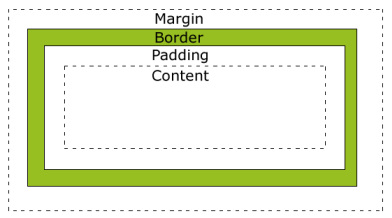
The image following illustrates the box model:
The different parts are:
In order to set the width and height of an element correctly in all browsers, you need to know how the box model works.
If the following is the CSS applied to an HTML element:
     width:250px;
     padding:10px;
     border:5px solid gray;
     margin:10px;
The total width of the element is 300px, calculated as:
     250px (width)
     + 20px (left and right padding)
     + 10px (left and right border)
     + 20px (left and right margin)
     = 300px
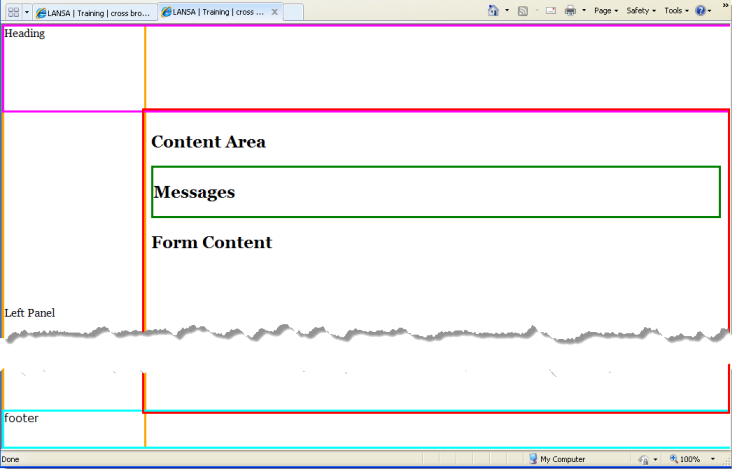
The completed layout will look like the following:
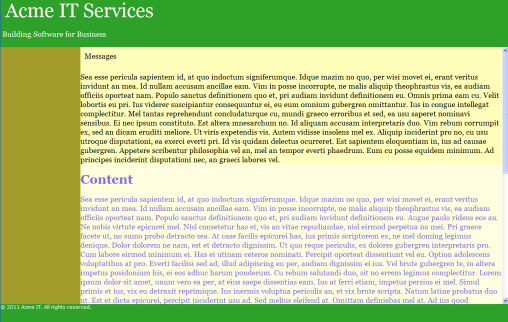
This layout will be constructed as follows:
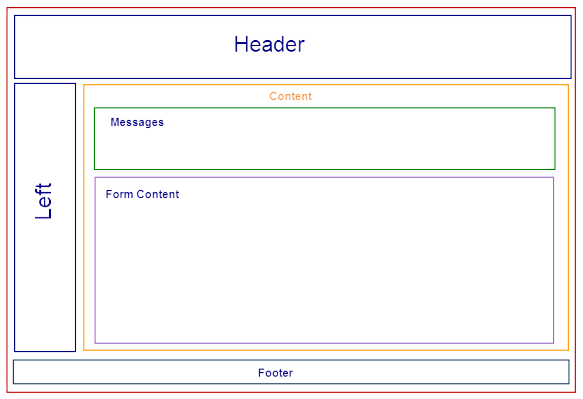
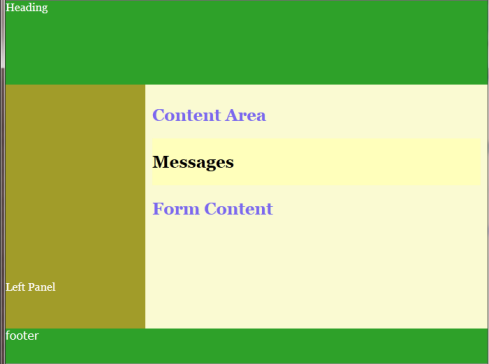
Each area is defined by a DIV with a unique id. A stylesheet (CSS) will define the position, size and appearance of each DIV. Other content is defined within the appropriate DIV. The content area DIVs are nested so that content, contains messages and form content.
     <!DOCTYPE html PUBLIC "-//W3C//DTD XHTML 1.0 Strict//EN"
     "http://www.w3.org/TR/xhtml1/DTD/xhtml1-strict.dtd">
     <html xmlns="http://www.w3.org/1999/xhtml" xml:lang="en">
     <head>
     <meta http-equiv="Content-Type" content="text/html; charset=UTF-8" />
     <title> LANSA | Training | cross browser fixed header/footer/left column layout scrolling middle area | WAMs |  </title>
     <link REL="stylesheet" TYPE="text/css" href="iii_acme_style.css">
     </head>

     <body class="acme_layout">
     <div id="acme_header">Heading</div>

     <div id="acme_footer">footer</div>

     <div id="acme_sidebar"> <div style="padding-top:400px">Left Panel</div> </div>

     <div id="acme_content"> <h2>Content Area</h2>
     <div id="acme_messagesContainer">
     <h2>Messages</h2>

     </div>
     <h2>Form Content</h2>

     </div>
     </body>
     </html>
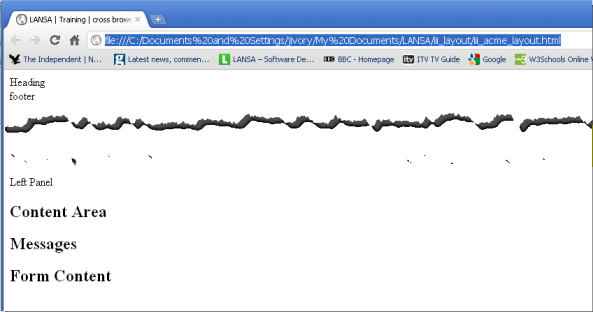
     #acme_content
     {
     overflow: auto;
     position:absolute;
     z-index:6;
     top:160px;
     bottom:50px;
     left:200px;
     right:0;
     border: solid;
     border-color: red;
     padding: 10px;
     }
     html {
     height:100%;
     max-height:100%;
     padding:0;
     margin:0;
     border:0;
     font-family:georgia, palatino linotype, times new roman, serif;
     overflow: hidden;
     }
     body
     {
     height:100%;
     max-height:100%;
     overflow:hidden;
     padding:0;
     margin:0;
     border:0;
     border: none;
     }
     #acme_header
     {position:absolute;
     margin:0;
     top:0;
     left:0;
     display:block;
     width:100%;
     height:160px;
     z-index:5;
     overflow:hidden;
     font-family:georgia, palatino linotype, times new roman, serif;
     border : solid;
     border-color: fuchsia;
     }
     #acme_footer
     {
     position:absolute;
     margin:0;
     bottom:0;
     left:0;
     display:block;
     width:100%;
     height:50px;
     font-family: Verdana, Geneva, Arial, Helvetica, sans-serif;
     z-index:5;
     overflow:hidden;
     border: solid;
     border-color: aqua;
     }
     #acme_sidebar
     {
     position:absolute;
     left:0;
     top:0;
     bottom: 0;
     width:200px;
     height : 100%;
     z-index:4;
     border: solid;
     border-color: orange;
     }
     #acme_content p
     {
     padding:10px;
     }
     .bold {font-size:1.2em; font-weight:bold;}

     dd {display:none;}
     .p1
     {
     font-size: .4em;
     color: white;
     }
     #acme_messagesContainer
     {
     top:0px;
     min-height: 50px;
     left: 0px;
     overflow: auto;
     z-index: 6;
     border: solid;
     border-color: green;
     }
          #acme_content
          {
          Background : #fafad2;
          Color : #7b68ee;
          }
          #acme_header
          {
          Background : #2ea129;
          Color : #fff;
          }
          #acme_footer
          {
          Background : #2ea129;
          Color : #fff;
          }
          #acme_sidebar
          {
          Background : #a19c29;
          Color : #fff;
          }
          #acme_messagesContainer
          {
          Background : #ffffbb;
          Color : black;
          }
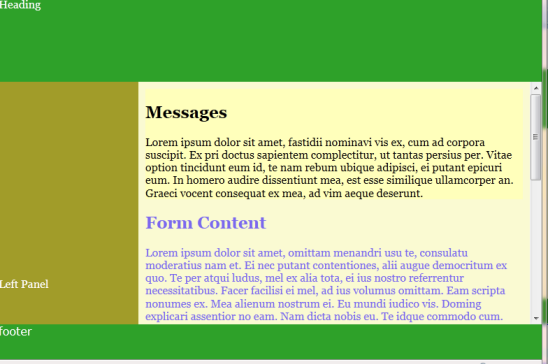
Note that the content area has been given a vertical scroll bar.