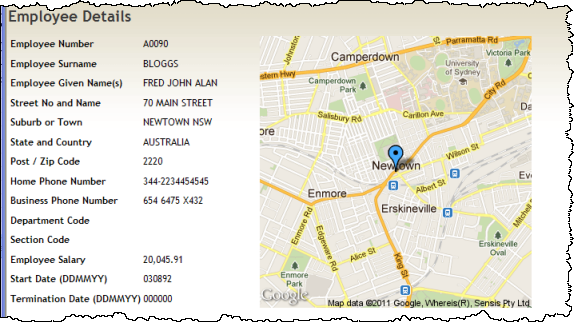
In this step you will extend the Details WebRoutine to use the employee address fields to set up the URL string which will be output as the #ADDRESS field.
Review the example Google URL provided in Objectives, and note the Brooklyn Bridge address values in that string.
An employee address such as:
70 MAIN STREET (field ADDRESS1)
NEWTOWN NSW (field ADDRESS2)
AUSTRALIA (field ADDRESS3)
Must be used to produce a string inside the Google URL such as:
MAIN+STREET,NEWTOWN,NSW,AUSTRALIA
Your code needs to do the following:
- Remove house number
- Remove leading spaces
- Add + between words in an address line
- Add a comma between elements in field ADDRESS2
- Define two work fields at WAM level (below the Begin_com):
     Define Field(#addr1) Reffld(#address1)
     Define Field(#addr2) Reffld(#address2)
- In the Details WebRoutine add the following logic, immediately after the FETCH statement.
- Remove numbers and first space character from ADDRESS1
#addr1 := #address1.removecharacters( "1234567890" ).remove( " " )
- Replace space character (between words) with a +
#addr1 := #addr1.replace( " ", "+" )
- Replace space character in ADDRESS2 with comma.
#addr2 := #address2.replace( " ", "," )
- Define the field ADDRESS as the complete Google URL
#ADDRESS := 'http://maps.googleapis.com/maps/api/staticmap?center=' + #addr1 + ',' + #addr2 + ',' + #address3 + '&zoom=14&size=340x340&maptype=roadmap&markers=color:blue%7C' + #addr1 + ',' + #addr2 + ',' + #address3 + '&sensor=false'
Note that the size value in the URL has been changed to 340x340.
All other values use the supplied example values for example, for color. These could all be adjusted by reference to the Google web site for this service.
- Compile and test your WAM. Your details web page should now look like the following: