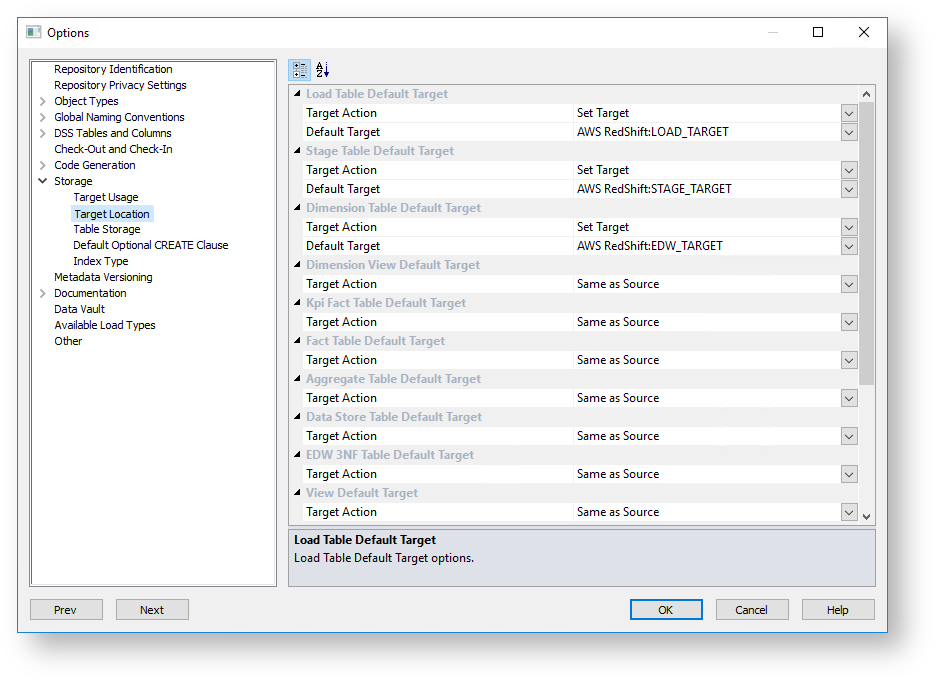
Target Location options enable users who are placing objects across multiple schemas to set default target locations for new tables.
Refer to Distributing Tables across Multiple SQL Server Databases if using multiple databases as target locations for tables in an SQL environment. |
Default table target locations can be set for the following objects:
This option enables you to set a default target for new tables to be created. It enables the Default Target drop-down list where a specific target for new tables can be defined.
If the Force Target Usage option is enabled in the Target Usage setting, selecting Set Target automatically sets the Default Target field with the first target location value, available from the drop-down list. The option to use Local target is also not available. |
This option is selected if the table's default storage must be the same as the original source where the table is coming from. This option cannot be selected for Load tables.
A default target can only be entered if the Set Target action has been selected in the Target Action drop-down list.
With this option, users can choose between setting a table's default location:
To set a default target location on a table-by-table basis:
To know more about Target table locations, refer to Connections to the Data Warehouse/Metadata Repository for SQL and Oracle Databases and Connections - Database or Connections - ODBC for target-based databases, such as Netezza, Greenplum and PDW.
Even though the default target location can be set in the Target Location options, this setting can also be changed after the table has been created via the Storage tab of each table object's Properties screen.
To see more information about changing the schema after a table has been created, refer to Storage.