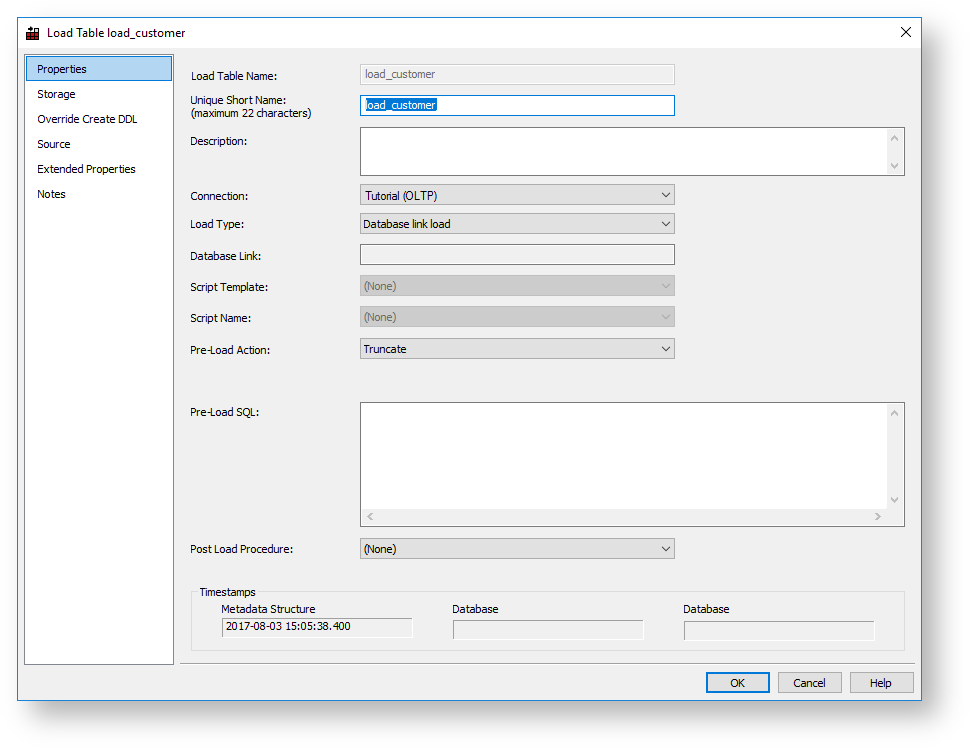
The fields in the Database Link Load Properties screen are described below:
Fields | Description | |
|---|---|---|
Load Table Name | The table name is limited by most relational databases to a maximum of 30 characters and must be unique. Table name defaults can be set up in Tools > Options to define a prefix or a post fix that can be added in order to identify clearly that this is a load table. Example: load_customer. By default, WhereScape RED uses the prefix load_ for Load tables. | |
Unique Short Name | The table short name is limited in size to 22 characters in Oracle and SQL Server and 12 characters in DB2. It must be unique. The short name is used in the naming of indexes, keys, procedures and scripts. | |
Description | Enter a description of the table. This description appears in the documentation that can be generated, once the data warehouse is built. | |
Connection | Enter the connection being used to get the data. The connections for Load tables can be changed in bulk, refer to Changing load Connection and Schema for details. | |
Load Type | The load type is typically defined by the connection, and should not normally be changed. This drop-down shows all valid load types for the connection. | |
Database Link | The database link is displayed in this field. | |
Script Template | The script template used for a script based load. | |
Script Name | This field is only active for script-based loads.
| |
Pre-load Action | Select an action to be performed on the table before the load occurs. Options are:
| |
Pre-load Sql | If a Pre-load Action of Execute pre-load Sql was selected, then the SQL statement to execute before the load takes place should be entered in this box. | |
Truncate Options | Oracle Only: WhereScape RED enables controlling the Oracle TRUNCATE options, such as REUSE/DROP STORAGE for load processing.
Example of pre-load statements: truncate table load_customer
| |
Table Properties clauses (e.g. Partition) | These are clauses that are added to the end of the table create statement. Typically used for putting partition information on the table. In Oracle, this can also be used to add a parallel clause or compression clause to the table. | |
Post Load Type |
Enables you to specify the type of post load to execute for the table. Options are Procedure or Script. | |
Post Load Procedure | A procedure that is executed immediately following the load. If you execute an externally loaded table, no load occurs, but a post load procedure can still be executed. Post load procedures can either be manually generated from a RED provided procedure outline or generated using a RED template—refer to Rebuilding Update Procedures for details. | |
Post Load Script |
A script that is executed immediately following the load. If you execute an externally loaded table, no load occurs but a post load script can still be executed. Post load scripts can be generated using a RED template—refer to Rebuilding Update Procedures for details. |
Three fields at the bottom of the Load Table Properties screen display date information:
|