The RED Client command line interface enables you to execute commands to:
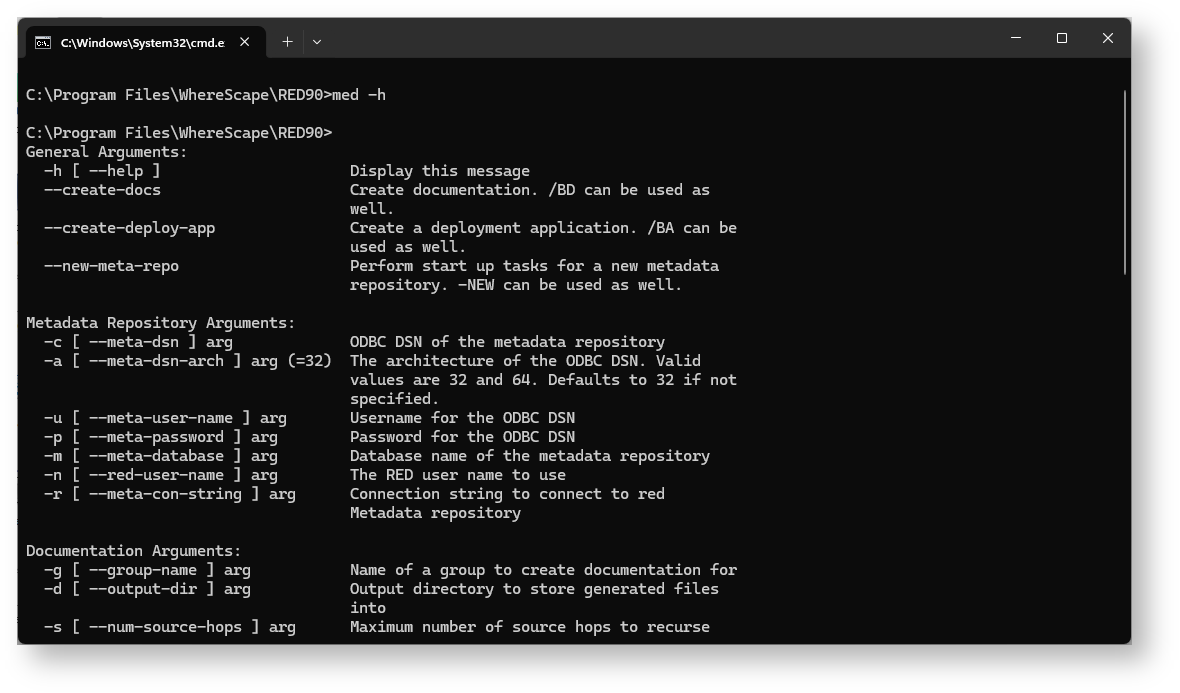
The following is a sample Windows Command Prompt that displays the help for RED Client (med.exe) arguments.
The following describe the command line arguments that can be used in RED Client (med.exe) arguments.
Description | Argument long name | Argument short name |
|---|---|---|
Display the RED arguments. Note: No other arguments required. | --help | -h or /h |
Batch documentation create. Note: Must have other arguments, refer to Batch Documentation Creation. | --create-docs | -BD or /BD |
Batch deployment application create. Note: Must have other arguments, refer to Batch Deployment Application Creation. | --create-deploy-app | -BA or /BA |
First start with a new repository. Note: Must have other arguments, refer to New Metadata Repository Start up Task Creation. | --new-meta-repo | -NEW or /NEW |
Group name Note: All objects included, if group name is not specified. | --group-name <name> | -G or /G |
Multiple use: Output directory or Database schema. | --output-dir <path name> or <db_schema> | -D or /D |
Number of processes/ hops in the source diagrams. | --num-source-hops <number> | -S or /S |
Disable impact analysis | --no-impact-analysis | I or /I- |
ODBC DSN | --meta-dsn <name> | -O or /O |
ODBC user name | --meta-user-name <name> | -L or /L |
ODBC DSN architecture | --meta-dsn-arch <32|64> | -A or /A |
ODBC username | --meta-user-name <name> | -U or /U |
ODBC password | --meta-password <password> | -P or /P |
Connection name | --meta-dsn <name> | -C or /C |
Metadata database Note: Only used in Teradata | --meta-database <name> | -M or /M |
Connection string to connect to red Metadata repository | --meta-con-string | -R or /R |
Session user name | --red-user-name <name> | -N or /N |
Application ID number | --app-number <name> | -I or /I |
Application version number | --app-version <number> | -V or /V |
Application ID file name | --app-file-name <path name> | -AF or /AF |
Remove connections | --remove-connections | -RC or /RC |
Remove parameters | --remove-parameters | -RP or /RP |
Remove scheduler jobs | --remove-jobs | -RJ or /RJ |
Group name | --group-name <name> | -AG or /AG |
Project name | --project-name <name> | -AP or /AP |
All objects | --deploy-all | -ALL or /ALL |
The succeeding sections outline how the arguments are used.