WhereScape RED metadata can be restored from a prior backup. For SQL Server data warehouses, the restore must take place in a Windows environment either through the WhereScape RED tool or manually.
The Backup and Restore process uses PostgreSQL pg_dump and pg_restore respectively. The version of pg_dump and pg_restore installed with RED is at 12.4.
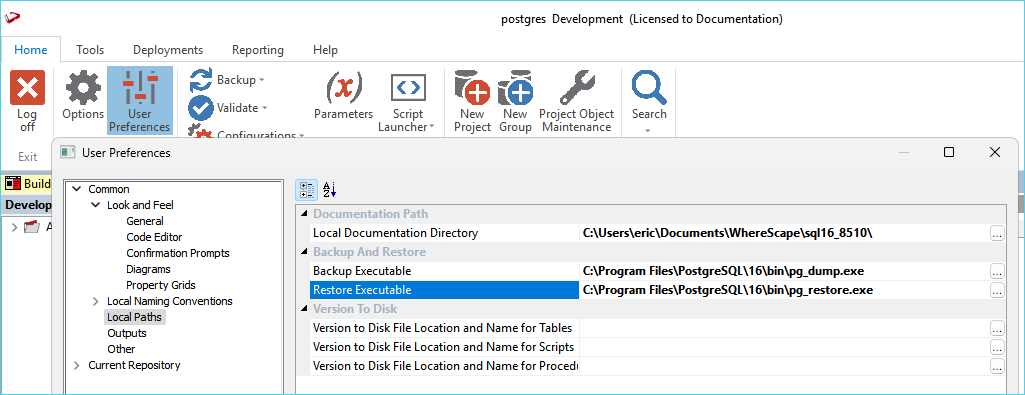
If you want to use another version of the backup and restore tools, you can set their location from the User Preferences menu in RED.
To change the path to the executables, go to User Preferences > Common > Local Paths and set the path for each tool.
A backup of a metadata repository can be restored over the top of an existing repository. This action replaces the existing repository in its entirety. The restoration of repositories is covered in an earlier section, but its uses in the promotion of code are discussed here. This restore process does not affect any existing database tables or any compiled procedures, so it can be used as a means of updating a metadata repository, albeit by replacing that repository. It is often a good method to choose when first establishing a new repository. For example, if we have a development repository and want to create a production environment the steps may be:
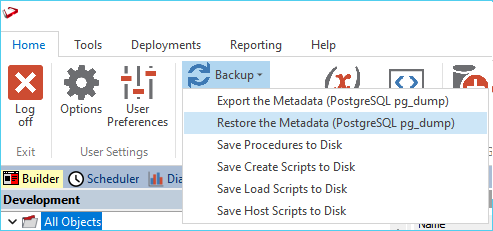
To restore the metadata from a backup, use the menu item Backup > Restore the Metadata (PostgreSQL pg_restore)
Enter the required data and click OK.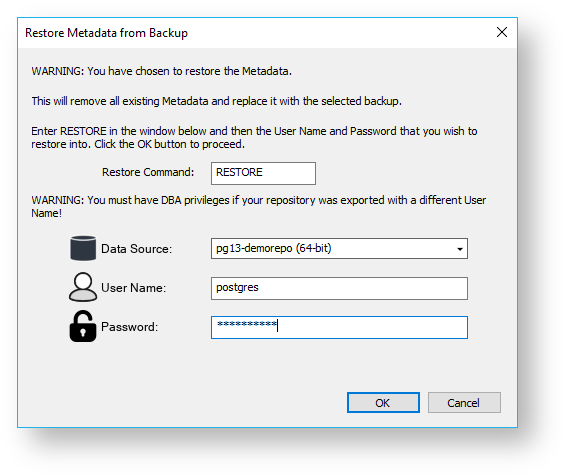
After clicking OK, a new dialog box will appear asking for a selection of the export directory. Browse to the contents of the directory where the export is located. Once the export directory is selected, the import will begin.
A dialog box will appear to show the results of the import.
The example command shown below is what RED UI would execute if you used the menu option to restore.
Note: the below example is written as a batch script which could be executed as a RED Host Script so that the required environment variables are set. Replace the environment variables with the actual values if running outside of RED. Replace <PG_DUMP_FILE> with the full path to your backup file.
| The command below assumes you are restoring back to the same metadata as RED is currently running, since it uses the WSL_META_ environment variables available to RED scripts. |
setlocal EnableDelayedExpansion SET PGPASSWORD=!WSL_META_PWD! setlocal DisableDelayedExpansion "C:\Program Files\PostgreSQL\15\bin\pg_restore.exe" --host=%WSL_META_SERVER% --port=%WSL_META_DBPORT% --dbname=%WSL_META_DB% --username=%WSL_META_USER% --no-password --no-owner --no-privileges --clean "<PG_DUMP_FILE>" |