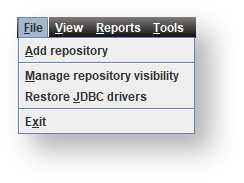

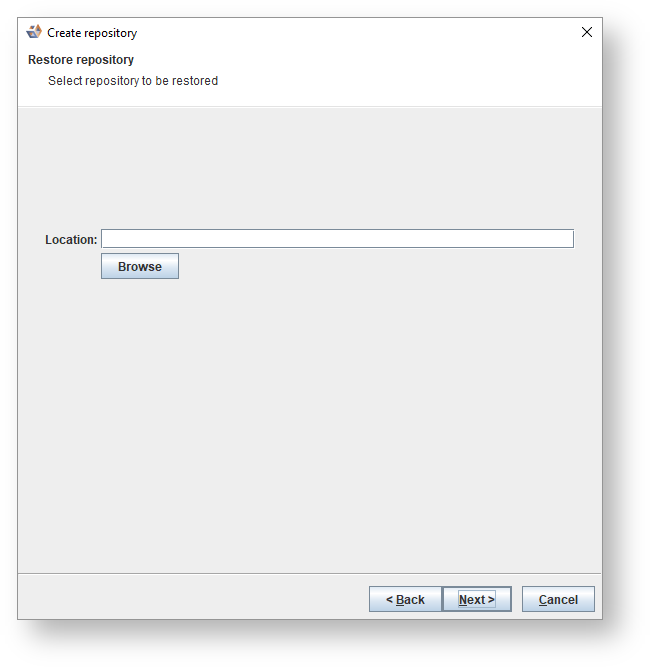


If your repository is on 3D version 8.2.1.0 or below, you will get an option to restore and migrate the repository to the latest version of 3D. |

Fields | Description | |
|---|---|---|
Repository name | The name of the repository you are creating. | |
Description | A short description of the repository you are creating. | |
Purpose | The reason for creating the repository. | |
Host | Default is localhost but you can enter a new host. | |
Port | Default is 53722 but you can enter a new port. | |
Create database | By default this checkbox is selected. Clear the checkbox if you do not want to create a new database. | |
Database name | The name of the database. | |
Database username | The username to access the database.
| |
Password | The password to access the database. | |
Retype password | Re-enter the password that you entered above to access the database. | |
Metadata server username | A user that has permissions to create databases and create roles. Default is wsmetauser. | |
Password | The password to access the metadata server. Default is wsmetauser. | |
Advanced | ||
Maintenance database | The database to connect to for creating a database. If left empty the default template will be used. | |
SSL enabled | Select the checkbox to enable SSL. | |
Validate | Click to validate repository details. | |

