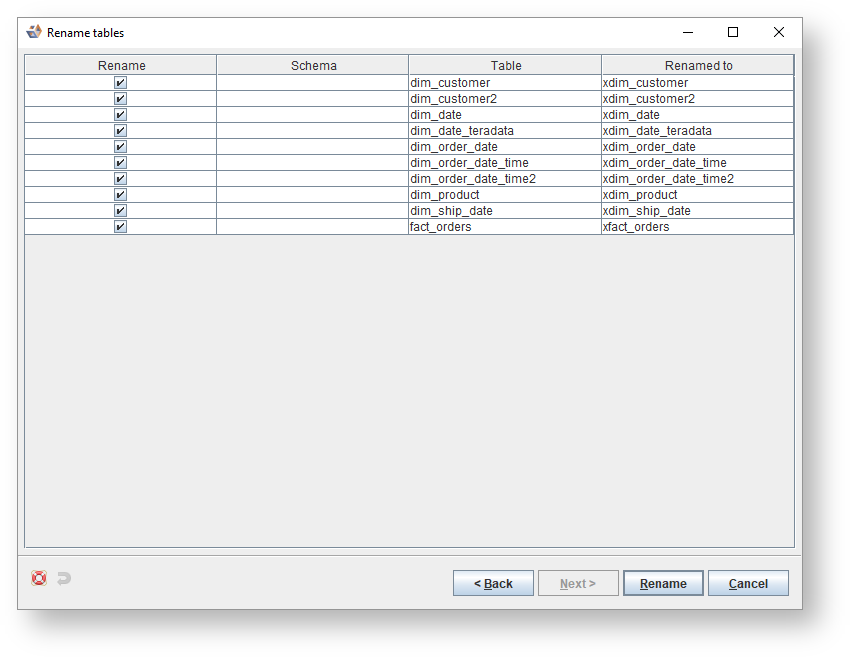
To rename multiple entities within a model version...
Right-click on the version of the model in the left pane and select Entities>Rename multiple entities. Alternatively, right-click on a white space in the diagram and select Tables>Rename tables or click on  in the toolbar and select Rename multiple tables from the list.

- Click
 to specify which tables are to be included or click
  to specify which tables are to be excluded in this renaming process. Click Next.

- The tables matching the criteria in the last step are displayed. Move any specific tables not to be included to the Exclude tables list and click on Next.

- From Table rename criteria, manage the rename criteria, click to add a rename criteria.

Icons | Description |
|---|
| Click to Add rename criteria. |
| Click to Edit the selected criteria. |
| Click to Delete the selected criteria. |
| Click to move the selected criteria a level Up. |
| Click to move the selected criteria a level Down. |
- Select a Criteria from the drop-down list and enter one or two values where appropriate.
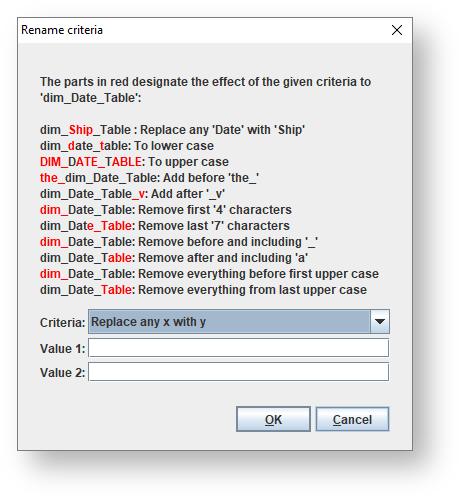
The options are as follows:Options | Descriptions |
|---|
Replace any x with y | Replace any Value 1 with Value 2. |
To lower case | Convert to lower case. |
To upper case | Convert to upper case. |
Add before | Add Value 1 before the name. |
Add after | Add Value 1 after the name. |
Remove first N characters | Remove the first (Value 1) characters, where Value 1 is an integer. |
Remove last N characters | Remove the last (Value 1) characters, where Value 1 is an integer. |
Remove before and including | Remove the characters in the name before and including Value 1. |
Remove after and including | Remove the characters in the name after and including Value 1. |
Remove everything before first upper case | Remove everything in the name before the first upper case letter. |
Remove everything from last upper case | Remove everything in the name from the last upper case letter onwards. |
- Select the required criteria and click Derive.

- With only the required tables selected, click Rename.