Name: iiiSecMaint
Description: Section Maintenance
Layout weblet: iiilay01
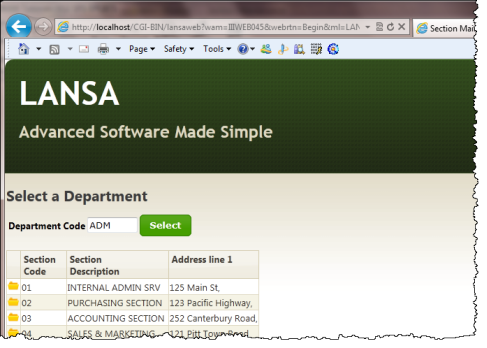
Consider the first two screen captures shown in the Objectives section that show the Begin WebRoutine in operation. This WebRoutine initially displays a list of sections that is empty and an input field for a department code. An AutoComplete weblet will replace the Department Code input field. A Select push button invokes the Begin WebRoutine that builds a list of sections for the department and displays this list.
Consider what working lists will be needed to handle this web page and what logic will be necessary?
- Define a work field DEPT_IN based on DEPTMENT, this will be the department code input field.
- Define working list DEPTS, to support the AutoComplete weblet. The list contains the field DEPTMENT only.
- Define working list SECTLIST, to support the list of sections containing STDSELECT, SECTION, SECDESC, SECADDR1. Note: All fields apart from STDSELECT should have an *output attribute.
- Map STDRENTRY globally as a hidden field.
     Map field DEPT_IN for * both
     Map for *output the Sections working list, SECTLIST
     Case of field STDRENTRY
     * Select Push Button
     When = S
     clear list SECTLIST
     select fields in working list from the section table with the key dept_in
     add entry to working list
     end of select loop
     end of case loop
Define a response WebRoutine AutoComplete to build the list DEPTS to support the AutoComplete weblet
     Define WebRoutine AutoComplete with a Response(*JSON) keyword
     Map DEPT_IN for input
     Map list DEPTS for output as a *JSON list
     Convert the first character of DEPT_IN to uppercase
     clear list of departments
     Select DEPTMENT from the file DEPTAB with the key DEPT_IN, with a Generic(*yes) keyword
     Add an entry to the department list
     end select
     end subroutine
Your completed code should now look like the following:
     Function Options(*DIRECT)
     Begin_Com Role(*EXTENDS #PRIM_WAM) Layoutweblet('iiilay01')
     Define Field(#dept_in) Reffld(#deptment)
     Def_List Name(#depts) Fields(#deptment) Type(*Working)
     Def_List Name(#sectlist) Fields(#STDSELECT (#SECTION *out) (#SECDESC *out) (#SECADDR1 *out)) Type(*Working)
     Web_Map For(*both) Fields((#stdrentry *hidden))
     WebRoutine Name(Begin) Desc('Select a Department')
     Web_Map For(*both) Fields(#dept_in #sectlist)
     Case (#stdrentry)
     When (= S)
     Clr_List Named(#sectlist)
     Select Fields(#sectlist) From_File(sectab) With_Key(#dept_in)
     Add_Entry To_List(#sectlist)
     Endselect
     Endcase
     Endroutine
     WebRoutine Name(AutoComplete) Response(*JSON)
     Web_Map For(*input) Fields(#dept_in)
     Web_Map For(*output) Fields((#depts *json))
     #dept_in := #dept_in.substring( 1, 1 ).upperCase
     Clr_List Named(#depts)
     Select Fields(#deptment) From_File(deptab) With_Key(#dept_in) Generic(*yes)
     Add_Entry To_List(#depts)
     Endselect
     Endroutine
     End_Com
Compile your WAM and open the Begin WebRoutine in the Design view.
Your web page should look like the following: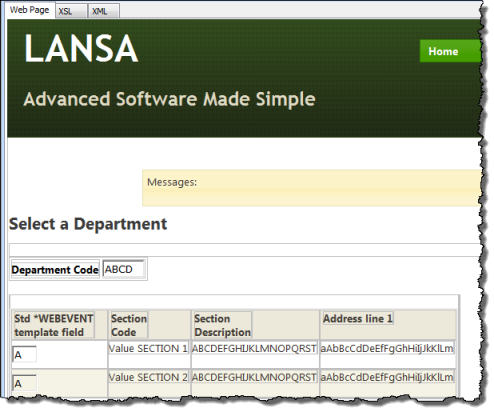
Drag and drop an jQuery UI AutoComplete weblet onto the Department Code field. Select the Details tab and set up the AutoComplete properties:
Property | Value |
|---|---|
sourceWrName |
|
Listname |
|
valueField |
|
If the Select column (field STDSELECT) is shown as an input field (i.e. it does not have a clickable image weblet field visualization defined in the Repository), drop a Clickable Image weblet into the field in the first column.
With the clickable image selected, select the Details tab and set up its properties:
Property | Value |
|---|---|
currentrowhfield |
|
currentrownumvalue |
|
Rentryvalue |
|
tooltip |
|
on_click_wrname |
|
Note:
|
 button and select the /normal/16 folder and then select any suitable image. See the example following: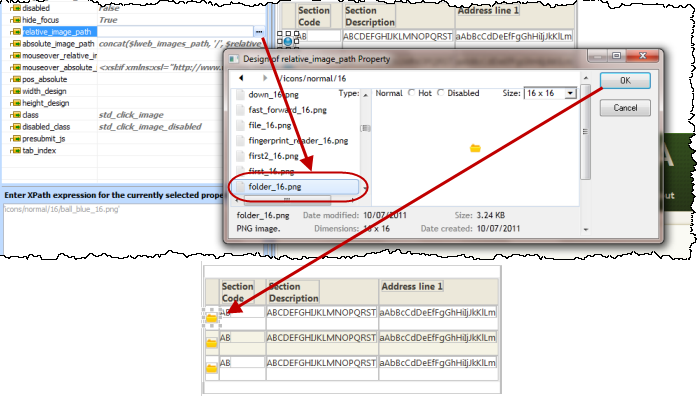
Set up the push button properties:
Property | Value |
|---|---|
caption |
|
on_click_wrname |
|
submitExtraFields |
|
|
Note: Whenever possible, set a weblet property value by selection from its dropdown list. Using a list of values provided by the editor, when available, will help to minimize errors in your XSL. |