Objectives
This exercise initially shows how session management operates using a single WAM.
WAM iiiSessionMng demonstrates how various WebRoutines within the same WAM can manipulate and share data that is automatically stored on the server. There are a number of key concepts to understand when implementing session management.
- Session management must be enabled at the WAM level. For example
Begin_Com Role(*EXTENDS #PRIM_WAM) Layoutweblet('iiilay01') Sessionstatus(Active)
- At least one WebRoutine must have an Onentry() keyword of *sessionstatus_none. This enables the WebRoutine to execute, in order to activate a session.
- Other WebRoutines have a default Onentry() keyword of *sessionstatus_of_wam. If sessions are enabled for the WAM, then a session must be active for this WebRoutine to run.
- The WAM should contain an event handling routine for #com_owner.sessioninvalid that determines what happens when a session is invalid or expired. Usually this will transfer to the "login" WebRoutine to force a session to be established.
- Fields and lists to be stored on the server are defined via a special web_map. For example the following defines two working lists that are to be stored as persistent data:
Web_Map For(*none) Fields(#empsave #empdata) Options(*PERSIST)
The For(*none) keyword value means the fields are not mapped to and from the web page.
- As long as the session is active, each time the WAM starts, the persistent fields and lists are restored.
- Each time the WAM ends, the persistent fields and lists are saved.
- It's important to understand that as each WebRoutine executes, it shares the same persistent fields and lists and their current values as established by the last WebRoutine to execute.
For more details on using session management, refer to the Web Application Modules (WAM) Guide.
For more details refer to <a href="wamb1_130.htm">WAM Session Management</a>.
A second WAM will be developed that shares the session established by iiiSessionMng. This will demonstrate how more than one WAM may share a session and the persistent fields and lists which session management enables.
WAMs share a session by having a BEGIN_COM statement that declares Sessionstatus active and has a common Session groupname. For example:
Begin_Com Role(*EXTENDS #PRIM_WAM) Layoutweblet('iiilay01') Sessiongroupname('MYSESSION') Sessionstatus(Active)
Description of WAM iiiSessionMng
The Search WebRoutine web page will look like the following:
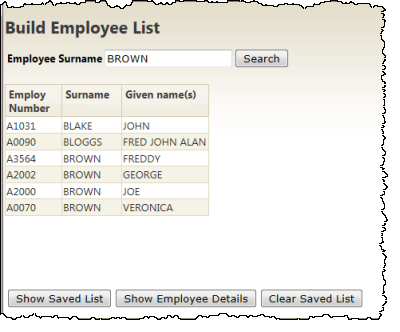
- The WebRoutine search will build and display a list of employees, searching the file by surname. Each search adds entries to a working list that is displayed and a second persistent working list which is stored on the server.
- WebRoutine showsave is called by a push button on the search web page. This second routine builds and displays a list from the saved list.
- The Clear Saved List pushbutton invokes the search WebRoutine to clear the saved list.
- Other functionality will be added in later steps.
To meet these objectives you will complete the following:
Step 1. Create Session Management 1 WAM
Step 2. Retrieve and Store Employee Details
Step 3. Create Session Management 2 WAM
Step 4. Test the Session Management Application
Summary
 Before You Begin
You should complete all preceding exercises in this workshop.