WAM080 - Session Management
1. Create a new WAM:
Name: iiiSessionMng
Description: Session Management 1
Layout Weblet: iiilay01
Again, note the Identifier assigned to this WAM. You will need this information in a later step. Of course you could always look up the Identifier in the Repository.
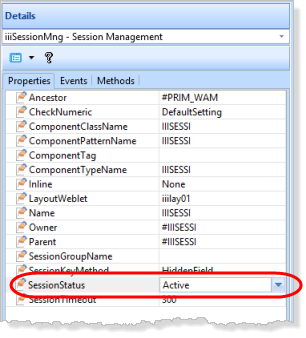
2. Press F7 to display the WAM properties. To enable session management, set SessionStatus to Active.
3. Define the following lists and global web maps:
list of employees to be saved on the serverDef_List Name(#empsave) Fields(#empno #surname #givename) Counter(#std_count) Type(*Working) Entrys(99) latest search list of employeesDef_List Name(#empnew) Fields((#empno out) (#surname *out) (#givename *out)) Type(*Working) Entrys(99) display current saved list of employees.Def_List Name(#empdisp) Fields(#stdselect (#empno out) (#surname *out) (#givename *out)) Type(*Working) Entrys(99) Map persistent dataWeb_Map For(none) Fields(#empsave) Options(*PERSIST) Map common return field from webletsWeb_Map For(*input) Fields((#stdrentry *hidden))
Note that working list EMPSAVE is mapped as persistent data.
4. Create three WebRoutines based on the following:
Initialize WebRoutine sets sessionstatus activeWebRoutine Name(init) Onentry(*SESSIONSTATUS_NONE)#com_owner.sessionstatus := activeMessage Msgtxt('Session is now active')Transfer Toroutine(search)Endroutine Perform search and display results.WebRoutine Name(search) Desc('Build a list of employees') Web_Map For(both) Fields(#surname)Web_Map For(*output) Fields(#empnew)Endroutine Load and display a list, from the saved listWebRoutine Name(showsave) Desc('Show saved list of employees')Web_Map For(*output) Fields(#empdisp)Endroutine
Note that as outlined in the Objectives, the init WebRoutine may be executed before a session is active.
5. Add the initial logic to WebRoutine search.
- when STDRENTRY is S
- This should clear the list EMPNEW, which is built by each search.
- Ensure the surname is not blank
- Build the list EMPLIST by reading the logical file PSLMST2, with a key of surname, with generic(*yes).
- Add entries to both EMPNEW and the saved list EMPSAVE.
Your code should look like the following:
Case (#stdrentry)When (= S)Clr_List Named(#empnew)BegincheckValuecheck Field(#surname) With_List(*BLANK) In_List(*ERROR) Not_Inlist(*NEXT) Msgtxt('Surname may not be blank')EndcheckSelect Fields(#empsave) From_File(pslmst2) With_Key(#surname) Nbr_Keys(*compute) Generic(*yes)Add_Entry To_List(#empnew)Add_Entry To_List(#empsave)EndselectEndcase
6. Add the initial logic to the showsave WebRoutine
- Output the list EMPDISP which is loaded from the save list EMPSAVE.
- When STDRENTRY is L
- If the saved list counter value (STD_COUNT) is greater than 1
- Clear the list EMPDISP
- Read all records from EMPSAVE using SELECTLIST
- Add entries to EMPDISP
- Else
- Output message 'Saved list of employees is empty'
- Transfer to search WebRoutine.
Your code should look like the following:
Case (#stdrentry)When (= L)If (#std_count > 1)Clr_List Named(#empdisp)Selectlist Named(#empsave)Add_Entry To_List(#empdisp)EndselectElseMessage Msgtxt('Saved employee list is empty')Transfer Toroutine(search)EndifEndcase
7. Add an event handling routine for session invalid to transfer to the search init WebRoutine. Your code should look like the following:
Evtroutine Handling(#COM_OWNER.sessioninvalid)Message Msgtxt('Session Management must be active')Transfer Toroutine(init)Endroutine
8. Compile the WAM.
9. Open the Search WebRoutine in the Design view. Add a column to the table containing employee surname. Drop a push button into the new column. Set up the button properties:
Property |
Value |
caption |
Search |
on_click_wrname |
Search |
submitExtraFields
|
Field Name: STDRENTRY |
|
Literal Value: S |
10. Add a few blank lines below the table containing the employees list and insert a table with 1 row and 3 columns. Drop a push button into the left hand column and set up the button properties:
Property |
Value |
Caption |
Show Saved List |
On_click_wrname |
Showsave |
submitExtraFields
|
Field Name: STDRENTRY |
|
Literal Value: L |
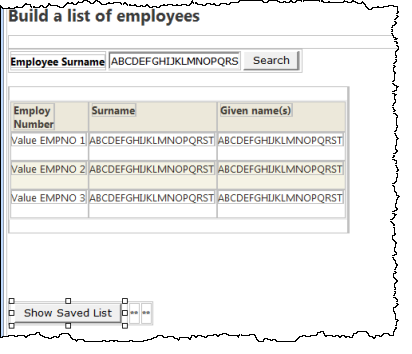
Adjust the width of the push button to show the caption as a single line.
Save your changes.
Your page should look like the following:
11. Open the showsave WebRoutine in the Design view. Select the list, move the cursor right and press enter to create a blank line below the list. Drop a push button below the list and set up its properties:
Property |
Value |
Caption |
Return |
On_click_wrname |
Search |
submitExtraFields
|
Field Name: STDRENTRY |
|
Literal Value: M |
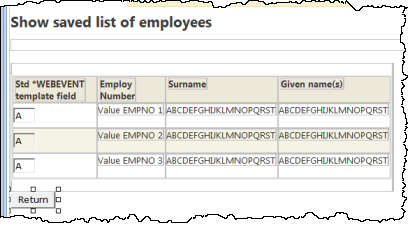
Your web page should look like the following:
12. Save your changes.
13. Execute your WAM in the browser by running any WebRoutine. Control will pass to the init WebRoutine which will enable session management, and transfer to the search WebRoutine.
You should be able to see the following results:
- A list of employees based on a search value such as B or S.
- Display the current saved list in WebRoutine showpage.
- Return to the WebRoutine search.
- Perform another search and display the result of both searches in the showpage WebRoutine.
- Restart the WAM from the init WebRoutine and immediately display the saved list.
Q. Why is the list empty?
A. The persistent data is only restored if the session is already active. Running WebRoutine init starts a new session.