Name: iiiDspEmpDocs
Description: Display Employee Documents
Layout Weblet: iiilay01
- Map field STDRENTRY for *both as a *hidden field
- Define a Group_By, EMPDATA for fields, EMPNO, SURNAME, GIVENAME, ADDRESS1, ADDRESS2, ADDRESS3, POSTCODE, DEPTMENT and SECTION.
- Define a working list DOCLIST containing fields DF_ELFNAM
- Define a working list MYDOCS containing field STD_TEXTL
- Define a work field RETCODE with reference field IO$STS
- Define a webroutine BEGIN
- Map field EMPNO for *both
- Map fields FULLNAME, ADDRESS1, ADDRESS2, ADDRESS3, POSTCODE, DEPTMENT and SECTION for *output. All fields should have a display attribute of *output
- If STDRENTRY = S
- Clear list DOCLIST
- Clear list MYDOCS
- Fetch group_by EMPDATA from file PSLMST with the key EMPNO
- Use the BIF transform_file to populate the list MYDOCS from the file "C:\Program Files (x86)\LANSA\MYDOCS.txt"
- Selectlist MYDOCS
- Change DF_ELFNAM to STD_TEXTL
- Add an entry to DOCLIST
- Endselect
- Endif
- Map field DF_ELFNAM for *input
- Set #HTTPR, property ContentFile to "C:\Program Files (x86)\LANSA\" + DF_ELFNAM
- Endroutine
Sample code is supplied in WAM095. Appendix B.
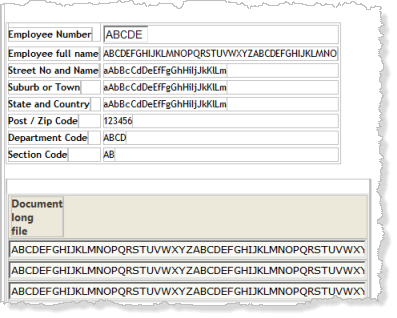
Set up the push button properties:
Property | Value |
|---|---|
Caption |
|
On_Click_wrname |
|
submitExtraFields |
|
|
Type in a new column heading - Employee Documents.
You may need to click on another part of the layout to refresh the column heading.
Set up the Anchor weblet properties:
Property | Value |
|---|---|
Currentrowhfield |
|
Currentrownumval |
|
On_click_wrname |
|
Show_in_new_window |
|
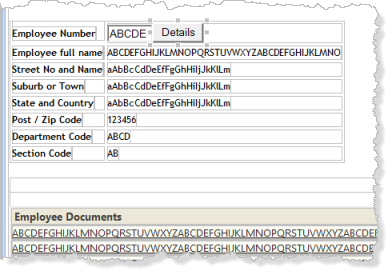
Your design should look like the following:
Click on one of the documents to display it. The way that the browser and Windows handles the request will depend on the version of browser and the version of Windows being used. For example, in Windows 7 with MS Office installed and IE10, the txt and pdf files are displayed in a new browser tab. The Office documents prompt to be displayed in the required Office program.