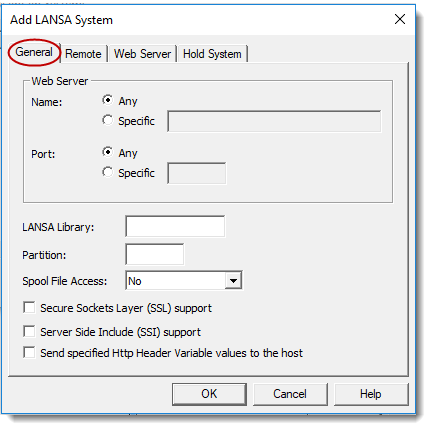
This page allows you to record a system name and port identifier for a LANSA System on the IBM i.
| Note: Multi-homing Support |
LANSA Web can be configured with multiple IP Addresses that point to one LANSA System.
It can be set up using IBM's HTTP Web Server products. To use LANSA Web with multi-homing support, you will need to specify the System Name and Port Number when creating a new LANSA system.
If you are not using multi-homing support, choose Any as your Web Server Name.
If you are using multi-homing support, enter either the DNS Name (for example: sydaspect.lansa.com) or the DNS's IP Address (for example: 124.54.56.21) in the System Name field.
If you are not using multi-homing support, choose Any as your Web Server Port.
If you are using multi-homing support, enter the port number associated with the Web Server Name.
Multi-homing systems are resolved in this order:
Priority | System Name | Port Number |
|---|---|---|
1 | Specified Name | Specified Port |
2 | Specified Name | Any |
3 | Any | Specified Port |
4 | Any | Any |
Enter the LANSA library.
When you first install LANSA Web, it will check if a LANSA system has already been set up. If no LANSA system has been set up, the library to which LANSA Web is being installed will be used as the default LANSA library.
Specify the partition if you want to have all the requests for that port use a particular LANSA partition.
If a partition is specified, it will override any partition specified in the URL.
If no partition is specified, you must specify the partition parameter in your URL.
Select an entry from the drop down list to set the level of user access to view IBM i Spool files via LANSA Web.
Possible Spool File Access selections are:
Select this option if you want to enable SSL for this system.
The default LANSA library is the LANSA system assigned to port 80. This is the default port identifier for the HTTP protocol.
If you have SSL support enabled, remember that the default port for SSL is 443.
Select this option if you want to enable SSI support for this system. Make sure that your Web serving product is capable of supporting this feature before enabling this option.
Select this option if you want to send the values for the specified HTTP Header Variables to the host, that is, the Data/Application Server. To specify the HTTP Header Variables to be sent, select the Tools menu and choose the HTTP Header Variables command.
For information about HTTP Header Variables, refer to HTTP Header Variables (Connected to IBM i Web Server).