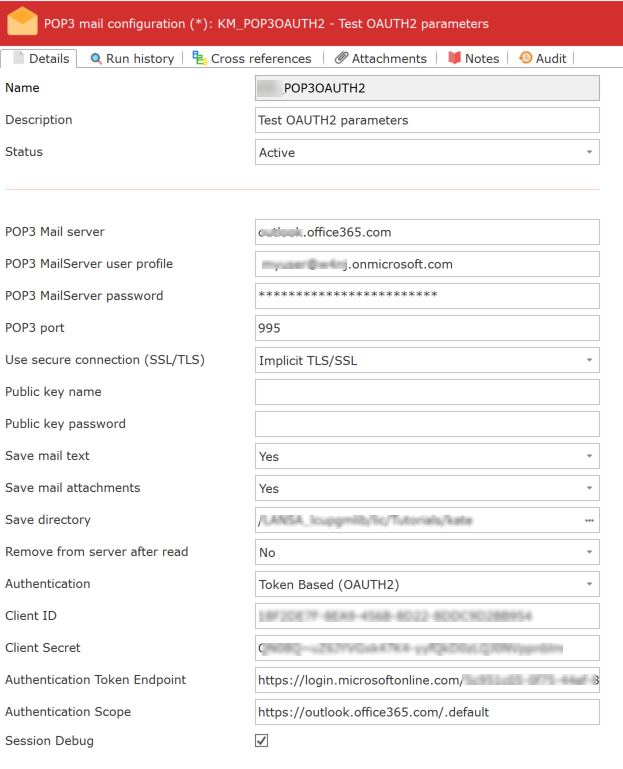
The POP3 mail Configuration may be used to specify details of your email server and how emails are to be retrieved from that email server using the POP3 protocol.
Two standard POP3 email Activities are provided. They are MAIL_RECEIVE and MAIL_RECEIVEALL. These Activities retrieve emails from the email server. Details of the email server can be set up in this Configuration
ID | An identifier to uniquely identify this Configuration. |
|---|---|
Description | This should describe the Configuration. |
Status | Active or Inactive. Configurations cannot be used in a processing sequence while they are in inactive status – supplied activities will end in error if they attempt to use a configuration that has inactive status. |
POP3 Mail Server | This is the IP address of your mail server. If this value is not provided in this Configuration, it must be specified in the LANSA Integrator POP3MailService properties file. |
POP3 MailServer user profile | This is the user profile to be used to connect to your mail server. If this value is not provided in this Configuration, it must be specified in the LANSA Integrator POP3MailService properties file. |
POP3 MailServer password | This is the password that is used with the user profile to connect to your mail server. If this value is not provided in this Configuration, it must be specified in the LANSA Integrator POP3MailService properties file. |
POP3 port | This value is optional. The default value is 110 (or 995 for a secure connection using Implicit SSL/TLS). |
Use secure connection (SSL) | Specifies whether to use a secure connection to the specified POP3 mail server. You can choose one of the following: |
Public key name | This value is optional. It may be used to decrypt secure messages that have been encrypted with the recipient's public key. This value is used to access the appropriate private key store in the LANSA Integrator POP3 service properties. |
Public key password | This value is optional. It is used with the Public key name as the password component. |
Save mail text | Yes or No. If Yes is specified, the text of the emails is to be saved to the directory specified in the Save directory. |
Save mail attachments | Yes or No. If Yes is specified, the email attachments are to be saved to the directory specified in the Save directory. |
Save directory | This must be specified if the mail text or mail attachments are to be saved. You can click the prompt button to browse for a folder location on the LANSA Composer server. |
Remove from server after read | Yes or No. If No is specified, then the emails that are read are left on the email server. This means that a subsequent connection to the email server and read will retrieve the same emails. It is usual to remove emails from the server after they have been read and the text and attachments saved. |
Authentication | OAUTH2 – Token-based authentication. |
Client ID | The client_id is a public identifier for apps. Even though it’s public, it’s best that it isn’t guessable by third parties, so many implementations use something like a 32-character hex string. E.g. ZYDPLLBWSK3MVQJSIYHB1OR2JXCY0X2C5UJ2QAR2MAAIT5Q |
Client Secret | The client_secret is a secret known only to the application and the authorization server. It is essentially the application’s own password. It must be sufficiently random to not be guessable, which means you should avoid using common UUID libraries, which often consider the timestamp or MAC address of the server generating it. A great way to generate a secure secret is to use a cryptographically-secure library to generate a 256-bit value and then convert it to a hexadecimal representation. In PHP, you can use the random_bytes function and convert to a hex string: bin2hex(random_bytes(32)); Lq08Q~EtgN-BpoINX6msRD9GL_cCx
|
Authentication Token Endpoint | The token endpoint is used by the application in order to get an access token or a refresh token. It is used by all flows except for the Implicit Flow because, in that case, an access token is issued directly. E.g. -https://login.microsoftonline.com/5c951c05-0f75-44ef-6223f150a449/oauth2/v2.0/token
|
Authentication Scope | Scope is a way to limit an app’s access to a user’s data. Rather than granting complete access to a user’s account, it is often useful to give apps a way to request a more limited scope of what they are allowed to do on behalf of a user. |
| Note: A Test button can be used to test the validity of the configuration parameters. The values tested are: POP3 Mail Server, POP3 MailServer user profile, POP3 MailServer password, POP3 port, Use secure connection (SSL), Public key name, Public key password. |