You can restart an eligible Processing Sequence run from within the LANSA Composer client application. To do this, perform the following steps:
- Expand Definitions in the Navigator and click Processing sequences. Use the filters and the Processing Sequence list to locate and select the desired Processing Sequence.
- Click the Run History tab. A list of recorded prior runs of the Processing Sequence will be displayed.
- Select the run you wish to restart and click the Restart button. If the Restart button is not enabled, then the run is not eligible to be restarted. The Restart processing sequence window is displayed.
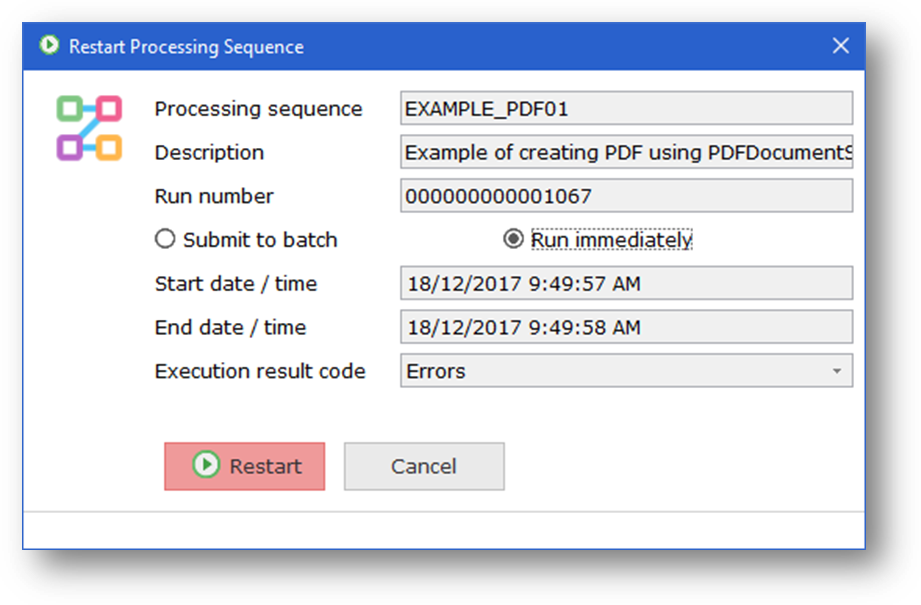
- Click the Restart button.
- If the Submit to batch radio button is checked, the Processing Sequence run is submitted to batch using the job description specified in System Settings. When the job completes, you can review the result and the log output on the Run History tab.
- If you selected the Run immediately button, the Processing Sequence runs immediately and you must wait for it to complete. When the run is complete, the Processing Sequence Log window shows the result code and log output for the Processing Sequence run. The amount of detail in the log output depends on the logging level set in the LANSA Composer system settings.