
A list of parameters is displayed as per the example below:


Parameters pass information between two or more procedures and between the WhereScape RED environment and procedures.
They can be accessed within the WhereScape RED environment in two ways:
A parameter can be added, edited, copied, or deleted using the right-click context menu of the Parameter column: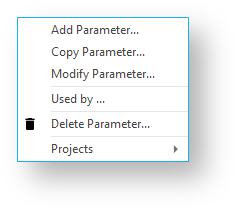
Parameters can also be added or removed from Projects you have defined in RED using the Projects context menu option. Refer to Organizing Objects for details.
Typical parameter usage may be the global definition of how many days should be looked back for changed data, a month or processing period, etc.
Parameters can be used in Load tables to place limits in a 'Where' clause, etc. Refer to Database Link Load - Source Mapping for details.
Stage table procedures also use them as variables. Refer to Generating the Staging Update Procedure for details.