Copy the file x_cpu.exe from the Tools directory of a LANSA system at the supported level specified above to a VM in your Cloud.
Set the type of Cloud to AWS or Azure in this registry entry.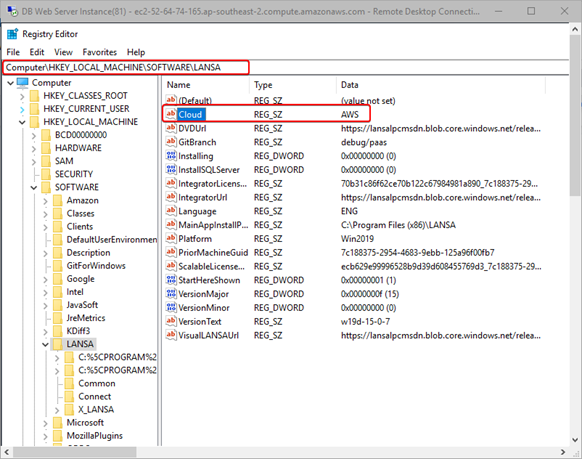
- For AWS run:
X_cpu -cAWS
- For Azure run:
X_cpu -cAZR
To get the Cloud Account ID License File, follow the steps:
x_cpu.exe executable from the specified LANSA version.Follow the steps to generate the Hardware Definition File:
Copy the file x_cpu.exe from the Tools directory of a LANSA system at the supported level specified above to a VM in your Cloud.
Set the type of Cloud to AWS or Azure in this registry entry.
X_cpu -cAWSX_cpu -cAZRFor example, for the AWS Account ID 775488040364, do the following:
x_cpu.exe to.X_cpu -cAWS.x_cpu_aws_775488040364-us-east-1.txt.
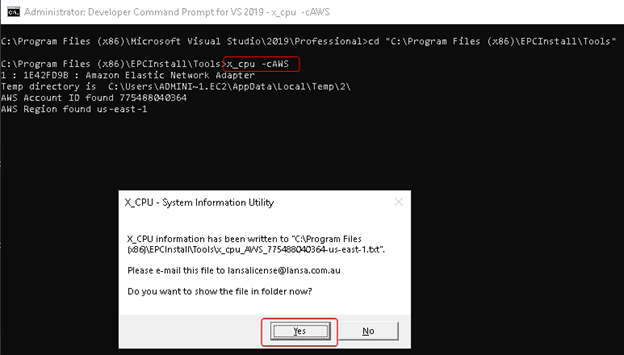
A file name example for Azure is x_cpu_AZR_739c4e86-bd75-4910-8d6e-d7eb23ab94f3-ae.txt.
x_cpu.exe needs to be run for each account/region combination, and all license files sent to LANSA Licensing.