This document provides troubleshooting steps for different issues related to Azkaban and the RED Scheduler.
Error: Azkaban windows service - Error 1053: The service did not respond to the start or control request in a timely fashion.
If your get this error from the WhereScape Scheduler Installer or when trying to start an existing service via Windows Services management, then you may be running into a sharing violation between other WhereScape Scheduler services which are running on the Local System account.
It is not recommended to run multiple WhereScape Scheduler services with combinations of Local System and User logins. This is a known issue which will be addressed in a later release of RED. The workaround is to turn off any WhereScape Scheduler services running as Local System and start the User based services first.
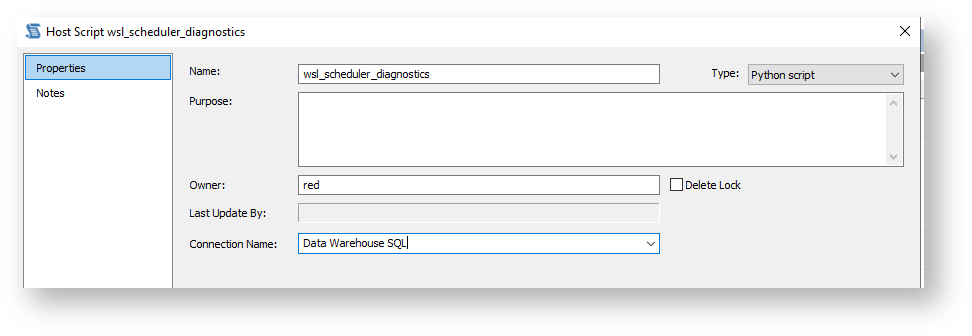
The below python script can be used to run a job against an Azkaban Executor that outputs diagnostic information and tests ODBC connectivity, useful for debugging and also for providing to support for analysis:
# wsl_scheduler_diagnostics script, version 3 for RED 10.3+

import json
import os
import subprocess
import sys
import traceback
import pyodbc
import re

debugModeExt = "TRUE"
interactiveLog = ''
if debugModeExt == 'TRUE':
    debugMode = True
else:
    debugMode = False

def write_audit(message = '', logType = 'audit', statusCode = 'I'):
    # statusCodes 'E' = error, 'W' Warning, 'I' information, 'S' Success
    global interactiveLog
    if is_red_interactive():
        interactiveLog = '\n'.join([interactiveLog, message])
    else:
        outputJson = json.dumps({"type": logType, "message": message, "statusCode": statusCode})
        print(outputJson, flush=True)

def write_error(message = ''):
    write_audit(message, 'audit', 'E')

def write_detail(message = '', statusCode = 'I'):
    if debugMode:
        write_audit(message, 'detail', statusCode)

def write_result(message = '', statusCode = 'S'):
    write_audit(message, 'result', statusCode)

def is_red_interactive():
    if os.environ.get('WSL_JOB_KEY','') == '0' and os.environ.get('WSL_JOB_NAME','') == 'Develop':
        return True
    else:
        return False

def exit_script(exitCode = 0, message = 'Executed the script'):
    if is_red_interactive():
        if exitCode != 0:
            print(-2, flush=True)
        else:
            print(1, flush=True)
        print(message, flush=True)
        print(interactiveLog, flush=True)
        sys.exit(0)
    else:
        if exitCode != 0:
            write_result(message,'E')
        else:
            write_result(message,'S')
        sys.exit(exitCode)

def ExecuteSQLBlock(
    block = 'SELECT 1',
    uid = str(os.environ.get('WSL_TGT_USER','')),
    pwd = str(os.environ.get('WSL_TGT_PWD','')),
    dsn = str(os.environ.get('WSL_TGT_DSN','')),
    conString = str(os.environ.get('WSL_TGT_CONSTRING',''))
    ):
    if block.isspace() or block == "":
        return True
    try:
        if conString == "":
            conString = "DSN=" + dsn
            if uid and not uid.isspace():
              conString += ";UID="+uid
            if pwd and not pwd.isspace():
              conString += ";PWD="+pwd
        if pwd and not pwd.isspace():
            conStringPwdsRemoved = re.sub(str(pwd),'*****',conString)
        else:
            conStringPwdsRemoved = conString
        write_audit('Connecting to: ' + conStringPwdsRemoved)
        odbcCon = pyodbc.connect(conString, autocommit=True)
        conCursor = odbcCon.cursor()
        try:
            result = conCursor.execute(block)
        except pyodbc.ProgrammingError as e:
            if str(e) == 'No results.  Previous SQL was not a query.':
                return True
            else:
                write_error(f"SQL error: {e}")
                raise e
        conCursor.close()
        return True
    except Exception as exceptionError:
        write_error(f"SQL error or connection error has occurred: " + repr(exceptionError))
        return False

def ExecuteCommand (command = 'echo test'):
    env = dict(os.environ)
    result = subprocess.run(command, shell=True, env=env, stderr=subprocess.PIPE, stdout=subprocess.PIPE, text=True)
    return_code = result.returncode if result.returncode < 2**31 else result.returncode - 2**32
    if result.stderr != "" or str(return_code) != "0":
      if result.stderr != "":
          write_error(str(result.stderr))
      raise Exception(f"Error occurred while executing the command {command}")
    if result.stdout != "":
      write_audit(str(result.stdout))

# Main

try:
    exitCode = 0
    # Meta test
    msg = 'Metadata connection test: '
    if ExecuteSQLBlock(block = 'SELECT 1',uid = str(os.environ.get('WSL_META_USER','')),pwd = str(os.environ.get('WSL_META_PWD','')),dsn = str(os.environ.get('WSL_META_DSN','')),conString = str(os.environ.get('WSL_META_CONSTRING',''))):
        res = 'PASSED'
    else:
        res = 'FAILED'
    write_audit(msg + res)

     # Target test
    if os.environ.get('WSL_TGT_CONSTRING','') != "":
        msg = 'Target connection test: '
        if ExecuteSQLBlock(block = 'SELECT 1'):
            res = 'PASSED'
        else:
            res = 'FAILED'
        write_audit(msg + res)

    # Source test
    if os.environ.get('WSL_SRC_CONSTRING','') != "":
        msg = 'Source connection test: '
        if ExecuteSQLBlock(block = 'SELECT 1',uid = str(os.environ.get('WSL_SRC_USER','')),pwd = str(os.environ.get('WSL_SRC_PWD','')),dsn = str(os.environ.get('WSL_SRC_DSN','')), conString = str(os.environ.get('WSL_SRC_CONSTRING',''))):
            res = 'PASSED'
        else:
            res = 'FAILED'
        write_audit(msg + res)

    # Get azkaban.local.properties
    azkabanLocalProps = {'azkaban.passwordEncryption' : 'NONE'}
    if os.environ.get('JOB_PROP_FILE','') != "":
        jobPropFile = os.environ["JOB_PROP_FILE"]
        splitPoint = jobPropFile.find(r'..')
        azkabanLocPropFile = os.path.join(str(jobPropFile[:splitPoint]), '../azkaban.local.properties')
        with open(azkabanLocPropFile, 'r') as f:
            for line in f:
                line = line.rstrip() #removes trailing whitespace and '\n' chars
                if "=" not in line: continue #skips blanks and comments w/o =
                if line.startswith("#"): continue #skips comments which contain =
                k, v = line.split("=", 1)
                azkabanLocalProps[k] = v
    azkabanExecutorLocation = os.path.abspath(os.path.join(azkabanLocPropFile, os.pardir))
    write_audit(f"------ Executor location \n{azkabanExecutorLocation}")
    write_audit(f"------ Executor properties passwordEncryption \n{azkabanLocalProps['azkaban.passwordEncryption']}")

    if os.name == 'nt':
        # Windows tests
        write_audit(f"------ Script directory")
        write_audit(str(os.path.dirname(os.path.abspath(__file__))))
        cmds = {
          'Work directory WSL_WORKDIR': "echo %WSL_WORKDIR%",
          'Windows User': 'echo %USERNAME%',
          'Python version': 'python --version'
        }
    else:
        # Linux tests
        cmds = {
          'Script dir': 'echo $PWD',
          'Work directory WSL_WORKDIR': "printf '%s\n' $WSL_WORKDIR",
          'Linux User': 'echo $USER',
          'User DSNs': 'odbcinst -q -s -h',
          'System DSNs': 'odbcinst -q -s -l',
          'Java version': 'java --version',
          'Python version': 'python --version',
          # comment out this item if your passwords are in plain text in the properties file
          # 'Executor properties': 'cat ${JOB_PROP_FILE%..*}../azkaban.local.properties',
          'List Azkaban Processes': 'ps -ef | grep azkaban'
        }
        if azkabanLocalProps['azkaban.passwordEncryption'] == 'WALLET':
          # Modify WALLET test command as required
          cmds['Test WALLET'] = 'pass ls'

    # Execute cmds
    for key in cmds.keys():
        write_audit(f"------ {key}")
        try:
            ExecuteCommand(str(cmds[key]))
        except Exception as exceptionError:
            write_audit(f"Running test cmd [{cmds[key]}] failed: " + repr(exceptionError))

# exit
    exit_script(exitCode = 0, message = 'Testing script execution complete, check the audit logs for results.')
except Exception as exceptionError:
    write_error(repr(exceptionError))
exit_script(exitCode = 1, message = 'Testing script execution failed, check error and detail logs.') |



|
This section provides troubleshooting steps for some issues that you could face while adding jobs.
A possible cause is the WsAzkabanWeb and WsAzkabanExec services are not running. Go to Services.msc in Windows and check if they are running. if they are not running, right click on a service and select start. Or for Linux, follow the diagnostics process mentioned in the linux scheduler installation for determining of the services are running.
In order for any tags to be retrieved you must have: