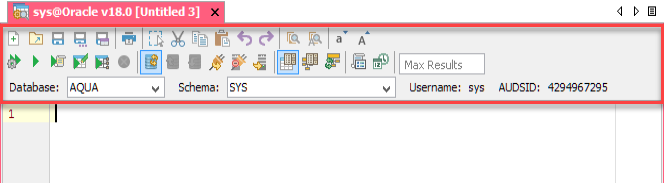
The following table describes the Toolbar options, along with the keyboard shortcut keys.
The toolbar options provide quick access to create, modify, and save scripts in the Query Analyzer.
The following table describes the Toolbar options, along with the keyboard shortcut keys.
| Toolbar Options | Keyboard Shortcut | Description |
| CTRL + N (Windows & Linux) | Creates a new script file. |
| CTRL + O (Windows & Linux) | Opens an existing script file. |
| CTRL + S (Windows & Linux) | Saves changes to an existing file. |
| CTRL + SHIFT + S (Windows & Linux) | Saves the script as a new file. |
| CTRL + R (Windows & Linux) | Saves the query result to a file or sends the result to the clipboard in the specified data format. |
| CTRL + P (Windows & Linux) | Opens the print dialog. |
| NA | Enables or disables the Block Selection mode in the editor. |
| CTRL + X (Windows & Linux) | Removes the selected script. |
| CTRL + C (Windows & Linux) | Copies the selected script. |
| CTRL + V (Windows & Linux) | Pastes the script on a script file. |
| CTRL + Z (Windows & Linux) | Undo the last action. |
| CTRL + SHIFT + Z (Windows & Linux) | Redo the last action. |
| CTRL + F (Windows & Linux) | Finds text within the opened file. |
| CTRL + H (Windows & Linux) | Finds and replaces text within the opened file. |
| CTRL + L (Windows & Linux) | Changes the current word or selected text to lower case. |
| CTRL + U (Windows & Linux) | Changes the current word or selected text to upper case |
| CTRL + ALT + A (Windows & Linux) | Parses the script and displays a list of the commands to be executed on the server. |
| CTRL + E (Windows & Linux) | Executes the script in the query window. |
| CTRL + ENTER (Windows & Linux) | Executes the current statement, defined by the cursor position. |
| CTRL + ALT + ENTER (Windows & Linux) | Executes the SELECT statement and opens the result in an editable window. |
| CTRL + SHIFT + ENTER (Windows & Linux) | Displays Visual Explain Plan for the current statement. |
| CTRL + ALT + BACKSPACE (Windows & Linux) | Cancels the currently executing statement or script. |
| CTRL + SHIFT + A (Windows & Linux) | Determines whether commit is performed automatically after each statement is executed. |
| CTRL + SHIFT + C (Windows & Linux) | Commits any active transactions. |
| CTRL + SHIFT + R (Windows & Linux) | Rollbacks any active transactions. |
| CTRL + SHIFT + INSERT (Windows & Linux) | Reconnects the current connection. |
| NA | Disconnects the current connection for this Query Analyzer. |
| NA | Opens a new Query Analyzer with the selected server connection. |
| CTRL + SHIFT + U (Windows & Linux) | Enables or disables auto-completion. |
| CTRL + SHIFT + O (Windows & Linux) | Displays tables/views for all schema objects, other than just the current schema. |
| CTRL + SHIFT + E (Windows & Linux) | Clears the current autocompletion cache. |
| NA | Enables or disables the parameterized scripts. |
| NA | Sets a limit on the number of rows that Aqua Data Studio can retrieve after querying a table. |
| NA | Selects the Database (and Schema) to be used. Displays User, Connection ID, AUDSID, and other details specific to the RDBMS vendor. |
See Also, Menus and Toolbars.


