Aqua Data Studio's Query Window - SQL Automation menus rapidly increase the speed of writing a query. Automate is the fifth menu (from left to right) in the Main Application Window.
The SQL Automation feature set in Aqua Data Studio (the "Automate" pull-down menu) helps you reduce the number of keystrokes made while writing SQL statements, and to let the application rapidly fill in what a user would normally spend seconds or minutes typing.
The largest amount of time spent typing is probably writing templates for basic SELECT, INSERT and UPDATE statements, including writing out the columns.
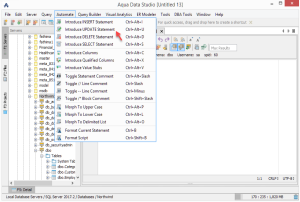
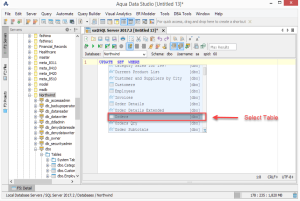
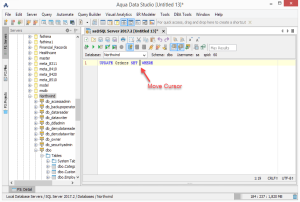
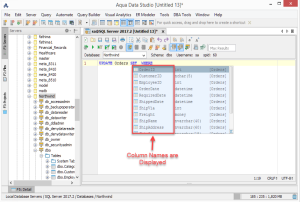
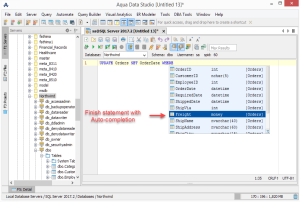
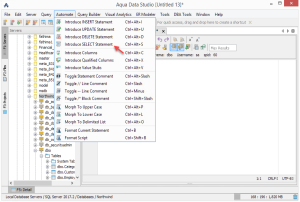
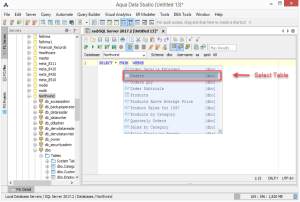
Below are examples of how to automate the writing of basic UPDATE and SELECT statements.
Automating an UPDATE statement
|
|
|
|
|
| 1. Click Automate insert UPDATE | 2. Select the Table | 3. Move the Cursor | 4. Column names without typing | 5. Finish the SQL Statement |
Automating a SELECT statement
|
|
|
| 1. Click Automate insert SELECT | 2. Select the Table | 3. Finish the SQL Statement |
Automate INSERT
- Press CTRL+ALT+I
a. Introduce an INSERT template,INSERT INTO () VALUES()
b. Place the cursor at theINSERT INTO ^() VALUES()location
c. Popup a list of tables for autocompletion of the table name you want to INSERT data into - Type out the table you want and move the cursor to the column location
INSERT INTO MYTABLE(^) VALUES() - Press CTRL+ALT+C
a. Introduce all of the columns for the TABLE you have typed in a comma-separated list in the order of definition - Move the cursor to the values definition location
INSERT INTO MYTABLE(COLUMN1, COLUMN2, ...) VALUES(^) - Press CTRL+ALT+V
a. Introduce stubbed values for the columns of the table according to data type - At this point, you have
INSERT INTO MYTABLE(COLUMN1, COLUMN2, ...) VALUES(’’, 0, ...) - You can now finish your statement
Automate UPDATE
- Press CTRL+ALT+U
a. Introduce an UPDATE templateUPDATE SET WHERE
b. Place the cursor at theUPDATE ^ SET WHERElocationc. Popup a list of tables for auto-completion of the table name you want to UPDATE - Type out the table you want and move the cursor to the column set location,
UPDATE MYTABLE SET ^ WHERE - Press CTRL+ALT+C
a. Introduce all of the columns and value stubs for the TABLE you have typed in a comma-separated list in the order of definition - At this point, you have
UPDATE MYTABLE SET EMPLOYEEID=0, NAME=’’, SALARY=0, TITLE=0, CREATEDDATE=’2002-12-30 23:59:59.0’ WHERE - You can now finish your statement
Automate SELECT
- Press CTRL+ALT+S
a. Introduce a SELECT templateSELECT * FROM WHERE
b. Place the cursor at theSELECT * FROM ^ WHERE
c. Popup a list of tables for auto-completion of the table name you want to SELECT - Type out the table you want and move the cursor to the column set location,
SELECT ^* FROM MYTABLE WHERE - Press CTRL+ALT+C
a. Introduce all of the columns for the TABLE you have typed in a comma-separated list in the order of definition - At this point you have
SELECT EMPLOYEEID, NAME, SALARY, TITLE, CREATEDDATE FROM MYTABLE WHERE - You can now finish your statement
All of the Automation functionality is in the Automate pull-down menu.