Application - Command Line
SQL scripts may be executed from the commandline without launching the Aqua Data Studio GUI. This allows scheduling the execution of scripts from an OS scheduler such as a Unix cron job or with Windows Task Scheduler. There are two files in the root install directory called "runscript.sh/bat" and "runscript-bundled.sh/bat". For more on command line use, see the Aqua Commands page.
An example of what you can do with this:
Every morning a cron job runs a script that queries for a set of data, lays out pivot or graph information, saves it to file and then emails the file to a set of people.
These are examples of how to run a script from the command line. If you type "runscript" from within the root install directory the usage will display, which follows.
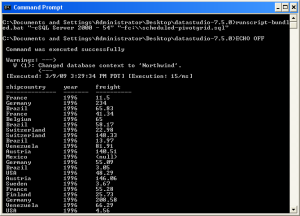
Windows Usage:
runscript.bat "-cMy Connection" "-fc:\myscript.sql" "-oc:\myscript-out.txt" "-uusername" "-m100" "-htrue" |
- connection [-c] - [required] Identifies the connection name.
- filename [-f] - [required] File name of the script to execute.
- output file [-o] - [optional] File name for the text output. Standard out is used if not defined.
- username [-u] - [optional] Username to use for login. If not indicated, then the saved username will be used.
- password [-p] - [optional] Password to use for login. If not indicated, then the saved password will be used.
- maxResults [-m] - [optional] Max Results in any given query resultset.
- binaryToHex [-h] - [optional] true/false in option to convert hex to binary.
Example:
runscript.bat "-cSQL Server 2000 - 54" "-fc:\\scheduled-pivotgrid.sql" |
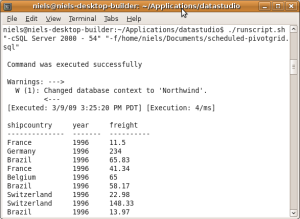
Linux Usage:
runscript.sh "-cMy Connection" "-fc:\myscript.sql" "-oc:\myscript-out.txt" "-uusername" "-m100" "-htrue" |
- connection [-c] - [required] Identifies the connection name.
- filename [-f] - [required] File name of the script to execute.
- output file [-o] - [optional] File name for the text output. Standard out is used if not defined.
- username [-u] - [optional] Username to use for login. If not indicated, then the saved username will be used.
- password [-p] - [optional] Password to use for login. If not indicated, then the saved password will be used.
- maxResults [-m] - [optional] Max Results in any given query resultset.
- binaryToHex [-h] - [optional] true/false in option to convert hex to binary.
Example:
./runscript.sh "-cSQL Server 2000 - 54" "-f/home/currentusername/Documents/scheduled-pivotgrid.sql" |
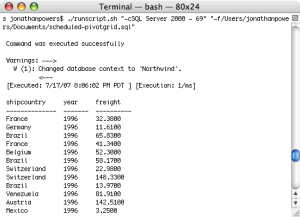
OS X Usage:
runscript.sh "-cMy Connection" "-fc:\myscript.sql" "-oc:\myscript-out.txt" "-uusername" "-m100" "-htrue" |
- connection [-c] - [required] Identifies the connection name.
- filename [-f] - [required] File name of the script to execute.
- output file [-o] - [optional] File name for the text output. Standard out is used if not defined.
- username [-u] - [optional] Username to use for login. If not indicated, then the saved username will be used.
- password [-p] - [optional] Password to use for login. If not indicated, then the saved password will be used.
- maxResults [-m] - [optional] Max Results in any given query resultset.
- binaryToHex [-h] - [optional] true/false in option to convert hex to binary.
Example:
./runscript.sh "-cSQL Server 2000 - 69" "-f/Users/currentusername/Documents/scheduled-pivotgrid.sql" |
Within OS X it is possible to create an iCal alarm event which is an Apple Script. This Apple Script can contain a wrapper for a shell that runs the runscript.sh.
See Also