This functionality allows you to configure a repository and export its configuration settings. You can then apply those settings to other repositories.
Exporting Settings
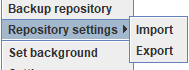
To export repository settings, follow these steps:
- On the Repository Tree right click on a repository
- Go to Repository settings and select Export
- Choose a name and location for the exported settings and click Save.
Importing Settings
To Import settings to a repository, follow these steps:
- On the Repository Tree right click on the repository that you want to configure.
- Go to Repository settings and select Import.
- Locate and select the file that contains the settings, click Open.