When running scheduled jobs from WhereScape RED, it's possible to configure a job to run commands when the job finishes successfully or when a task in the job fails. These commands can be set to trigger email notifications, maintenance tasks, create a log file, or other actions.
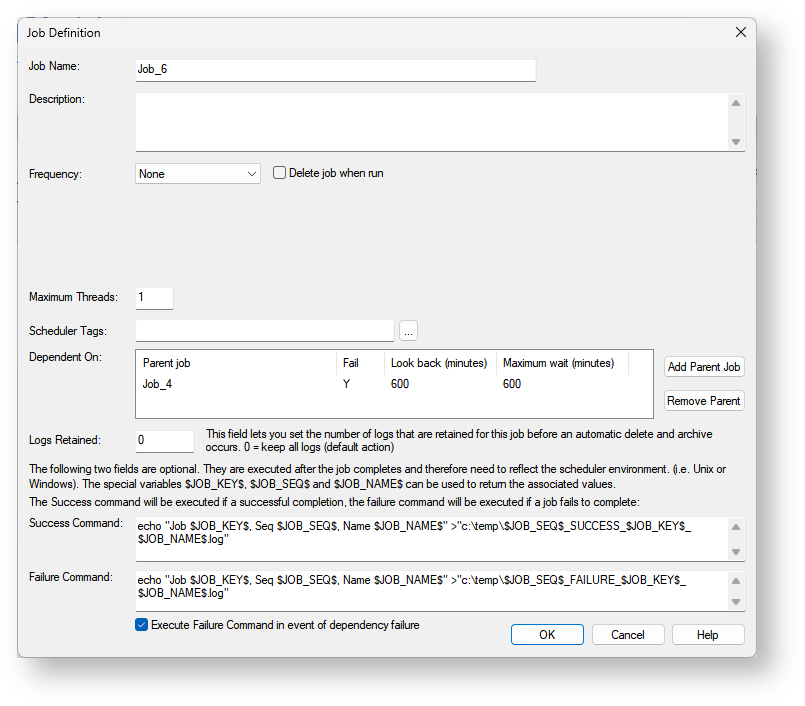
The commands can be entered in the Job Definition screen as shown below. It is important to make sure the commands you enter reflect the operating system (Linux or Windows) where the job will run or be portable between environments, as the commands entered are simply run as a system command where the job is being executed.
Success commands run when a job is a marked as successful in the final stage of execution and the Success Command field is populated.
Failure commands run when a task marks a job as failed and the Failure Command field is populated. This command will only run once for the job even if more than one task fails in multi-threaded jobs.
If the Execute Failure Command in event of dependency failure option is set the failure command will also be run when the following conditions are met:
The following environment variables are set prior to running the command
The Script Sourcing feature of RED is also available to be used in the Success and Failure Commands, this allows referencing a Host Script from the RED metadata rather than a script that exists on the operating system.
Example success command:
python "WSL_SCRIPT_my_python_success_script_CODE" |
When this Success Command is executed at run-time RED will do the following: