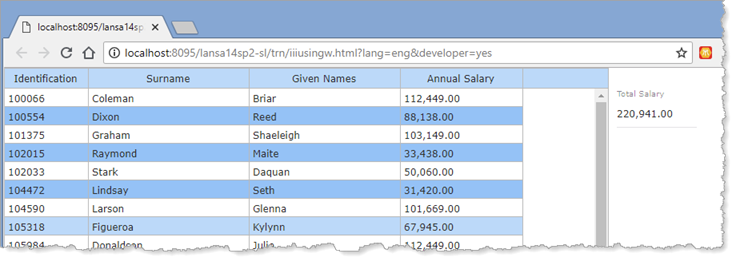
In this step, you will populate the Employees list when the web page initializes and add logic to the list's ItemGotSelection and ItemLostSelection event routines to calculate total salary.
1. Copy and paste the working list xEmployeeList and Group_By xEmployee definitions from the Server Module iiixEmployeeDataServer into your web page.
2. Create a method routine, named LoadEmployees to perform the following:
Define a component for iiixEmployeeDataServer / FindAll srvroutine, with name GetEmployees
Assign Employee ID value null
Execute GetEmployees asynchronously, exchanging list xEmployeeList.
Within an event routine for GetEmployees.Completed
Clear the list EmployeesList
Select all entries in the list xEmployeeList
Add each entry to the list ListEmployees
End Select
End routine
Your code should look like the following:
Mthroutine Name(LoadEmployees) Define_Com Class(#iiixEmployeeDataServer.findall) Name(#GetEmployees) #xEmployeeIdentification := *NULL #GetEmployees.ExecuteAsync( #xEmployeeList ) Evtroutine Handling(#GetEmployees.Completed) Clr_List Named(#ListEmployees) Selectlist Named(#xEmployeeList) Add_Entry To_List(#ListEmployees) Endselect Endroutine Endroutine
3. Create a CreateInstance event routine for the web page. Add code to invoke the method LoadEmployees.
Evtroutine Handling(#Com_owner.CreateInstance) #com_self.LoadEmployees Endroutine
4. Complete the ListEmployees.ItemGotSelection event by adding code to calculate TotalSalary for each selected employee. Your code should look like the following.
Evtroutine Handling(#ListEmployees.ItemGotSelection) #TotalSalary += #xEmployeeSalary Endroutine
5. Similarly, complete the ItemLostSelection event for the ListEmployees list, to subtract Salary from TotalSalary as each employee loses selection. Your code should look like the following:
Evtroutine Handling(#ListEmployees.ItemLostSelection) #TotalSalary -= #xEmployeeSalary Endroutine
6. Compile and test your web page. When the web page loads, the list should display all employees (the shipped Employee table contains approximately 100 employees).
When you select a number of employees using either the Shift key or Control key with the Left mouse button, Total Salary should reflect the salaries for the selected employees.