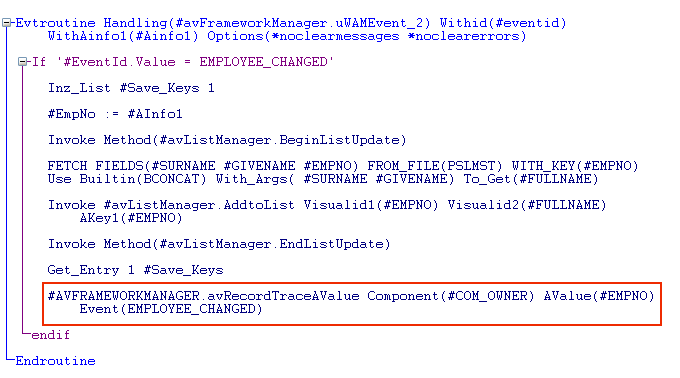
In this step, you will add another trace statement to the filter. The statement will show when the EMPLOYEE_CHANGED event was signaled and the employee number passed.
- Locate the event routine handling the EMPLOYEE_CHANGED event (#avFrameworkManager.uWAMEvent_2) and add this statement to trace when the EMPLOYEE_CHANGED event is triggered and to show the employee number passed by the event:
#AVFRAMEWORKMANAGER.avRecordTraceAValue Component(#COM_OWNER) AValue(#EMPNO) Event(EMPLOYEE_CHANGED)
- Compile the filter and check it in.
- In the Framework select employees using the filter and then select one employee to display the Employee Details command handler.
- Change one of the employee details and click the Save button.
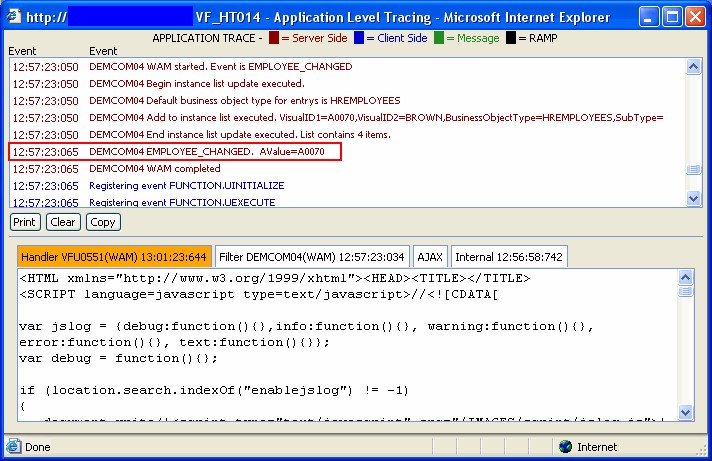
- Notice the EMPLOYEE_CHANGED event and the employee number are shown in the trace:
- Close The Framework