Not every JSM Binding Script necessarily uses a LANSA Integrator binding solution.
But for those that do, the LANSA Integrator binding solution becomes an integral part of your LANSA Composer solution.
With respect to those parts of the solution that are designed within the main LANSA Composer application (such as the JSM Binding Script configuration and the Processing Sequences that use it), the definitions of these items are held in the LANSA Composer Server's database and are subject to the usual export, import, audit, backup, and recovery procedures that apply to the server database.
The LANSA Integrator binding solution, however, is defined and deployed through the LANSA Integrator Studio application. In the first place, its definition resides entirely on the client computer that created it. You will need to take additional measures to protect and backup this solution, including, if required, version control.
This section provides you with essential information to help you understand the nature of these solutions and the suggested minimum steps you should take to protect them. The information is organized under the following headings:
About LANSA Integrator Binding Solutions
Where do the Solutions Reside?
LANSA Integrator Binding Solution Definitions
LANSA Integrator Binding Solution Deployable Components
Suggested Minimum Procedure for Managing the Solution
Refer also to the LANSA Integrator Guide for additional information.
Examples and illustrations in this section make reference to the ExampleJSONBind JSON binding solution. This is supplied with LANSA Composer as an attachment to the example Processing Sequence EXAMPLE_JSONIN. Refer to Example Processing Sequences for information on installing and using the example Processing Sequences. Refer to the notes attached to the EXAMPLE_JSONIN Processing Sequence for information on installing the ExampleJSONBind JSON binding solution on your computer.
About LANSA Integrator Binding Solutions
Your LANSA Integrator binding solutions are created through LANSA Integrator Studio using one of the LANSA Integrator wizards. For example:
- A solution for calling a web service is created using LANSA Integrator's SOAP Agent Wizard
- A solution for reading or writing a JSON-formatted document is created using LANSA Integrator's JSON Binding Wizard.
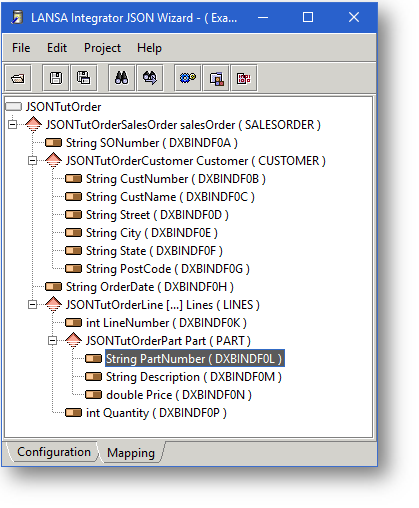
LANSA Integrator provides means to organize your solutions into projects and solution groups. You should refer to the LANSA Integrator Guide for further information.
But however you organize your solutions, in the first place, the definition of the completed solution resides entirely on the PC where it was created.
Where do the Solutions Reside?
Normally you use the LANSA Integrator Studio installed with the LANSA Composer client to create and maintain your LANSA Integrator binding solutions.
In a default installation of LANSA Composer client, the files that comprise your LANSA Integrator Studio projects, solution groups, and solutions can be found at a path similar to this:
C:\Program Files (x86)\LANSA Composer\Integrator\Studio\workspace
In the workspace directory, you will find a directory for each project. The project directory contains further directories and files that comprise the definition of the solution groups and solutions in that project.
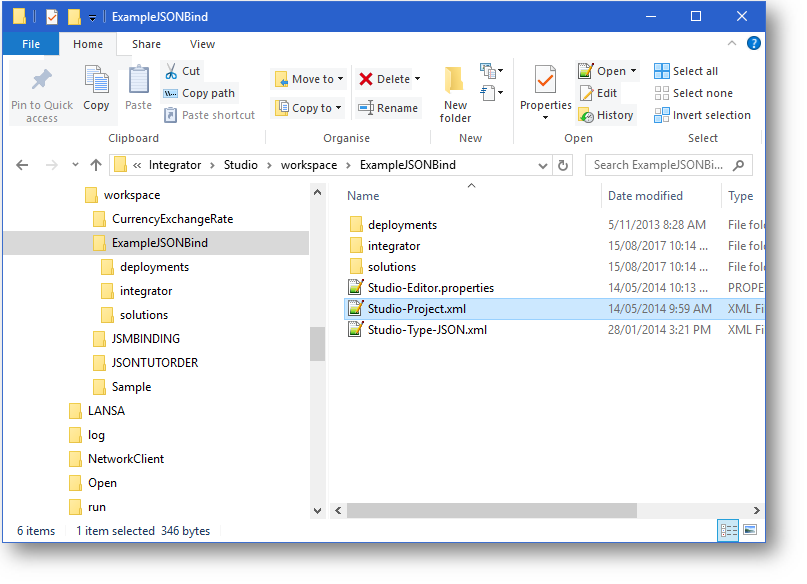
In the illustration above, ExampleJSONBind is the name of BOTH the project and its only solution group. Thus the workspace directory contains an ExampleJSONBind directory for the project, while the workspace\ExampleJSONBind\solutions directory also contains an ExampleJSONBind directory for the solution group.
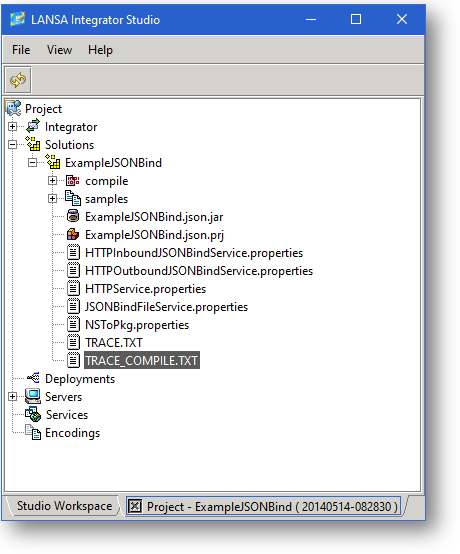
When the project is opened in LANSA Integrator Studio, it is represented like this:
LANSA Integrator Binding Solution Definitions
The ExampleJSONBind JSON binding solution is primarily contained in the ExampleJSONBind.json.prj file. (In LANSA Integrator Studio, you double-click this file to open it in the JSON Binding Wizard.)
However, the complete solution is also dependent on other files found in the project and solutions directories. For example:
- The Studio-Type-JSON.xml file in the project directory contains the JSON server types that are used in the solution.
- If the project contained a SOAP Agent solution too, there might also be a Studio-Type-SOAP.xml file containing the SOAP server types that are used in the solution.
So a full backup of the solution really must include the entire project directory tree.
This raises a further consideration – if you make a backup of the project directory as your backup of a single solution contained within it, you potentially expose yourself to the risk of multiple and possibly inconsistent versions of those files that are common to all the solutions in the project. For example, the Studio-Type-JSON.xml and Studio-Type-SOAP.xml files mentioned above
For this reason, you might want to consider maintaining a one-to-one relationship between LANSA Integrator Studio projects, solution groups, and solutions when using them with LANSA Composer's JSM Binding Script. (A disadvantage of this, however, is that your solutions can no longer share certain definitions such as the SOAP and JSON server types.)
LANSA Integrator Binding Solution Deployable Components
LANSA Integrator binding solutions are defined using one of the LANSA Integrator wizards such as the SOAP Agent Wizard or the JSON Binding Wizard.
When you have completed the definition of the solution, there are build and deploy steps necessary before you can make use of the solution.
There are two files or groups of files created by the build step that must be deployed to the server in order to use the solution:
- The solution code is compiled into a JAR (Java archive) file.
For example, the ExampleJSONBind.json.jar file is generated for the ExampleJSONBind JSON binding solution. - There are one or more sets of service properties that must be added to the appropriate LANSA Integrator service properties file on the server.
For example, the properties in the JSONBindFileService.properties file need to be deployed to the server's file of the same name.
The significant thing to understand here is that the correctly deployed components are all that is required to execute your solution. The other directories and files comprising your LANSA Integrator binding solution definition are not required to be present at run-time.
Suggested Minimum Procedure for Managing the Solution
As a minimum, you should make provision for backing up your LANSA Integrator binding solutions' definitions.
One simple way to do this is to add the solution definition to the JSM Binding Script configuration using LANSA Composer's Attachments feature. (Refer to the heading Maintain Attachments in Working with Definition Items for more information.)
By doing this, the solution definition becomes a part of the JSM Binding Script configuration, stored in the LANSA Composer Server's database and subject to that database's backup regime. In addition, the solution definition will be included when the JSM Binding Script is exported and imported through LANSA Composer.
To do this, you could follow these steps:
1. Locate the project directory for the solution as described in Where do the Solutions Reside? Create a zip archive of the project directory contents, including all the descendant files and directories.
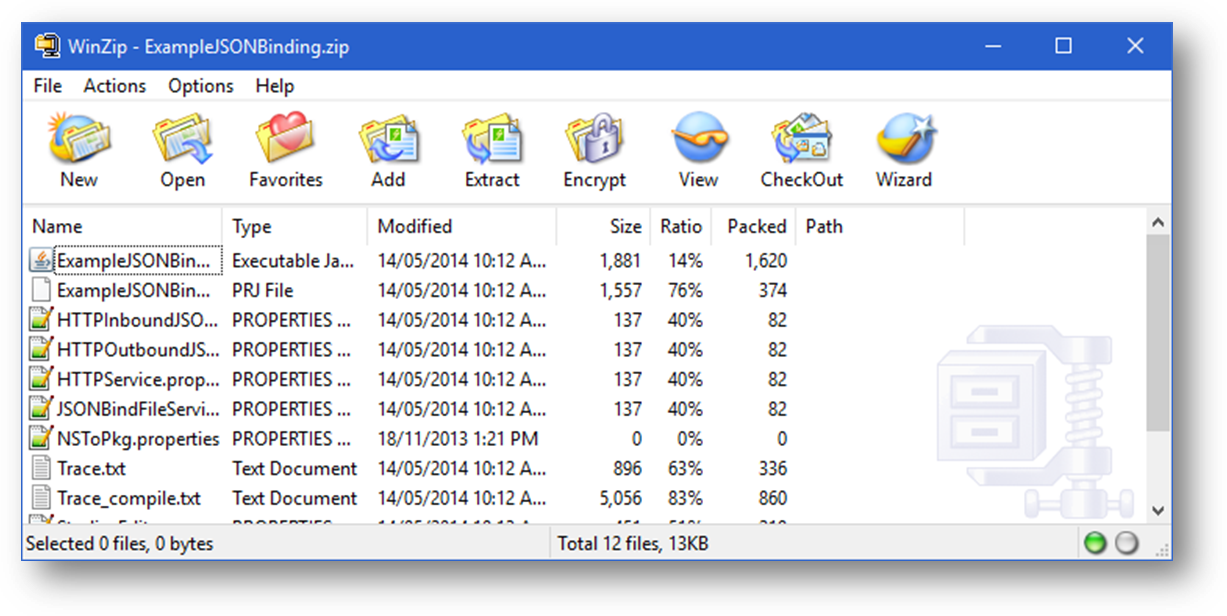
2. In LANSA Composer, locate and select the JSM Binding Script configuration that uses the LANSA Integrator binding solution. Click the Attachments tab. In Windows Explorer, locate the zip file, and drag-and-drop it onto the temporary workspace window of the Attachments tab (hold down the Ctrl key as you release the mouse button if you want to copy the zip file, such that it remains in its original location).
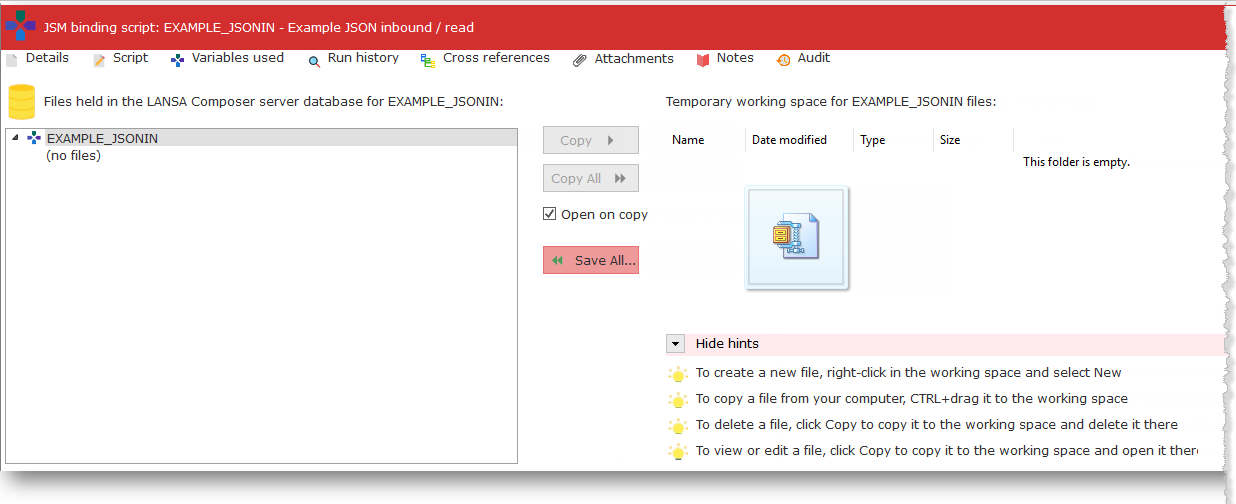
3. Click the Save All button to save the attachment to the LANSA Composer database. When LANSA Composer asks you to confirm the request, click the Confirm button.
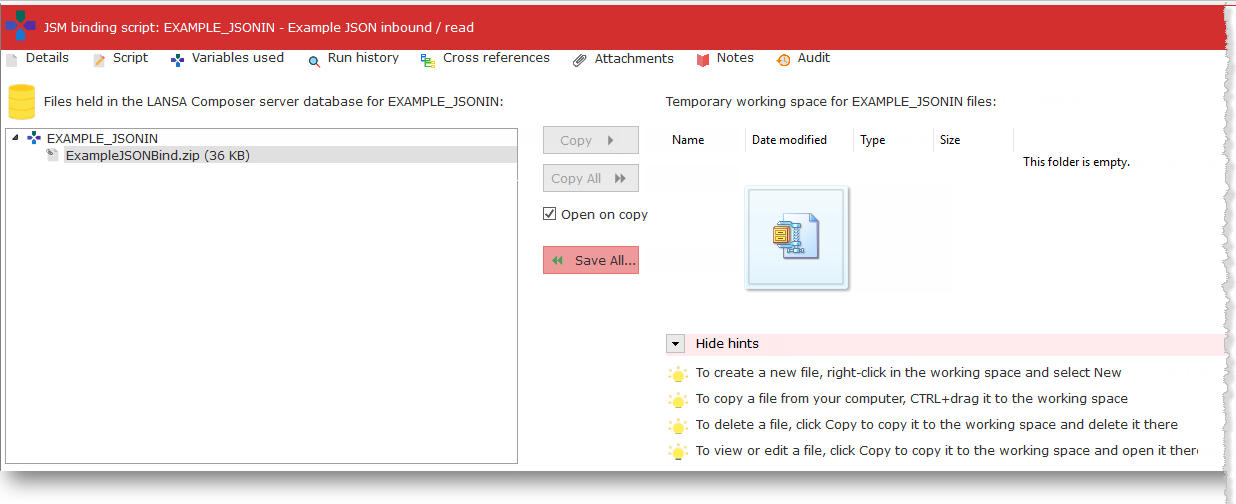
4. If completed successfully, the zip file should appear in the pane on the left – the zip file is now saved in the LANSA Composer database, associated with the JSM Binding Script configuration and will be backed up when the LANSA Composer Server database is backed up.
5. If you need to restore the LANSA Integrator binding solution to the same or a different LANSA Composer client computer, you can retrieve it using the Attachments tab, and then unzip the project directory to the LANSA Integrator Studio workspace directory on the target computer.
The foregoing is a simplified procedure that you should consider a minimum but not necessarily sufficient for all circumstances. Some of the additional issues you should consider include:
- If you revise the LANSA Integrator binding solution, you must zip the revised solution and attach the revised version to the JSM Binding Script configuration, replacing the previous version.
- If the same LANSA Integrator binding solution is used by more than one JSM Binding Script configuration, you need to consider which configuration has the "master" copy.
- If the LANSA Integrator project contains more than one solution group and/or solution, you need to consider how to manage the shared files such as Studio-Type-JSON.xml or Studio-Type-SOAP.xml.