It is recommended that all partitions are defined as multilingual.
To provide multilingual support within a partition you must define the languages you want to work with in the partition.
For both Visual LANSA and IBM i, a new partition is automatically defined as multilingual and a default language is specified for the partition.
Any other languages must be defined manually.
LANSA on an IBM i
For an IBM i Master system you change the new partition after it has been created using the Housekeeping option Change partition being worked with. After selecting the partition you wish to work with, use the Housekeeping option Work with partition multilingual attributes to set up or review the multilingual attributes of the partition.
DC@P400501 Multilingual Partition Languages
Multilingual Partition : XXX
Select language to review/change or use Add key to add a new language
Sel Language Description Default
= ENG English YES
= DEU German
= TCHI Traditional Chinese
= HEB Hebrew +
Fnn=Help Fnn=Exit Fnn=Cancel Fnn=Messages
DC@P400502 Display Multilingual Partition Language
Multilingual Partition . . . . . . . . . . : XXX
Language . . . . . . . . . . . . . . . . . . . . . ENG
Language description . . . . . . . . . . English
DBCS support required . . . . . . . . NO YES, NO
IGCCNV required . . . . . . . . . . . . . . NO YES, NO
Function key / description . . . . . /
Line number . . . . . . . . . . . . . . . . .
RLTB support required . . . . . . . . . NO YES, NO
Default language . . . . . . . . . . . . . . YES YES, NO
Development language . . . . . . . . . NO YES, NO
PC Locale uppercasing required . . NO YES, NO
Fnn=Help Fnn=Exit Fnn=Cancel Fnn=Messages Fnn=Change Fnn=Delete
Select the language and options you need for your partition. Advice for each option is in this guide.
Visual LANSA
In a Visual LANSA Slave or Independent System, after creating a partition or changing a partition to be multilingual you define the supported languages using the Language Settings tab on the Partition definition.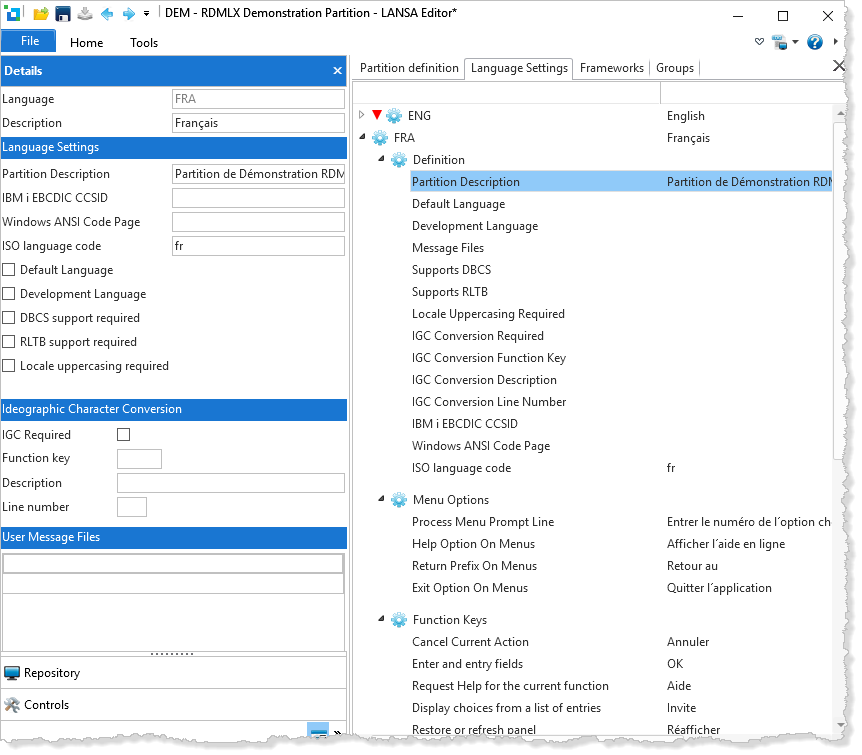
You can define any number of languages (from any of the language groups) that are to be supported within the partition. The definition of a language includes these options: