The Network Client Server details dialog is automatically displayed if you have selected the Setup Type: Shortcuts to run Visual LANSA installed on another PC. In this dialog, you enter the details of the Windows Server to which this Network Client is to be linked.
The Server can be either a Slave (connected to an IBM i) or an Independent system. In either case, the database on the server must be accessible by the Network Client Workstation.
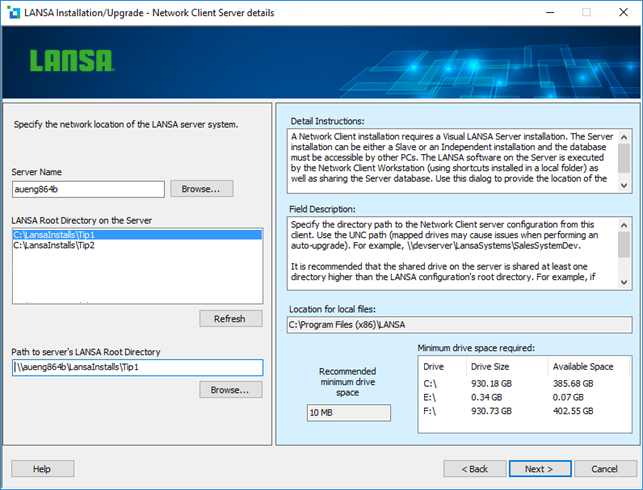
Server Name
The name of this PC on your server's network.
The unqualified computer name or the full computer name can be used. Use the Browse button to select from the list of computers currently shown on your network.
LANSA Root Directory on the Server
Select the location of the configuration on the Server. Only configurations that match the version number of this install are listed.
Path to the server's LANSA Root Directory
The path to the server's LANSA Root directory from this machine. The path should be specified with a UNC path. For example, \\abcserver\LansaSystems\LansaDev.
It is recommended that the shared drive on the server is shared at least one directory higher than the LANSA configuration's root directory. For example, let's say Visual LANSA has been installed on the server in C:\Program Files (x86)\LansaSystems\LansaDev . In this case,
C:\Program Files (x86) or C:\Program Files (x86)\LansaSystems could be shared, not C:\Program Files (x86)\LansaSystems\LansaDev .
Once the Next button is pressed, testing of the selected Server configuration is performed. These tests will confirm that the selected configuration is a valid Network Server for this installation. For example, the Server's Visual LANSA must be at the same version as you are installing on the Client.
Location for local files
This is the directory into which this LANSA software is to be installed that was specified on the Setup Type dialog. Press <Back if you wish to change it.
You will now be asked for the 3.4.5 LANSA Network Name on the Options and Summary page. From there you can press the Install button.