The Visual LANSA Application Wizards guide you in the creation of complex Visual LANSA applications using a series of predefined steps.
Before you can run a Visual LANSA Wizard:
- Visual LANSA needs to be installed and correctly configured
- The partition needs to be Web enabled
- The system needs to have a web server installed and configured to run WAMs if the execute option is selected.
To access the wizards, in the LANSA editor, select the Tools tab, and in the Utilities group, click on Wizards.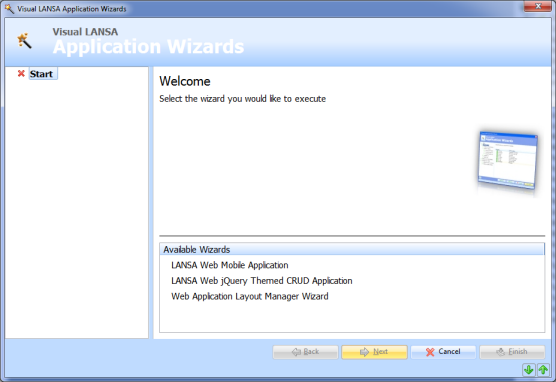
To start, click on any of the wizards in the Available Wizards list.
Each Wizard contains a list of questions which are listed with a  , once you answer each question, the becomes a
  . You need to answer all the questions before you can the the wizard.
You can navigate between the different questions by using the back  and next
  buttons.
The up  and down
  arrows at the bottom right corner of the wizard dialog are used to scroll through the messages, if any messages are displayed in the message bar.
The Wizards available are:
- 1.7.1 LANSA Web Mobile Application
This wizard generates LANSA Web Mobile Browser applications with the ability to filter, view lists and show Header/Detailer forms including a Sampler to showcase the types of controls that can be used within your own LANSA Web Mobile applications. - 1.7.2 LANSA Web jQuery Themed CRUD Application
This wizard generates a complete LANSA Web CRUD (Create, Read, Update, Delete) application over any LANSA or keyed files. Features include: - jQuery themed using your selected site layout or the default
- Drilldown to related files
- Searches over application data.
- 1.7.3 Web Application Layout Manager Wizard
This wizard provides an easy way to customise and generate the site layout for your web application. Features include: - Color scheme and look and feel
- Multiple content areas
- Ability to use both LANSA weblets and jQuery weblets
- Enable Web 2.0 sites using AJAX.