The RED Import category and discovery method contained within the metadata integration enablement pack can be used to import models from WhereScape RED to 3D.
Once the WhereScape RED metadata has been imported into WhereScape 3D the resulting models can be compared against other models within the 3D repository. Any differences between models can then be merged together or unchanged entities can be identified and removed from RED Export models, resulting in faster deployments to WhereScape RED.
Importing models from WhereScape RED into 3D also allows for 3D’s conversion sets to be applied to models that weren’t designed within 3D. This can reduce manual effort if repetitive changes are required in a RED repository.
Enablement pack installation
Installing the RED metadata Integration Enablement Pack involves adding the following components to your WhereScape 3D repositories:
- A discovery method for reading data from the WhereScape RED metadata repository.
- A new Category for importing WhereScape RED models into.
- A connection for connecting to the WhereScape RED metadata repository.
The steps required to install the Enablement Pack are:
| Step | Description |
|---|---|
| Download the Enablement Pack | The Enablement Pack files should be downloaded from the WhereScape Enablement Pack site and unzipped. |
| Execute the Install_WS3D_EP.ps1 script | The Install_WS3D_EP.ps1 script contained in the Enablement Pack folder can be used to add all required components to your existing WhereScape 3D repositories. Execute Install Script
|
| Select Repositories | After executing the Install_WS3D_EP.ps1 script you will be prompted to select which repositories you will want to use the Enablement Pack with. |
Customizing the discovery method based on your environment
- Go to Tools -> Manage Discovery Methods
- Target locations: Add the target locations relevant to your environments in the target locations section of the discovery method.
- UI config column properties: If you have configured column properties that need to be imported from RED add the relevant queries in the 'UI config column properties' section.
- Extended table properties & Extended column properties: If you have additional metadata that needs to be imported from RED then consider using extended properties.
Setting up a connection to the WhereScape RED metadata repository
Create either an ODBC or JDBC connection to your WhereScape RED metadata repository. Review the following sections in the user guide for further details:
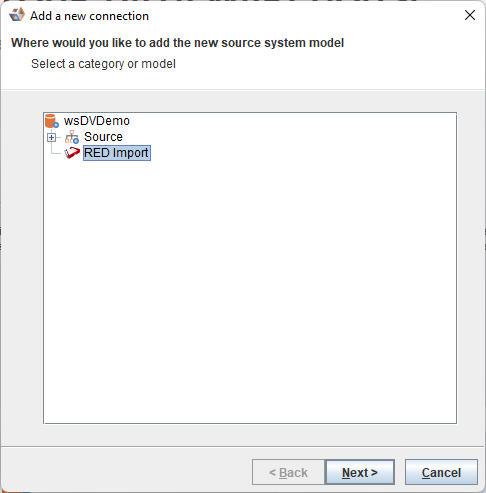
When discovering the new connection select the RED Import category as the location for the model.
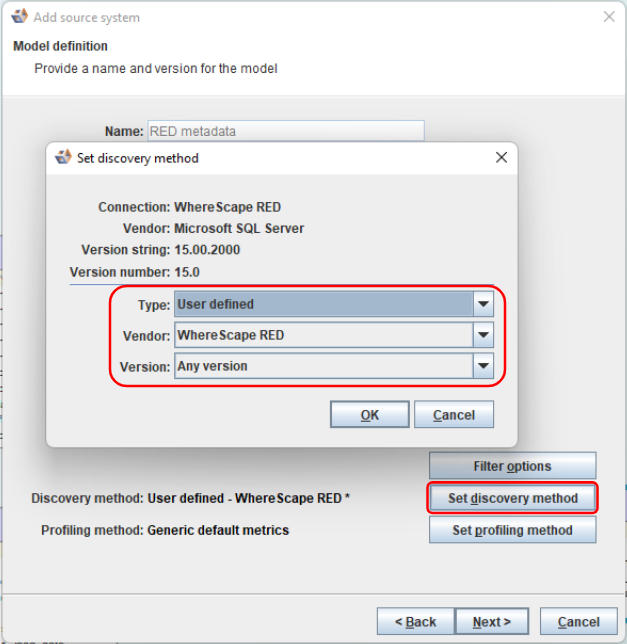
Set the discovery method to the user defined WhereScape RED discovery method.
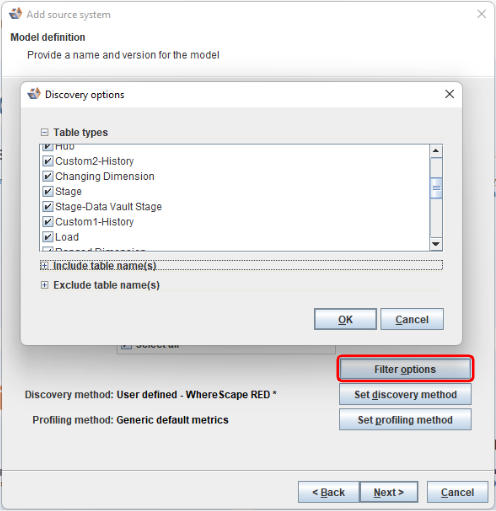
Ensure that the Filter options are set appropriately, based on your needs.
Discovering the WhereScape RED metadata
After installing the metadata integration enablement pack WhereScape RED metadata can easily be discovered by WhereScape 3D (The discovery process could also be executed by the WhereScape RED scheduler). See the 'Discovery' section in the user guide for more details.
Comparing and merging the imported metadata with other models
Once the WhereScape RED metadata has been imported into WhereScape 3D the resulting model can be compared against other models within the 3D repository. Any differences between models can then be merged together or unchanged entities can be identified and removed from RED Export models, resulting in faster deployments to WhereScape RED.