The *TRADINGPARTNER built-in variable may be extended with a range of qualifiers to access the attributes and properties of the trading partner and the directories, Transformation Maps and/or Configurations linked to the trading partner. The available qualified forms of the *TRADINGPARTNER built-in variable may be displayed and accessed by expanding the corresponding item listed on the Built-ins tab in the Processing sequence editor.
Note: While the *TRADINGPARTNER built-in variable is writeable, the qualified forms that provide access to the attributes of the current trading partner are not writeable.
Trading Partner Attributes
The base attributes for the current trading partner may be accessed using the following qualifiers with the *TRADINGPARTNER variable:
Qualifier | Description |
|---|---|
.II | The unique internal identifier of the trading partner. (The internal identifier is a 32 character value uniquely assigned by LANSA Composer. You can see the unique identifier for a trading partner on the Audit tab.) |
.ID | The identifier or name of the trading partner definition |
.STATUS | The status code (A=active, I=inactive) of the current trading partner. |
.NM | The description of the trading partner definition. |
.A1 | The street address lines 1, 2 and 3 for the trading partner. |
.PH | The telephone number for the trading partner. |
.FX | The fax number for the trading partner. |
.EM | The email addresses for the trading partner. |
.TXDOC_RECEIVE | The identifier (name) of a processing sequence associated with this trading partner to send outbound transaction documents, if specified. |
.TXDOC_SEND | The identifier (name) of a processing sequence associated with this trading partner to receive inbound transaction documents, if specified. |
In the following example, the *tradingpartner.id form is used in an If condition to condition a part of the Processing Sequence:

Trading Partner Properties
Values of installation-defined properties for a Trading Partner may be accessed by using the following qualified forms of the *TRADINGPARTNER built-in variable:
*TRADINGPARTNER.PROPERTY.<property name>
where <property name> is the name of the installation-defined Trading Partner property. Refer to Code maintenance for information on defining Trading Partner properties.
In the following example, the *tradingpartner.property.myproperty form is used in the details for an activity to access the value of the installation-defined property named myproperty for the current Trading Partner:

The use and values of these properties is subject to your own circumstances and conventions. LANSA Composer does not enforce the entry of the fields corresponding to these properties, nor does it validate any values entered.
Trading Partner Data Interchange Attributes
The data interchange attributes for the current trading partner may be accessed using the following qualifiers with the *TRADINGPARTNER variable:
Qualifier | Description |
|---|---|
.EDI.CA | Communication agreement |
.EDI.IAP | Inbound archive file prefix |
.EDI.IRA | Inbound receiver routing address |
.EDI.IRI | Inbound receiver ID |
.EDI.IRQ | Inbound receiver qualifier |
.EDI.ISA | Inbound sender routing address |
.EDI.ISI | Inbound sender ID |
.EDI.ISQ | Inbound sender qualifier |
.EDI.OAP | Outbound archive file prefix |
.EDI.OAR | Outbound application receiver |
.EDI.OAS | Outbound application sender |
.EDI.ORA | Outbound receiver routing address |
.EDI.ORI | Outbound receiver ID |
.EDI.ORQ | Outbound receiver qualifier |
.EDI.OSA | Outbound sender routing address |
.EDI.OSI | Outbound sender ID |
.EDI.OSQ | Outbound sender qualifier |
.EDI.RPQ | Recipient's password qualifier |
.EDI.RPW | Recipient's password |
.EDI.SPLITIGNORECR | EDI split ignore carriage returns |
.EDI.SPLITMAX | EDI split maximum transactions |
.EDI.XTP | Exchange trading partner |
The use and values of these attributes is subject to your own circumstances and conventions. LANSA Composer does not enforce the entry of the fields corresponding to these attributes, nor does it validate any values entered.
Trading Partner Linked Directories
Directories linked to a trading partner may be accessed using the following qualified form of the *TRADINGPARTNER built-in variable:
*TRADINGPARTNER.DIR.<directory type>
where <directory type> is a directory type code defined for the system. Refer to Code maintenance for information on defining directory types.
In the following example, the *tradingpartner.dir.iftp form is used in the details for an FTP_INBOUND Activity to access the inbound FTP directory for the current trading partner:
Trading Partner Linked Transformation Maps
Transformation maps linked to a trading partner may be accessed using the following qualified form of the *TRADINGPARTNER built-in variable:
*TRADINGPARTNER.MAP.<map type>
where <map type> is a map type code defined for the system. Refer to Code Maintenance for information on defining map types.
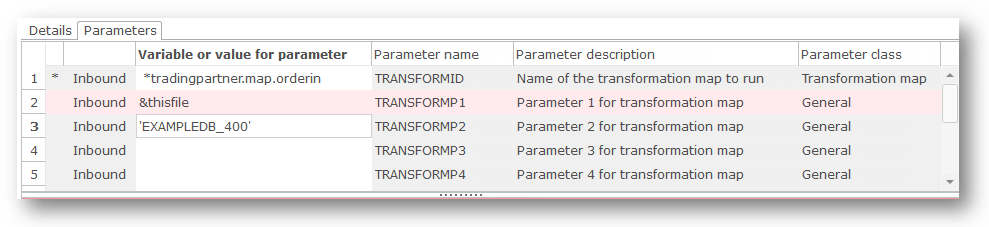
In the following example, the *tradingpartner.map.orderin form is used in the details for a TRANSFORM Activity to access the Transformation Map of type orderin linked to the current trading partner:
Notes:
- To execute a Transformation Map linked to a trading partner you must use the supplied TRANSFORM activity. Refer to TRANSFORM for information on this activity.
- More than one Transformation Map of the same type may be linked to a Trading Partner. This form of the *TRADINGPARTNER built-in variable yields the first Transformation Map of the specified type. A more flexible and powerful means of identifying a Transformation Map linked to a Trading Partner is provided by the supplied FIND_TPMAP activity. Refer to FIND_TPMAP for information on this activity.
Trading Partner Linked Configurations
Configurations linked to a trading partner may be accessed using the following qualified forms of the *TRADINGPARTNER built-in variable:
Qualifier | Description |
|---|---|
.DB | The database Configuration linked to the trading partner definition. |
.FTPIN | The FTP inbound Configuration linked to the trading partner definition. |
.FTPOUT | The FTP outbound Configuration linked to the trading partner definition. |
.FTPCMDS | The FTP command list Configuration linked to the trading partner definition. |
.HTTPIN | The HTTP inbound Configuration linked to the trading partner definition. |
.HTTPOUT | The HTTP outbound Configuration linked to the trading partner definition. |
.MSG | The Messaging Configuration linked to the trading partner definition. |
.LANSASYS | The LANSA system Configuration linked to the trading partner definition. |
.POP3 | The POP3 mail Configuration linked to the trading partner definition. |
.SMS | The SMS configuration linked to the trading partner definition. |
.SMTPMAIL | The SMTP mail Configuration linked to the trading partner definition. |
.SMTPSERVER | The SMTP server Configuration linked to the trading partner definition. |
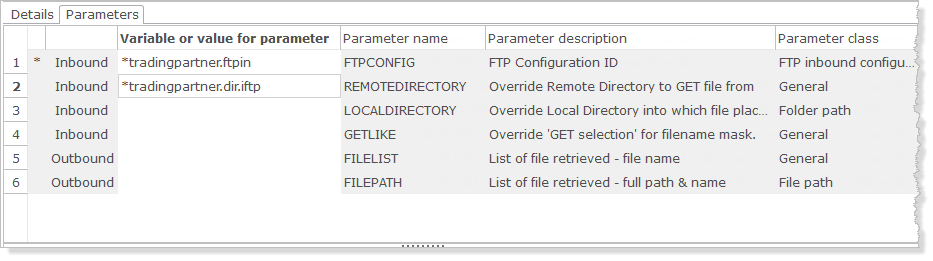
In the following example, the *tradingpartner.ftpin form is used in the details for an FTP_INBOUND Activity to access the inbound FTP directory for the current trading partner: