In this step, you will change the display mode of the fields in the list.
1. Change the field definitions in the DEF_LIST command to output and make PHONEHME hidden.
DEF_LIST NAME(#EMPLST) FIELDS((#EMPNO *OUTPUT) (#GIVENAME *OUTPUT) (#SURNAME *OUTPUT) (#ADDRESS1 *OUTPUT) (#PHONEHME *HIDDEN)) TYPE(*WORKING) ENTRYS(100)
If the Assistant is initially shown with the bottom tabs, you can use the left hand dotted bar, to drag, float and resize it. When you close the Assistant, the size and position is remembered.
When you click in each field it will be selected. Move the cursor right, add a space and type *out. The value *output and *out are synonymous.
2. Compile the WAM and open WebRoutine ListMain in the Design view.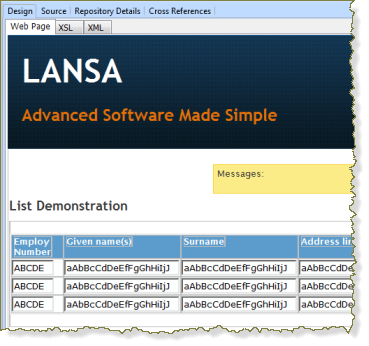
Notice all the fields are still showing as input fields. For existing WebRoutines, changes made to the WEB_MAP statements, after the first compile do not affect the page design.
3. To update the list definition, remove the list from the page and add it back:
a. Right click on an empty space in the list and select Delete Entire List.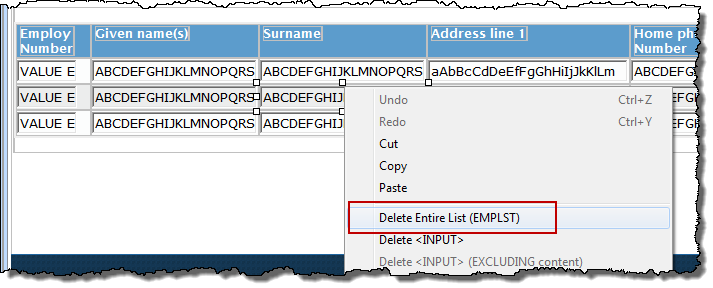
b. Open the WebRoutine Output view and drag the list back onto the page. Notice that the fields in the list are now correctly shown as output.
c. Save your changes.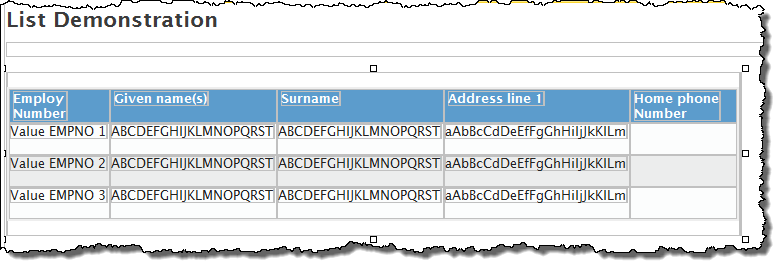
4. Click the Execute button on the toolbar to run the WebRoutine in the browser and see how the page will look.