The JSM Command is the most fundamental type of directive in any JSM binding script, and every JSM binding script will need to contain several if it is to do anything useful.
This directive is used to specify the JSM service command strings that are sent to the LANSA Integrator Java Service Manager (JSM) to be executed. The commands available depend on the service being used.
Refer to the LANSA Integrator Guide for details of the JSM services and commands that can be used. You can open the LANSA Integrator Guide from the Help menu in LANSA Composer.
Each JSM Command directive specifies one JSM command. You must specify all the commands necessary to perform the required actions, including the SERVICE_LOAD and SERVICE_UNLOAD commands.
For advanced applications, each JSM binding script may simultaneously use up to three separate JSM sessions. For example, you could use one to read a JSON file using the JSONBindFileService, while another writes the JSON data received to an XML file using the XMLBindFileService. Where appropriate, this type of solution may require that fewer fields be bound to processing sequence variables, and this can benefit performance of the solution.
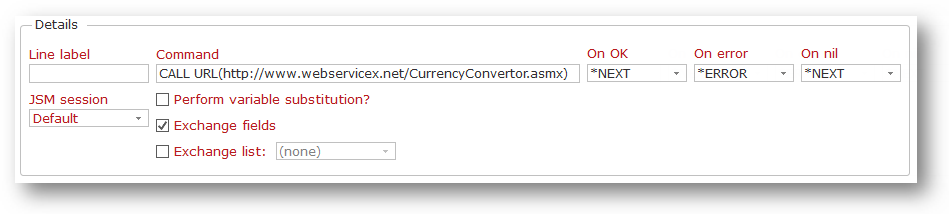
Line label | You can assign a label to this JSM binding script line that can be used to branch to this line: - from a Branch to label directive, or - from the On OK, On error or On nil result actions of another directive, or - as a result of the Processing Sequence setting the value of the ITERATIONBRANCHTO parameter of the JSM_BINDSCRIPT activity during iteration processing. If you specify a line label, it should be unique within this JSM binding script. |
|---|---|
JSM session | For advanced applications, you can select one of up to three JSM sessions that can be active simultaneously. The command you specify will be processed by the LANSA Integrator service active in that session. |
Command | This must specify the JSM service command to be executed. It is your responsibility to ensure that the JSM command string is valid in the context in which it is used. Refer to the LANSA Integrator Guide for details of the JSM services and commands that can be used. |
On OK | These values control the next JSM binding script line that will be executed according to the result of executing this command. If the command completes normally, then the On OK action is taken. If the command completes in error, then the On Error action is taken. If the command completes normally but no data is available, then the On nil action is taken. (Presently, this action corresponds to the NOFRAGMENT JSM response.) You may specify one of the following special values: *END indicates that the JSM binding script ends *NEXT indicates that the JSM binding script continues with the next line *ERROR indicates that the JSM binding script ends in error Otherwise, you must specify the Line label of another line to which the JSM binding script will branch. |
Perform variable substitution | Check this box if the JSM command string you specified contains embedded references to processing sequence variables and/or built-in variables that should be replaced at run-time with the corresponding variable values. If you do not check this box, any variable references will not be replaced. For best performance, only check this box for commands that do include embedded variable references. |
Exchange fields | Check this box if the JSM_BINDSCRIPT activity should exchange fields with the loaded JSM binding service when this command is executed. You should only check this when necessary, as there is an overhead associated with exchanging field values with the JSM service. Normally you need this checked with commands such as GET FRAGMENT(xxx) or SET FRAGMENT(xxx) that will receive or set values in the loaded JSM binding service. Normally you do NOT need to check this when using commands such as SERVICE_LOAD, SERVICE_UNLOAD, OPEN, READ, WRITE or CLOSE that do not receive or set values in the loaded JSM binding service. The fields exchanged are the twenty-six pre-defined binding fields that are named in: Binding Fields and Working Lists. |
Exchange list | Check this box, and choose the required built-in working list if the JSM_BINDSCRIPT activity should exchange a working list with the loaded JSM binding service when this command is executed. You should only check this when necessary, as there is an overhead associated with exchanging working lists with the JSM service. Normally you need this checked with commands such as GET LIST(xxx) or SET LIST(xxx) that will receive or set working list entries and values in the loaded JSM binding service. You do NOT need to check this when using other commands that do not receive or set working list entries and values in the loaded JSM binding service. |