The backup of the metadata repository can be undertaken as a separate exercise from the general backup of the data warehouse. The Backup and Restore process in RED uses PostgreSQL pg_dump and pg_restore respectively. The version of pg_dump and pg_restore installed with RED is at 12.4.
Changing the tools version
If you want to use another version of the backup and restore tools, you can set their location from the User Preferences menu in RED.
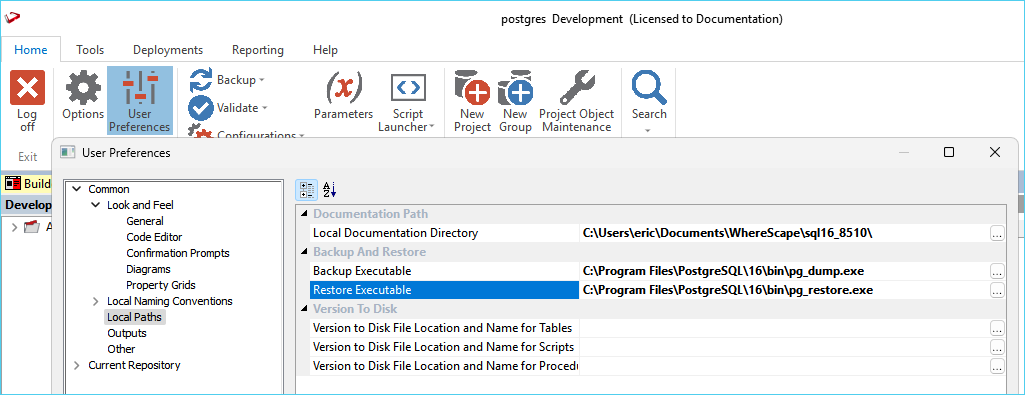
To change the path to the executables, go to User Preferences > Common > Local Paths and set the path for each tool.
Backup from the RED UI
Only 'red' schema is included.
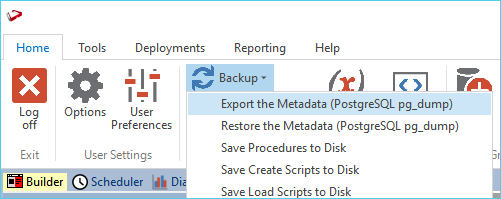
To backup the metadata database from RED, go to Backup > Export the Metadata (PostgreSQL pg_dump) then select a destination directory.
Backup from the Command Line
The example below shows what would be executed by the RED UI. The only difference is that the example below would backup all three schemas red, redadmin & white. When backing up from the command line you have the option to include all three schemas with this pg_dump switch: --schema="(red|redadmin|white)"
Note: the example below is written as a batch script which could be executed as a RED Host Script. When executing this script using RED the environment variables will be set automatically. In order to run the script outside of RED simply replace the environment variables with their respective values.
setlocal EnableDelayedExpansion
SET PGPASSWORD=!WSL_META_PWD!
setlocal DisableDelayedExpansion
"C:\Program Files\PostgreSQL\16\bin\pg_dump.exe" --host=%WSL_META_SERVER% --port=%WSL_META_DBPORT% --dbname=%WSL_META_DB% --username=%WSL_META_USER% --no-password --no-owner --no-privileges --schema="(red|redadmin|white)" --format=custom --file="c:\temp\%WSL_META_DSN%.dump" --verbose