Selecting this option will enable you to enter the Trace Options.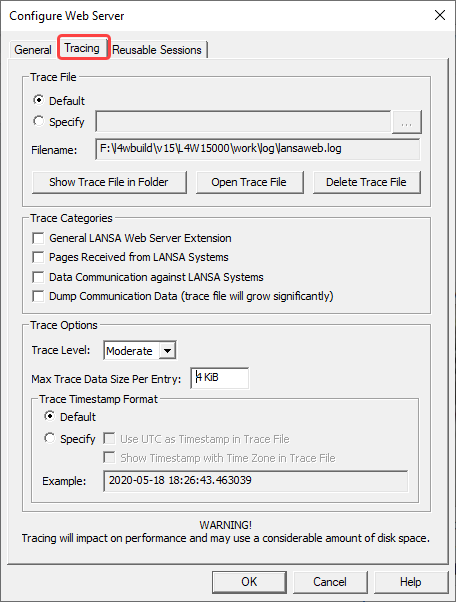
Trace File
Default will use the default name of the log file. The default filename is:
<LANSA Install Folder>\log\lansaweb.log
or
Choose Specify to enter the Trace file's full file name, including path information. The path can be an absolute or relative path. The actual path and filename to be used will be displayed in the Filename field.
Any new messages are added to the trace file if the file already exists. To create a completely new trace file, delete or rename the existing trace file.
Notes about the Trace file
- You may need to grant sufficient rights to Everyone (that is, a standard user group on Windows) for all the underlying directories of the trace file. Otherwise, the trace file will not be created/updated. Alternatively, if you know what NT logon is used to run the LANSA Web Server Extension, you may grant rights to that account only. It is normally:
IUSR_<machinename>.
- LANSA Web Server Extension will always generate a few messages when it is started or stopped. In the case of a serious problem with the LANSA Web Server Extension, messages will be added to the Trace file.
Trace Options
Trace Level
Select the level of tracing: Concise, Moderate and Verbose.
Default is Concise.
Max Trace Data Size Per Entry
Specify the maximum data size of trace entry. This is useful in controlling the size of the trace file.
Trace Timestamp Format
When Default is selected:
- Local timestamp without time zone is used in the Trace File.
For example: 2020-05-11 12:53:50.921598
When Specify is selected:
- Use UTC as Timestamp in Trace File
Choose whether to use UTC or local timestamp in the Trace File.
- Show Timestamp with Time Zone in Trace File
Choose whether to include time zone or not in the Trace File.
To include time zone is useful when there is a need to coordinate multiple trace files. This can be useful for Cloud environments. Note that time stamps without time zone are less useful unless the time zone is already known. However, producing time zone information may impact logging performance. Please take that into account when choosing the time stamp options.
The screen's Example will show you what your selected Trace Timestamp will look like.