PRIM_SRVM.HttpPushMessage
Manages the building, encrypting, and sending of push notifications.
Define_Com Class(#Prim_srvm.HttpPushMessage) Name(#Push)
Properties
ClaimsSubject
Specifies the email address of the application administrator for use in the JWT Claim. Group emails are preferred over individual email accounts.
ClaimsTokenTimespan
Specifies how long the JWT Claim will be valid in seconds. Values must be between 1 and 86,400.
HttpResponse
Returns the HTTP Response from the PushSend method.
PushMessageBadgeUrl
Specifies the image to be used as the badge of a push notification, the badge is displayed when there is not enough space to show the content of a notification, such as in smartphone notification centres.
PushMessageBody
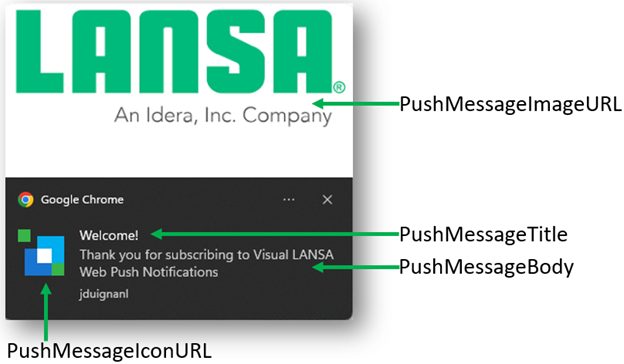
Specifies the content of the message body to be displayed.
PushMessageDirection
Specifies the direction of the enumeration values and meanings are: Auto – Text direction be determined from the iso language used. RightToLeft – Text will be displayed from right to left LeftToRight – Text will be displayed from left to right.
PushMessageIconUrl
Specifies the image to be used as the icon of a push notification.
PushMessageImageUrl
PushMessageImageUrl specifies the image to be used as the image of a push notification. It is not supported by all browsers.
PushMessageLang
Specifies the ISO language of the push notification content in ISO format.
PushMessageRenotify
Specifies the whether a user should be renotified.
PushMessageRequireAction
Specifies if the message is persistent on the screen until a user interacts with it or will only be displayed for several seconds.
PushMessageTag
Specifies an identifier for a message.
PushMessageTimestamp
Specifies the timestamp to set for the push message.
PushMessageTitle
Specifies the title to display on the notifications.
PushMessageUrl
Specifies a URL that will be navigated to upon clicking the notification. This can be either a relative path or an explicit path but must exist within the web application. By default, if no URL is set it will navigate to the application root URL.
SubscriptionObject
Specifies the encoded subscription string returned from the user subscribing to the push notifications.
TimeToLive
Specifies the delay between the push message being sent and the push notification being displayed to the end user in seconds.
Urgency
Specifies the priority of the message. When an inactive user comes online notifications are displayed in order of priority and then time sent.
ValidationMessage
Returns a value if the push notification fails any validations with details of the failure.
Methods
SendPush
Uses the properties construct e a push notification, encrypt it, and send it via HTTP. This requires the Private Key used to create the Vapid Public key as an input parameter.
There are also mandatory properties to be set before sending the notification. These are: SubscriptionObject, ClaimsSubject, ClaimsExpiry, and PushMessageTitle.
    Mthroutine Name(Send)
       Define_Map For(*INPUT) Class(#xPushManagerSubscriptionStatus) Name(#iStatus) Mandatory(*SQLNULL)

       Define_Com Class(#prim_Capi.PrivateKey) Name(#PushPrivateKey)

       If (#PushPrivateKey.LoadPemFile( #COM_SELF.GetPrivateKeyPath ))

          #Push.PushMessageBadgeUrl := #xPushMessageBadge
          #Push.PushMessageBody := #xPushMessageBody
          #Push.PushMessageDirection := #xPushMessageDirection
          #Push.PushMessageIconUrl := #xPushMessageIcon
          #Push.PushMessageImageUrl := #xPushMessageImage
          #Push.PushMessageLang := #xPushMessageLanguage
          #Push.PushMessageRenotify := #xPushMessageRenotify
          #Push.PushMessageRequireAction := #xPushMessageRequireAction
          #Push.PushMessageTag := #xPushMessageTag
          #Push.PushMessageTimestamp := #xPushMessageTimestamp
          #Push.PushMessageTitle := #xPushMessageTitle
          #Push.PushMessageUrl := #xPushMessageData
          #Push.ClaimsTokenTimespan := #xPushMessageClaimsExpiry
          #Push.ClaimsSubject := #xPushMessageClaimsSubject.LowerCase
          #Push.SubscriptionObject := #xPushSubscriptionObject
          #Push.Urgency := #xPushMessageUrgency
          #Push.TimeToLive := #xPushMessageTimeToLive


      Select Fields(#xPushSubscriptionObject) From_File(xPushSubscriptions)

             #Push.SubscriptionObject := #xPushSubscriptionObject

             If (#Push.SendPush( #PushPrivateKey ))

                #PushNotificationHttpIsSuccessfulRequest := #Push.HttpResponse.IsSuccessfulRequest
                #PushNotificationHttpResponseCode := #Push.HttpResponse.HttpStatusCode

                If (#PushNotificationHttpIsSuccessfulRequest.not)
                   #PushNotificationHttpErrorCode := #Push.HttpResponse.ErrorCode
                   #PushNotificationHttpErrorMessage := #Push.HttpResponse.ErrorMessage
                Endif

             Else

              #PushNotificationHttpErrorMessage := #Push.ValidationMessage

             Endif

          Endselect
       Endif

    Endroutine
The result of applying the features in your PWA is the following: