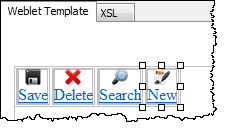
In this step you will complete the definition of the toolbar by setting up the properties for each of the four menu items.
- If necessary, open your iii_toolbar in the editor.
- In the Design view select the first menu item. The Details tab should now contain properties that can be set for each menu item.
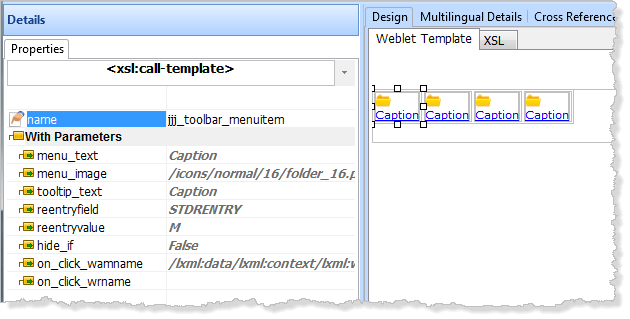
- Click on each of the 4 Menu items in order and set their weblet properties on the Details tab as follows:
On the Details Tab, make sure to take note of the tooltip/help text provided for each weblet property. Some of these tooltips are shipped with LANSA for standard weblet parameter types like WAMName and WebRoutine name but other custom properties like Menu Text also have tooltip text that was added to the weblet definition.First Menu Item
Property Name
Value
menu_text
Save
menu_image
icons/normal/16/diskette_16.png
tooltip_text
Save a changed or new employee
reentryfield
STDRENTRY (the default value)
reentryvalue
S
hide_if
#HIDESAVE='Y'
on_click_wamname
Leave as default (current WAM)
on_click_wrname
#WRNAME
Second Menu Item
Property Name
Value
menu_text
Delete
menu_image
icons/normal/16/cross_16.png
tooltip_text
Deletes the current employee
reentryfield
STDRENTRY (the default value)
reentryvalue
D
Hide_if
#HIDEDEL='Y'
on_click_wamname
Leave as default (current WAM)
on_click_wrname
Maint
Third Menu Item
Property Name
Value
menu_text
Search
menu_image
icons/normal/16/zoom_16.png
tooltip_text
Switch to the Search web page
reentryfield
STDRENTRY (the default value)
reentryvalue
M
Hide_if
#HIDESRCH='Y'
on_click_wamname
Leave as default (current WAM)
on_click_wrname
Begin
Fourth Menu Item
Property Name
Value
menu_text
New
menu_image
icons/normal/16/contract_16.png
tooltip_text
Switch to the create new employee web page
reentryfield
STDRENTRY (the default value)
reentryvalue
N
hide_if
#HIDENEW='Y'
on_click_wamname
Leave as default (current WAM)
on_click_wrname
New
Use the Ellipsis button to find an image for the menu_image value. - Save your changes. You have now completed the definition of your toolbar weblet, which should look like the following: