When using RAMP tools you should see a button like this on any 5250 form (you would normally use it on destination forms):
If you click it, you are prompted for further details about the type of wrapper you want to generate: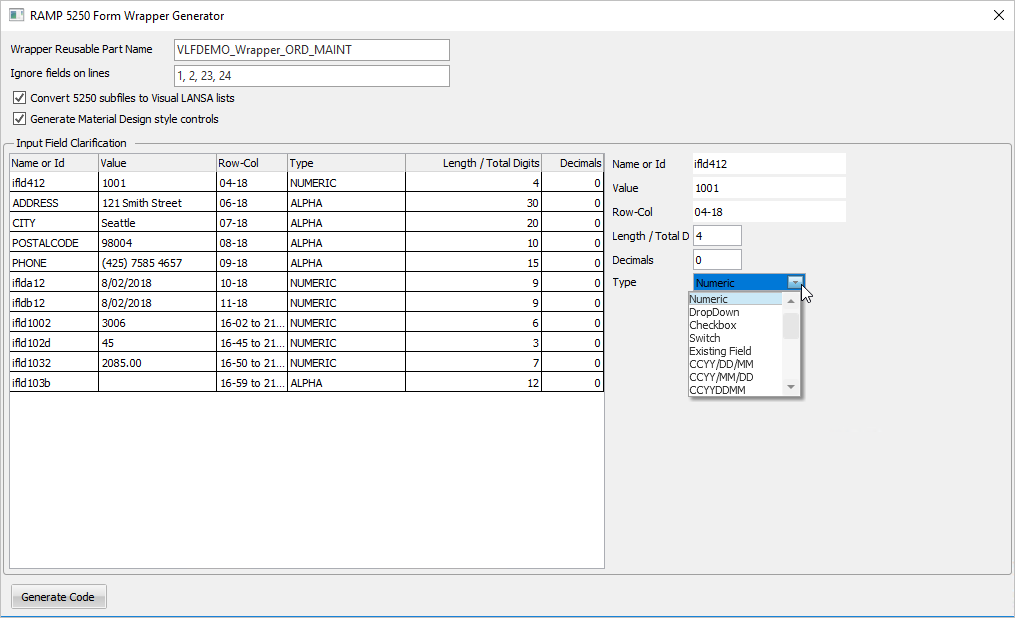
Click the 5250 input fields to specify how they are handled.
For example, you can elect to display an input field as a dropdown, a checkbox, or a formatted date, or define the number of decimals to be used for a numeric field.
It's easy to experiment with wrapper options because they are quick to generate and easy to delete if not appropriate for your needs.
The form wrapper generator will attempt to guess the captions and column headings to use in the generated wrapper code, but inevitably you are going to have to modify the wrapper from its generated form, most typically by deleting unwanted labels, titles, dates, etc.
The wrapper generator can also attempt to convert 5250 subfiles into Visual LANSA lists. If this option is disabled, it's because there are no 'real' DDS defined subfiles on the 5250 form, despite the fact that some data might look like it is a subfile.
If you uncheck the material design style option, the generated wrapper will look very much like the 5250 form it is based on.
However, using the Material Design style option will use visual controls that are radically different to 5250 form's controls. It will be a longer form because the MD controls are typically much higher than the Windows style controls. Typically, it will not look like the original 5250 form and will require you to reorganize its layout.