In this step, you will add logic to your web page to initially populate the dropdown with all department records.
The iiixDepartmentsDataServer Server Module which you created in WBF035 has a FindAll srvroutine which returns a working list of all departments.
1. Copy the working list definition, xDepartmentsList from the iiixDepartmentsDataServer Server Module at the top of the web page source, below the Define_Com statements.
2. Create a method routine, Name, LoadDepts.
Define a component for the xDepartmentsDataServer FindAll srvroutine, named GetDepartments.
Execute GetDepartments asynchronously, passing the list xDepartmentsList
Within an event routine for GetDepartments.Completed event
Clear the list component DEPT_DD
Select all entries in the list xDepartmentsList
Add entry to DEPT_DD
End Select
Get the first entry in DEPT_DD
Set focus for currentitem in dropdown DEPT_DD
Your code should look like the following:
Mthroutine Name(LoadDepts) Define_Com Class(#iiixDepartmentsDataServer.findall) Name(#GetDepartments) #GetDepartments.executeasync( #xDepartmentsList ) Evtroutine Handling(#GetDepartments.Completed) Clr_List Named(#DEPT_DD) Selectlist Named(#xDepartmentsList) Add_Entry To_List(#DEPT_DD) Endselect Get_Entry Number(1) From_List(#DEPT_DD) #DEPT_DD.CurrentItem.Focus := true Endroutine Endroutine
Note: The FindAll srvroutine reads the department table with the following SELECT statement:
Select Fields(#xDepartmentsList) From_File(xDepartments)
This means it reads all records from the Department Table.
Select the Select command and press F1 to open the Technical Reference entry for this command which includes examples of use.
3. Create a CreateInstance event routine for the web page and add code to invoke the LoadDepts method routine.
Your code should look like the following:
Evtroutine Handling(#Com_owner.CreateInstance) #com_self.LoadDepts Endroutine
4. Compile your web page.
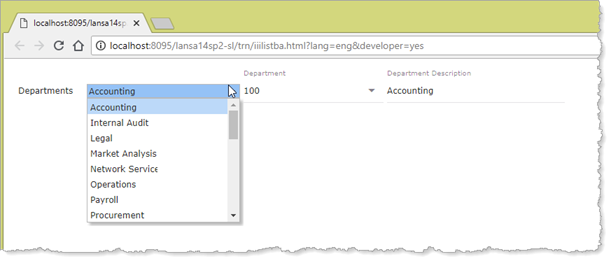
5. Execute your web page. Your page should look like the following:
Note:
- The dropdown is populated with all departments, displaying the department description column only.
- The dropdown positions to Accounting initially, the first record in the table xDepartments.
- Note that the web page variables (department code and description) are populated by the list item which has focus. You will need to allow for this when you are designing and coding your web pages.
6. Remove the fields xDepartmentCode and xDepartmentDescription from row 1.