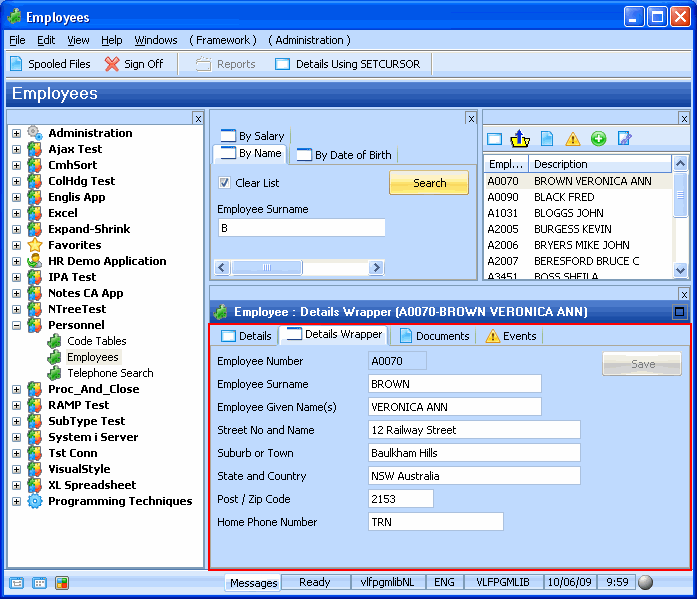
このステップでは、最初の画面ラッパーのコードをコピーし、画面ラッパーをフレームワークにスナップインします。
- Visual LANSA エディターで、iiiRMP03 という名前の、新しい再使用可能なパーツを作成します。記述には DisplayEmployee ラッパーとします。
- 再利用可能パーツのコードを以下のコードに置き換えます。
Function Options(*DIRECT)
BEGIN_COM ROLE(*EXTENDS #VF_AC010) HEIGHT(227) LAYOUTMANAGER(#MAIN_LAYOUT) WIDTH(497)
* ================================================================================
* Simple Field and Group Definitions
* ================================================================================
Group_By Name(#XG_HEAD) Fields(#EMPNO #SURNAME #GIVENAME #ADDRESS1 #ADDRESS2 #ADDRESS3 #POSTCODE #PHONEHME #DEPTMENT #SECTION)
* Body and Button arrangement panels
DEFINE_COM CLASS(#PRIM_PANL) NAME(#BUTTON_PANEL) DISPLAYPOSITION(2) HEIGHT(227) HINT(*MTXTDF_DET1) LAYOUTMANAGER(#BUTTON_FLOW) LEFT(409) PARENT(#COM_OWNER) TABPOSITION(3) TABSTOP(False) TOP(0) WIDTH(88)
DEFINE_COM CLASS(#PRIM_PANL) NAME(#BODY_HEAD) DISPLAYPOSITION(1) HEIGHT(227) HINT(*MTXTDF_DET1) LAYOUTMANAGER(#BODY_HEAD_FLOW) LEFT(0) PARENT(#COM_OWNER) TABPOSITION(2) TABSTOP(False) TOP(0) VERTICALSCROLL(True) WIDTH(409)
* Attachment and flow layout managers
DEFINE_COM CLASS(#PRIM_ATLM) NAME(#MAIN_LAYOUT)
DEFINE_COM CLASS(#PRIM_FWLM) NAME(#BUTTON_FLOW) DIRECTION(TopToBottom) FLOWOPERATION(Center) MARGINBOTTOM(4) MARGINLEFT(4) MARGINRIGHT(4) MARGINTOP(4) SPACING(4) SPACINGITEMS(4)
DEFINE_COM CLASS(#PRIM_FWLM) NAME(#BODY_HEAD_FLOW) DIRECTION(TopToBottom) MARGINBOTTOM(4) MARGINLEFT(4) MARGINRIGHT(4) MARGINTOP(4) SPACING(4) SPACINGITEMS(4)
DEFINE_COM CLASS(#PRIM_FWLI) NAME(#FWLI_EMPNO) MANAGE(#EMPNO) PARENT(#BODY_HEAD_FLOW)
DEFINE_COM CLASS(#PRIM_FWLI) NAME(#FWLI_SURNAME) MANAGE(#SURNAME) PARENT(#BODY_HEAD_FLOW)
DEFINE_COM CLASS(#PRIM_FWLI) NAME(#FWLI_GIVENAME) MANAGE(#GIVENAME) PARENT(#BODY_HEAD_FLOW)
DEFINE_COM CLASS(#PRIM_FWLI) NAME(#FWLI_ADDRESS1) MANAGE(#ADDRESS1) PARENT(#BODY_HEAD_FLOW)
DEFINE_COM CLASS(#PRIM_FWLI) NAME(#FWLI_ADDRESS2) MANAGE(#ADDRESS2) PARENT(#BODY_HEAD_FLOW)
DEFINE_COM CLASS(#PRIM_FWLI) NAME(#FWLI_ADDRESS3) MANAGE(#ADDRESS3) PARENT(#BODY_HEAD_FLOW)
DEFINE_COM CLASS(#PRIM_FWLI) NAME(#FWLI_POSTCODE) MANAGE(#POSTCODE) PARENT(#BODY_HEAD_FLOW)
DEFINE_COM CLASS(#PRIM_FWLI) NAME(#FWLI_PHONEHME) MANAGE(#PHONEHME) PARENT(#BODY_HEAD_FLOW)
DEFINE_COM CLASS(#PRIM_FWLI) NAME(#FWLI_SAVE_BUTTON) MANAGE(#SAVE_BUTTON) PARENT(#BUTTON_FLOW)
* The save button
DEFINE_COM CLASS(#PRIM_PHBN) NAME(#SAVE_BUTTON) CAPTION(*MTXTDF_SAVE) DISPLAYPOSITION(1) LEFT(4) PARENT(#BUTTON_PANEL) TABPOSITION(1) TOP(4)
* Collection for detail fields
DEFINE_COM CLASS(#Prim_ACol<#prim_evef>) NAME(#PanelFields)
* Fields in the head area
DEFINE_COM CLASS(#EMPNO.Visual) DISPLAYPOSITION(1) HEIGHT(19) HINT(*MTXTDF_DET1) LEFT(4) PARENT(#BODY_HEAD) READONLY(True) TABPOSITION(1) TOP(4) USEPICKLIST(False) WIDTH(209)
DEFINE_COM CLASS(#SURNAME.Visual) DISPLAYPOSITION(2) HEIGHT(19) HINT(*MTXTDF_DET1) LEFT(4) PARENT(#BODY_HEAD) TABPOSITION(2) TOP(27) USEPICKLIST(False) WIDTH(324)
DEFINE_COM CLASS(#GIVENAME.Visual) DISPLAYPOSITION(3) HEIGHT(19) HINT(*MTXTDF_DET1) LEFT(4) PARENT(#BODY_HEAD) TABPOSITION(3) TOP(50) USEPICKLIST(False) WIDTH(324)
DEFINE_COM CLASS(#ADDRESS1.Visual) DISPLAYPOSITION(4) HEIGHT(19) HINT(*MTXTDF_DET1) LEFT(4) PARENT(#BODY_HEAD) TABPOSITION(4) TOP(73) USEPICKLIST(False) WIDTH(363)
DEFINE_COM CLASS(#ADDRESS2.Visual) DISPLAYPOSITION(5) HEIGHT(19) HINT(*MTXTDF_DET1) LEFT(4) PARENT(#BODY_HEAD) TABPOSITION(5) TOP(96) USEPICKLIST(False) WIDTH(363)
DEFINE_COM CLASS(#ADDRESS3.Visual) DISPLAYPOSITION(6) HEIGHT(19) HINT(*MTXTDF_DET1) LEFT(4) PARENT(#BODY_HEAD) TABPOSITION(6) TOP(119) USEPICKLIST(False) WIDTH(363)
DEFINE_COM CLASS(#POSTCODE.Visual) DISPLAYPOSITION(7) HEIGHT(19) HINT(*MTXTDF_DET1) LEFT(4) PARENT(#BODY_HEAD) TABPOSITION(7) TOP(142) USEPICKLIST(False) WIDTH(216)
DEFINE_COM CLASS(#PHONEHME.Visual) DISPLAYPOSITION(8) HEIGHT(19) HINT(*MTXTDF_DET1) LEFT(4) PARENT(#BODY_HEAD) TABPOSITION(8) TOP(165) USEPICKLIST(False) WIDTH(286)
DEFINE_COM CLASS(#PRIM_ATLM) NAME(#ATLM_1)
DEFINE_COM CLASS(#PRIM_ATLI) NAME(#ATLI_1) ATTACHMENT(Center) PARENT(#ATLM_1)
DEFINE_COM CLASS(#PRIM_ATLI) NAME(#ATLI_2) ATTACHMENT(Center) MANAGE(#BODY_HEAD) PARENT(#MAIN_LAYOUT)
DEFINE_COM CLASS(#PRIM_ATLI) NAME(#ATLI_3) ATTACHMENT(Right) MANAGE(#BUTTON_PANEL) PARENT(#MAIN_LAYOUT)
* A screen wrapper is a VL reusable part of class VF_SY122. 内部のあらゆるタイプのルーチンとは対照的に、グローバルなスコープとして定義する必要があります。
DEFINE_COM CLASS(#vf_sy122) NAME(#myscreen_wrapper) DISPLAYPOSITION(3) HEIGHT(227) PARENT(#COM_OWNER) WIDTH(409)
DEFINE_COM CLASS(#PRIM_ATLI) NAME(#ATLI_4) ATTACHMENT(Center) PARENT(#MAIN_LAYOUT)
DEFINE_COM CLASS(#PRIM_ATLI) NAME(#ATLI_6) ATTACHMENT(Center) MANAGE(#myscreen_wrapper) PARENT(#MAIN_LAYOUT)
*
* --------------------------------------------------------------------------------
* Handle Initialization
* --------------------------------------------------------------------------------
Mthroutine Name(uInitialize) Options(*REDEFINE)
Define_Com Class(#Prim_evef) Name(#FormField) Reference(*dynamic)
Invoke Method(#Com_Ancestor.uInitialize)
For Each(#Control) In(#Body_Head.ComponentControls)
If_Ref Com(#Control) Is(*INSTANCE_OF #prim_evef)
Set_Ref Com(#FormField) To(*dynamic #Control)
Invoke Method(#PanelFields.Insert) Item(#FormField)
Endif
Endfor
* In the command's uInitialize method routine, set the screen wrapper's uCommand property to #com_owner
Set Com(#myscreen_wrapper) Ucommand(#com_owner)
Endroutine
* ----------------------------------------------------------------------------------------------------
* Handle Command Execution
*
* You may also disable the entire form to prevent any input while RAMP is navigating
* ----------------------------------------------------------------------------------------------------
Mthroutine Name(uExecute) Options(*REDEFINE)
Invoke Method(#Com_Ancestor.uExecute)
#myscreen_wrapper.makerampTSavailable
Set Com(#Save_Button) Enabled(False)
#com_owner.enabled := false
Endroutine
* ================================================================================
* Event Handlers
* ================================================================================
* RAMP has signalled it's ready. Invoke your navigation here.
* Once the navigaton starts, processing resumes in the vHandleArrive event handler.
Evtroutine Handling(#myscreen_wrapper.RampTSAvailable)
Invoke Method(#myscreen_wrapper.navigatetoscreen) Name('DisplayEmployee')
Endroutine

Evtroutine Handling(#myscreen_wrapper.vHandleArrive) Arrivedscreen(#CurrentScreen) Previousscreen(#PreviousScreen) Arrivedpayload(#Payload)
Case (#CurrentScreen)
When Value_Is(= 'DisplayEmployee')
Set Com(#SAVE_BUTTON) Enabled(false)
* Error handling: Payloads are destroyed when the ARRIVE script finishes executing. Therefore, a payload of UPDATE_EMPLOYEE would most likely mean there was a validation error.
If (#Payload = UPDATE_EMPLOYEE)
Use Builtin(message_box_show) With_Args(ok ok info "Validation Error" "Please correct any errors")
Else
* Unlock the framework
Set Com(#avFrameworkManager) Ulocked(false)
#myscreen_wrapper.getvalue From('txtEmpno') Value(#empno.value)
#myscreen_wrapper.getvalue From('txtSurname') Value(#surname.value)
#myscreen_wrapper.getvalue From('txtGivename') Value(#givename.value)
#myscreen_wrapper.getvalue From('txtAddress1') Value(#address1.value)
#myscreen_wrapper.getvalue From('txtAddress2') Value(#address2.value)
#myscreen_wrapper.getvalue From('txtAddress3') Value(#address3.value)
#myscreen_wrapper.getvalue From('txtPhone') Value(#phonehme.value)
#myscreen_wrapper.getvalue From('txtPostcode') Value(#POSTCODE.value)

#com_owner.enabled := true
Endif
Endcase
Endroutine
* --------------------------------------------------------------------------------
* Handle Save
* --------------------------------------------------------------------------------
Mthroutine Name(Save)
* Set the 5250 field values to the values from this panel
#myscreen_wrapper.setvalue Infield('txtSurname') Value(#surname.value)
#myscreen_wrapper.setvalue Infield('txtGivename') Value(#givename.value)
#myscreen_wrapper.setvalue Infield('txtAddress1') Value(#address1.value)
#myscreen_wrapper.setvalue Infield('txtAddress2') Value(#address2.value)
#myscreen_wrapper.setvalue Infield('txtAddress3') Value(#address3.value)
#myscreen_wrapper.setvalue Infield('txtPhone') Value(#phonehme.value)
#myscreen_wrapper.setvalue Infield('txtPostcode') Value(#POSTCODE.value)
* Send the Enter key with the payload
#myscreen_wrapper.sendkey Key(#myscreen_wrapper.KeyEnter) Payload(UPDATE_EMPLOYEE)
Endroutine

* Listen to messages from RAMP and the 5250 application
Evtroutine Handling(#myscreen_wrapper.RampMessage) Umessagetype(#MsgType) Umessagetext(#MsgText)
Case (#msgtype.value)
When Value_Is('= VF_ERROR')
* Fatal messages reported by Ramp (e.g. Navigation request failed, etc). If in design mode, show the underlying 5250 screen. Otherwise, make the error message appear in a message box on top of the command
If (#usystem.iDesignMode = true)
Set Com(#myscreen_wrapper) Visible(True)
Else
Message Msgid(dcm9899) Msgf(dc@m01) Msgdta(#msgtext.value)
#com_owner.avshowmessages
Endif
* Messages sent by the IBM i application or unknown form was encountered
When Value_Is('= VF_INFO' '= VF_UNKNOWN_FORM')
Message Msgid(dcm9899) Msgf(dc@m01) Msgdta(#msgtext.value)
* Failure to initialize RAMP. Could occur for mainly one of two reasons
When Value_Is('= VF_INIT_ERROR')
Message Msgid(dcm9899) Msgf(dc@m01) Msgdta(#msgtext.value)
#com_owner.avshowmessages
Otherwise
Use Builtin(message_box_show) With_Args(ok ok info *Component ('Unknown message type ' + #MsgType + 'encountered'))
Endcase
Endroutine
* --------------------------------------------------------------------------------
* Handle changes in any of the fields on the panel
* --------------------------------------------------------------------------------
Evtroutine Handling(#PanelFields<>.Changed)
* Enable the save button
Set Com(#SAVE_BUTTON) Enabled(True)
* Lock the framework and set a message for the user
Use Builtin(bconcat) With_Args('Changes made to employee' #GiveName #Surname 'have not been saved yet.' 'Do you want to save them before continuing?') To_Get(#sysvar$av)
Set Com(#avFrameworkManager) Ulocked(USER) Ulockedmessage(#sysvar$av)
Endroutine
* --------------------------------------------------------------------------------
* Enter key pressed
* --------------------------------------------------------------------------------
Evtroutine Handling(#PanelFields<>.KeyPress) Options(*NOCLEARMESSAGES *NOCLEARERRORS) Keycode(#KeyCode)
If Cond('#KeyCode.Value = Enter')
* If there no changes have been made issue message and ignore enter
If Cond('#SAVE_BUTTON.Enabled *EQ True')
Invoke Method(#Com_Owner.Save)
Else
* Issue 'There are no changes to save' message
Use Builtin(Message_box_show) With_Args(ok ok Info *Component *MTXTDF_NO_SAVE)
Endif
Endif
Endroutine
* --------------------------------------------------------------------------------
* Handle the save button
* --------------------------------------------------------------------------------
Evtroutine Handling(#SAVE_BUTTON.Click)
#com_owner.Save
Endroutine
* --------------------------------------------------------------------------------
* Handle Termination
* --------------------------------------------------------------------------------
Mthroutine Name(uTerminate) Options(*REDEFINE)
* Clean up the colelction of fields on the panel
Invoke Method(#PanelFields.RemoveAll)
* Do any termination defined in the ancestor
Invoke Method(#Com_Ancestor.uTerminate)
Endroutine
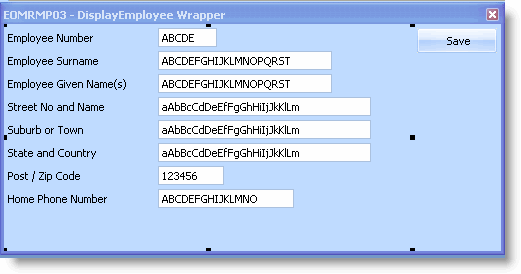
End_Com - コンポーネントの [デザイン] タブを表示し、画面ラッパーのユーザー・インターフェースを確認します。
- 画面ラッパーをコンパイルします。
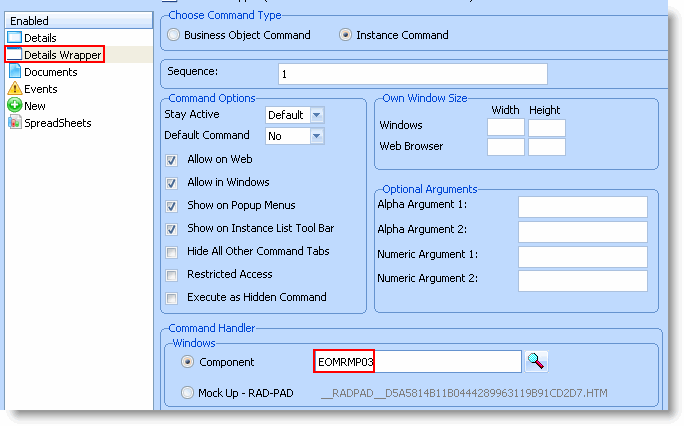
- フレームワークで、Employees ビジネス・オブジェクトのプロパティを表示します。
- 新しいコマンド、[詳細ラッパー] を作成し、Employeesビジネス・オブジェクトで有効にして、iiiRMP03 画面ラッパーをこれに関連付けます。
- フレームワークを保存して再起動します。
- 社員を選択し、社員の [詳細ラッパー] コマンド・ハンドラーを表示して、画面ラッパーをテストします。