The iiixEmployeeDataServer Server Module which you created in exercise WBF025 contains a FindEmployeeByDepar srvroutine which processes the Employee table using the index xEmployeeByDepartment, which has keys of xDepartmentCode and xEmployeeIdentification.
In this step, you will complete the web page by adding logic to fill the list of employees for the current department.
1. Open the iiixEmployeeDataServer Server Module in the editor and review the FindEmployeeByDepar srvroutine logic. Notice this routine is passed the two keys for the index xEmployeeByDepartment, fields xDepartmentCode and xEmployeeIdentification.
Notice also that the SELECT command which reads the employee table has a Nbr_Keys(*compute) parameter. This means if xEmployeeIdentification has a null value, the index is read with the higher level key only.
2. Copy and paste the xEmployeeList list definition into your web page, following the Define_Com statements.
3. Create a method routine LoadEmployees to perform the following:
Define a map for input, class xDepartmentCode, name DepartmentCode.
Define a component for the iiixEmployeeDataServer's srvroutine FindEmployeeByDepar with the name GetEmployees.
Assign a null value to xEmployeeIdentification.
Execute the GetEmployees component asynchronously with parameters for DepartmentCode and xEmployeeIdentification and working list xEmployeeList.
Within an event routine handling GetEmployees.Completed
Clear the list component, EmployeeList
Select the list xEmployeeList
Add and entry to list view EmployeeList
End Selection
Your code should look like the following:
Mthroutine Name(LoadEmployees) Define_Map For(*INPUT) Class(#xDepartmentCode) Name(#DepartmentCode) Define_Com Class(#iiixEmployeeDataServer.FindxEmployeeByDepar) Name(#GetEmployees) #xEmployeeIdentification := *NULL Clr_list #EmployeeList #GetEmployees.ExecuteAsync( #DepartmentCode #xEmployeeIdentification #EmployeeList ) Evtroutine Handling(#GetEmployees.Completed) Endroutine
Endroutine
4. Complete the DEPT_DD.ItemGotSelection event routine. Add code to invoke LoadEmployees passing department code:
Evtroutine Handling(#DEPT_DD.ItemGotSelection) #com_self.LoadEmployees( #xDepartmentCode ) Endroutine
5. Compile your web page.
6. Test your web page, which should now look like the following:
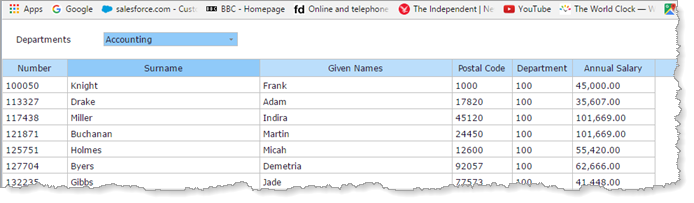
The employee list should be repopulated when you select a department. Note that initially the departments dropdown is positioned to Accounts but the employee list is not populated.
7. Add code to the web page's CreateInstance event to invoke the LoadEmployees method routine:
. . . Endselect Get_Entry Number(1) From_List(#DEPT_DD) #DEPT_DD.CurrentItem.Focus := true #com_self.LoadEmployees( #xDepartmentCode ) Endroutine Endroutine
8. Re-test the web page. The employee list should now be populated initially.