Objectives
- This exercise introduces an application that includes a list which is used to present a result set which enables selection of a single entry to maintain a record.
- To write a Section Maintenance WAM to display, update, delete and add sections. The main page will be based on a list of sections for the selected department.
- To show how lists can be used in a WebRoutine web page.
- To implement an example of the AutoComplete weblet.
Your completed application will look like the following: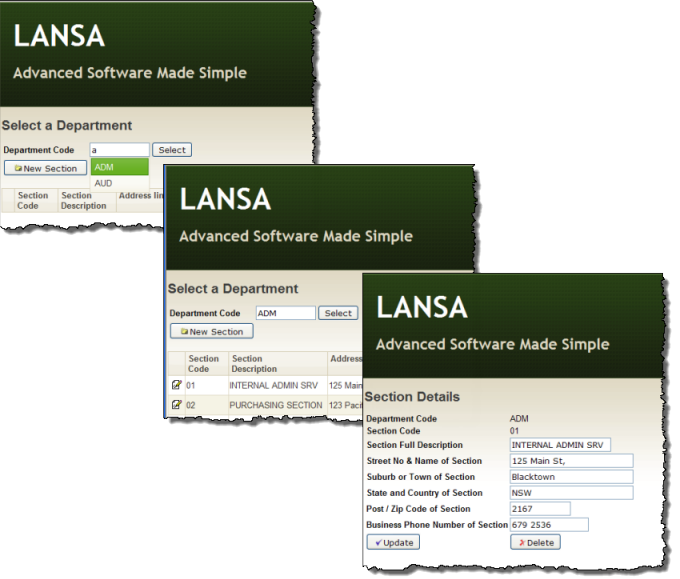
To achieve these objectives you will complete the following steps:
Step 1. Create iiiSecMaint - Section Maintenance WAM
Step 2. Add a Details WebRoutine
Step 3. Create iiiSecAdd - Add Section WAM
Step 4. Complete the AddSect WebRoutine
Step 5. Set up the 'New Section' button on the Begin page for ii SecMainti
Before You Begin
- In order to complete this exercise, you should have completed all the preceding exercises.
The AutoComplete Weblet
The AutoComplete weblet provides suggestions while you type into the field. The suggestions are provided by a WebRoutine using Ajax.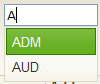
A sourceWrName property defines a called WebRoutine, which supports the AutoComplete weblet by returning a list as JSON data. The WebRoutine must have a Response(*JSON) keyword. The weblet calls this WebRoutine when you type into the input box.
A listName, labelField and ValueField define the list of values that the AutoComplete weblet displays.