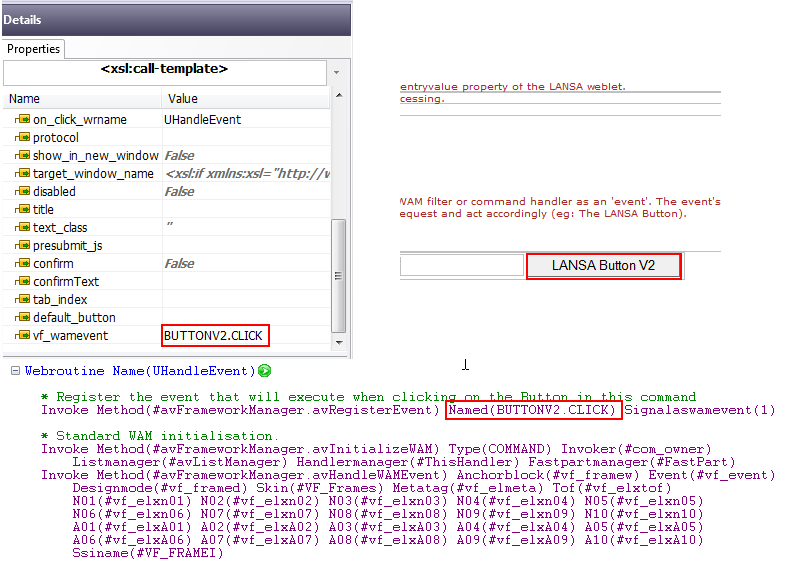
In Visual LANSA Framework WAM applications you can use LANSA Weblets.
When using LANSA Weblets you need to be aware of the following:
- When LANSA Weblets submit requests to the web server, they need to be identified to your WAM filter or command handler as an 'event'.
- The event's identifier allows your WAM filter or command handler to determine which Weblet made the request and act accordingly (for example Which button was clicked? Ok, Save or Cancel?).
- The identification of an event involves using a special property named VF_WAMEVENT.
- The value assigned to it identifies the event to your filter or command handler.
To use LANSA Weblets in VLF WAMs follow these steps:
- Add the LANSA weblet to the VLF filter or command handler WAM in the WAM editor of the LANSA IDE.
- On the Weblet's details tab set the property VF_WAMEVENT to the identifier of the event, e.g. 'BUTTON.CLICK'. Note that the value must be enclosed in single quotes.
- Set the on_click_wamname property of the weblet to the name of the VLF filter or command handler WAM, e.g. 'DM_T2901', and the on_click_wrname property to 'uHandleEvent'. The correct values for these properties will be available from dropdowns on the property fields.
- Register an event in the VLF WAM with the same event identifier as used in the reentryvalue property of the LANSA weblet.
- Create a corresponding event handler in the VLF WAM to perform the required processing.