1. Copy the iiiAddEmployee web page which you created earlier.
Give the new web page the name iiiAddEmployeeNew.
2. On the Outline tab, use the context menu on field xDepartmentCode, to Delete Component.
3. Drag the new field iiiDepartment to the top right of the left hand column. Select the Layout ribbon and set up the new field as follows:
Alignment | Top Right |
|---|---|
Flow | Down |
Margin Top | 5 |
Margin Right | 20 |
4. You now need to include the new dropdown field in the Find and Save method routines.
a. In the Find method routine, within the GetEmployee.Completed event routine, assign iiiDepartment the value of xDepartmentCode:
Mthroutine Name(Find) Define_Com Class(#iiixEmployeeDataServer.find) Name(#GetEmployee) #GetEmployee.executeasync( #xEmployeeIdentification #xEmployee #IO$STS ) Evtroutine Handling(#GetEmployee.Completed) #iiiDepartment := #xDepartmentCode Endroutine Endroutine
b. In the Save method routine, assign xDepartmentCode the value iiiDepartment, before execute SaveEmployee srvroutine.
c. Also set iiiDepartment to *null after the employee changes have been saved.
Your code should look like the following:
Mthroutine Name(Save) Access(*PRIVATE) Define_Com Class(#iiixEmployeeDataServer.save) Name(#SaveEmployee) #sys_msgq.clearall #xDepartmentCode := #iiiDepartment #SaveEmployee.executeasync( #xEmployee #io$sts ) Evtroutine Handling(#SaveEmployee.Completed) If (#IO$STS = OK) #xEmployee #iiiDepartment := *default Else #Messages.show Endif Endroutine Endroutine
5. Compile the new Add Employee web page.
6. Test the new Add Employee web page. When the web page loads, the Department dropdown should contain an entry for all departments:
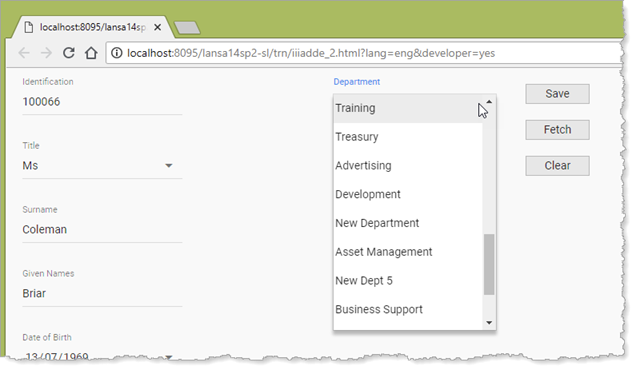
- Retrieve an existing employee (e.g. 100066, 143153, 100050). The department dropdown should display their department.
- Select a different department and click Save. All fields should be cleared, including the department dropdown.
- Retrieve the updated employee. The department should display the new value.